9 Best GrooveHQ Alternatives and What to Check Before You Switch
Discover the top GrooveHQ alternatives to help your customer support team. Check out our detailed guide to choose the right tool!
Written by Kateryna Havrylenko

GrooveHQ hasn’t gone anywhere. It goes by Groove Classic now, and keeps running for existing customers, with the same login and the same data. What changed is the company around it. The same team launched Helply, a separate AI-native platform, and pointed GrooveHQ.com at it.
That leaves two fair questions. If Groove Classic covers your email support today, what happens when you want AI handling the routine part, but that’s going into the other product? And if you’re choosing a help desk right now, is Groove Classic still a sensible place to start?
I’ve prepared 9 GrooveHQ alternatives with pricing, key features, and a checklist for choosing between them. And for anyone in a rush, treat this comparison table as an appetizer before we serve up the full 9-tool main course 🍽️:
| Alternative | Best for | Starting price |
|---|---|---|
| HelpCrunch | Teams that want to get not only basic email support but also proactive engagement tools, AI Agents, chatbots, and live chat under one roof. | From $15/user/mo |
| Help Scout | Teams looking for the closest Groove alternative for a simple, email-first feel, upgraded with better reporting and zero learning curve. | Free for up to 5 users, then from $30/user/mo |
| Front | Those who need a unified workspace for email, SMS, and messaging with deep internal collaboration tools. | From $35/user/mo |
| Freshdesk | Teams who outgrew the shared inbox and now need SLAs, proper routing, and reporting a manager can act on. | Free for 2 agents (6 months), then from $23/agent/mo |
| Zoho Desk | Budget-first teams, especially anyone already running Zoho CRM, who want more structure than Groove without a price jump. | Free for up to 3 agents, then from $7/agent/mo |
What you need to know about GrooveHQ in 2026
GrooveHQ is the help desk you know, only it goes by Groove Classic now.
The rename came with a bigger move, and that’s where most of the confusion starts. In 2026, founder Alex Turnbull opened a LinkedIn post with the line that explains most of the confusion: “GrooveHQ.com now redirects to Helply.”
Helply is now the master brand, with two products under it. Groove Classic is the help desk that companies have been using for over a decade. Helply is a separate AI-first platform built for B2B software companies in the $1M–$50M ARR range, priced on AI outcomes instead of seats. As Turnbull puts it in his note to customers: “Different buyer, different product, different sales motion.”
For existing customers, nothing has changed in practice. Groove’s FAQ confirms no migration and the same login URL.
What Groove Classic does today?
Groove Classic centralizes conversations from several channels in one place, allowing agents to work them in an email-like interface, and the rest of the toolkit handles the organizing.
The feature set is straightforward:
- Shared inboxes for email, live chat, Instagram, and Messenger;
- A website widget with knowledge base search, a contact form, and live chat;
- Ticket assignment, internal notes, and tagging;
- A built-in knowledge base for self-service;
- Reports on agents, productivity, volume, CSAT, and knowledge base performance;
- Copilot, an in-inbox AI assistant for agents;
- Integrations with Shopify, Stripe, HubSpot, Slack, Zapier, API and webhooks;
- iOS and Android apps.
Is Groove Classic still the right help desk for your team?
If Groove Classic already covers what your team does, there’s no reason to switch. But as your company scales and support volume grows, the case for looking at GrooveHQ alternatives gets stronger.
AI is the clearest example. Copilot helps your agent, not your customers: it drafts replies, but a human presses send every time. It’s also a paid add-on at $39/mo per account for existing customers. Groove doesn’t have an AI agent that resolves tickets on its own. Helply does, but that’s a separate purchase with its own sales process, not an upgrade path.
Volume is the other limit. GrooveHQ was built as a help desk for a small business, and reviewers who outgrew that description openly say that as ticket counts climb, the support platform gets slower to work in.
The third factor is where development is heading. Since Groove Classic still has a dedicated team pushing updates, it’s clear they aren’t abandoning it. But the roadmap energy is going to Helply. If you’re counting on major AI upgrades in Groove Classic, it’s worth checking what else is out there.
9 Best GrooveHQ alternative tools
The main course, as promised: nine customer support tools worth your shortlist, and what each one is good at.
HelpCrunch
Best for businesses of any size that want chat and email in one inbox with AI answering repetitive questions and handling customer requests directly.
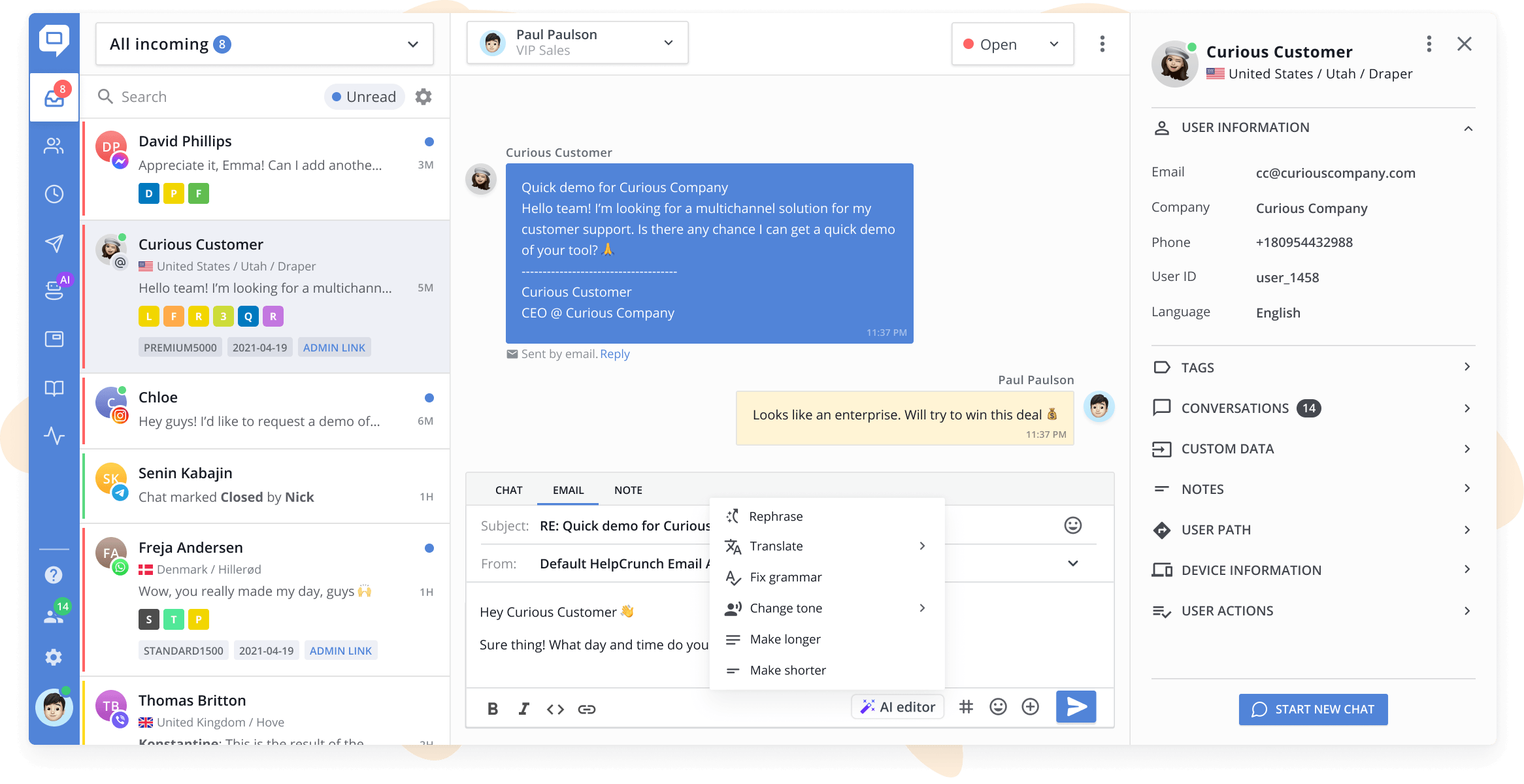
HelpCrunch covers the shared inbox workflow Groove users know, including assignment, private notes, tags, and saved replies, and adds live chat, AI Agents, chatbots, and marketing tools in the same workspace. Instead of hopping between different tabs, your agents get the full context in a single workspace.
Key features:
- Multichannel shared inbox. Chats, emails, Instagram, Messenger, WhatsApp, and more arrive as separate conversations (tickets) in one dashboard, stacked chronologically.
- Assignment and routing. Assign conversations to a teammate or an entire department manually, or set routing rules to distribute them automatically.
- Collaboration tools. Private notes visible only to the team, snoozing with reminders, saved replies.
- AI Editor in the inbox. Turns a rough draft into a finished reply, adjusts tone, shortens long explanations, and translates messages.
- AI Agents. Answer customer questions automatically based on your knowledge base and custom data sources. Available on Pro and Unlimited plans, with a monthly allowance of AI conversations included in each plan and extensions when you need more.
- Knowledge base. A self-service help center connected to both the chat widget and the inbox, with an AI Editor for drafting articles.
- Reports. Team performance, workload distribution, customer satisfaction, and dedicated AI Agent analytics (deflection rates, handling times, total team time saved, etc.).
- Free migration. HelpCrunch moves your existing data across as part of onboarding.
Why is it a strong alternative?
HelpCrunch is built for teams whose support grows beyond email. Live chat, social channels, and AI Agents work in the same inbox, so adding a channel doesn’t mean adding a tool. Its AI Agents trained exclusively on your data to minimize hallucinations and route the tricky questions straight to your team. The drawback is that AI features are available on the Pro plan, and AI Agents currently support chat and social channels (email AI is coming soon).
Pricing: HelpCrunch offers three plans: Basic, Pro, and Unlimited. Pricing is per team member and also depends on your monthly email volume, with monthly or annual billing (annual saves 20%). Basic starts at $15/mo per team member and covers the shared inbox, live chat, and knowledge base. Pro plan costs $25/mo per team member, and you get 5 chat widgets, 25 messaging channels, 5 AI Agents with 50 conversations (extra chats start at $29/100 and get cheaper with higher volume), a chatbot tool, and more. And Unlimited is $620/mo for unlimited team members. There’s a 14-day free trial with no credit card required.
Help Scout
Best for keeping support human and email-focused with an intuitive setup that feels just like a regular inbox.
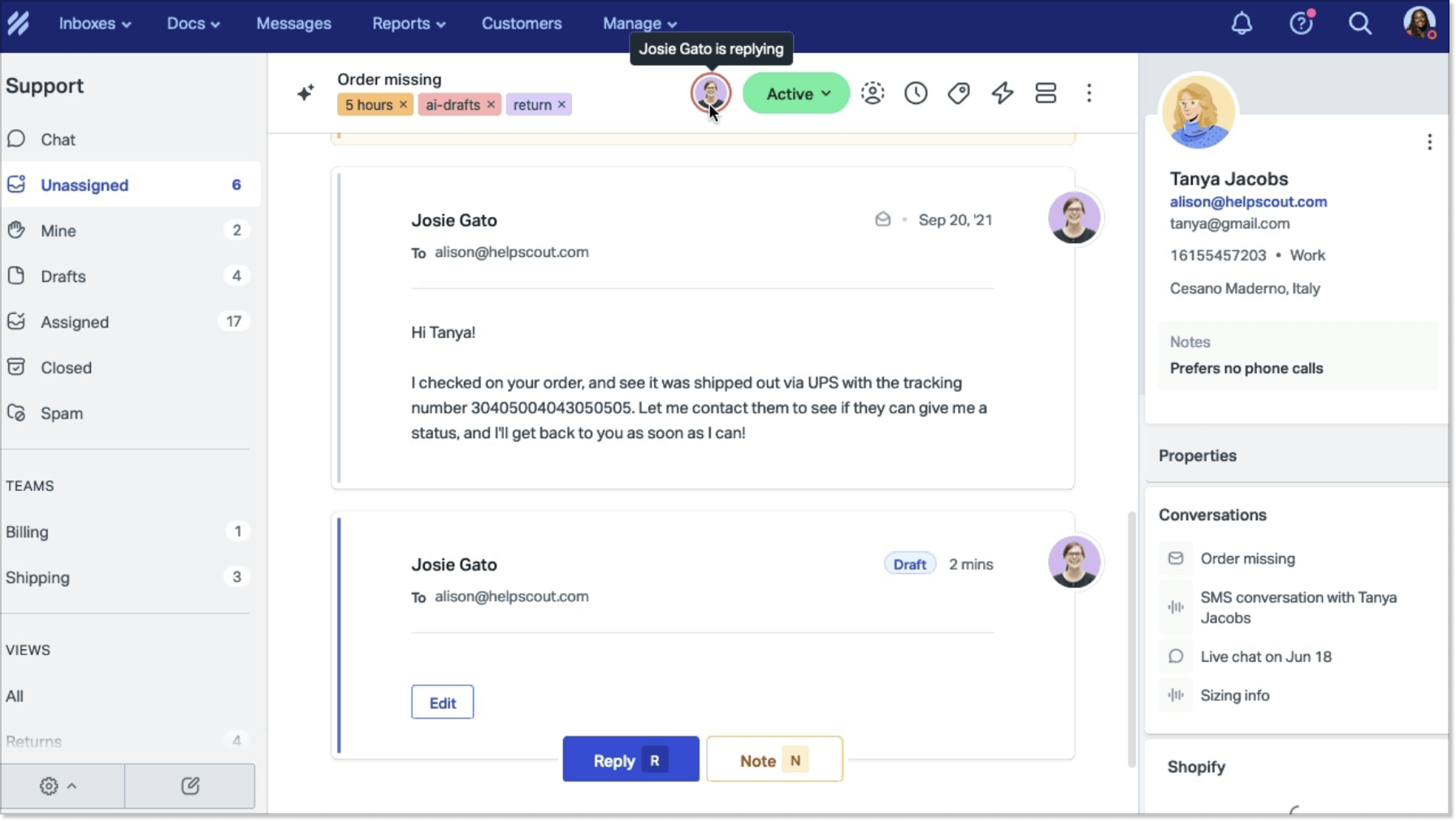
If you value straightforward setup, Help Scout is a great GrooveHQ alternative. It sticks to a clean shared inbox that feels like email. You get the modern upgrades, including Docs knowledge bases, Beacon chat, and AI drafting.
Key features:
- Shared inbox. Saved replies, tags, snooze, send later, and Views that group conversations by status, assignee, or priority.
- More channels than Groove offers. Email, live chat, WhatsApp, Instagram, and Facebook Messenger on paid plans, with SMS and phone available through integrations.
- Beacon widget. One embeddable hub that combines a contact form, live chat, and help articles, with different content suggested depending on the page a customer is on.
- Docs knowledge base. A branded help center with custom CSS, embedded contact forms, and restricted access via API on higher tiers.
- Routing. Round-robin assignment on Plus plan, load-balanced routing on Pro plan.
- AI that works at two levels. AI Assist rewrites, shortens, and translates inside the editor. AI Drafts generates replies, AI Summarize condenses long threads, and AI Answers is the customer-facing chatbot.
- Reporting. Pre-built reports covering volume, response times, and satisfaction, with 2 year or all-time history.
Why is it a strong alternative?
Adapting to Help Scout takes practically zero effort since your team keeps working in a familiar, email-style layout. On top of that, you get SLA tracking, smart workflows, and automated AI Answers.
Keep in mind that Help Scout charges $0.75 per AI resolution. For teams aiming for heavy ticket deflection, those usage fees can add up fast alongside your base seat costs.
Pricing: four tiers, priced per user. Standard is $30/mo per user and covers up to 25 users with live chat, social channels, basic workflows, and one SLA policy. Plus at $54 and Pro at $90 add advanced workflows, routing, AI Drafts, and larger user limits. There’s a free plan for up to 5 users, capped at 100 contacts a month with one inbox and one Docs site, and a 15-day trial of Standard or Plus without a credit card. AI Answers sits outside all of this at $0.75 per resolution.
Front
Best for teams that need a unified workspace for email, SMS, and chat with built-in internal team discussions.
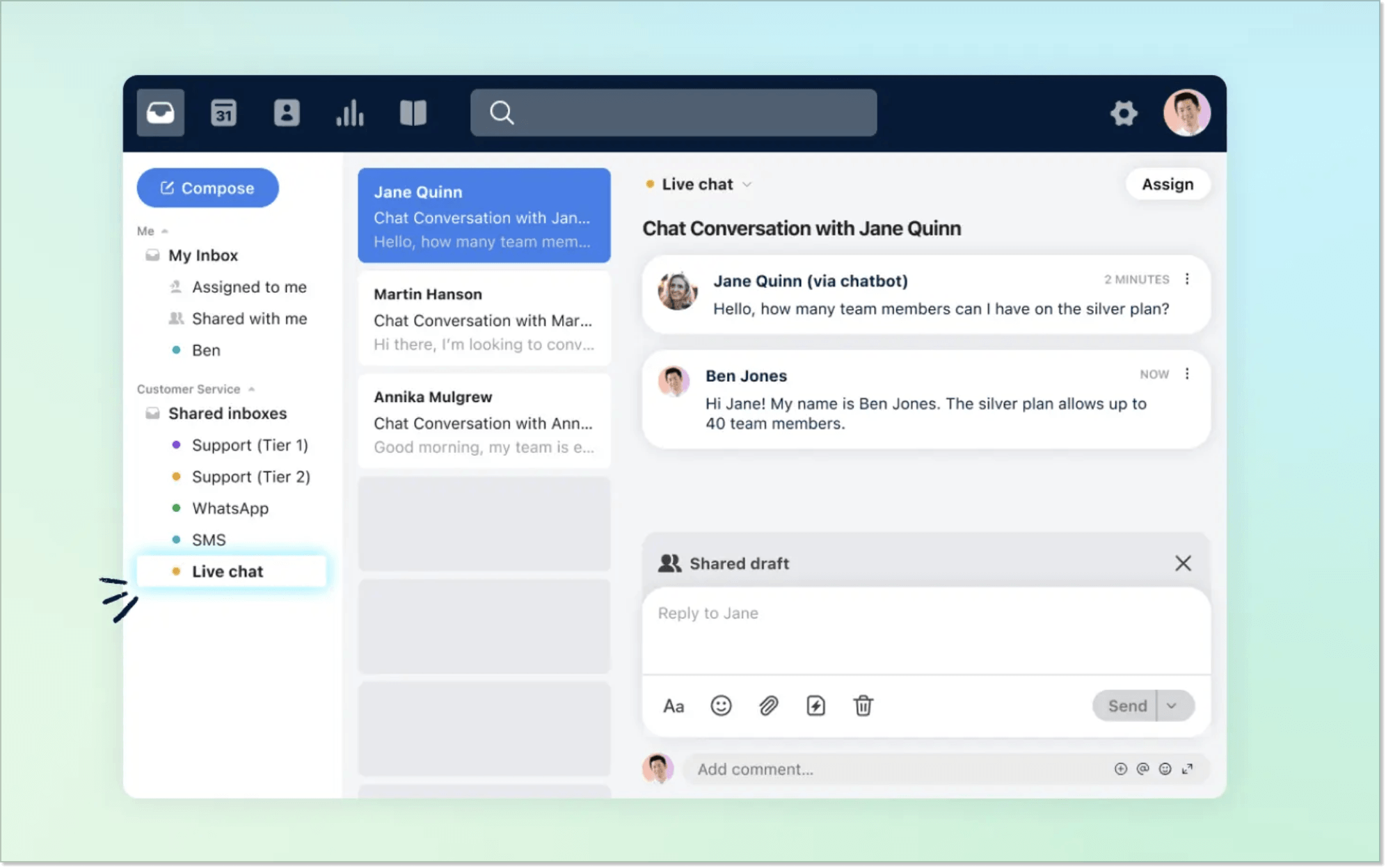
Most help desk platforms are built around tickets. Front is built around the inbox and the people working in it, which is why conversations there keep their human shape. You can see who’s replying or leave comments beside the thread, and two people can draft the same answer before it goes out. Additionally, success, sales, and ops teams can work in the same space instead of getting forwarded copies of the conversations.
Key features:
- Shared inbox built for collaboration. Internal comments, shared drafts, assignments, tags, custom views, snoozing, and message templates.
- Guest accounts. Bring someone outside the support team into a specific conversation thread without paying for another seat.
- AI and Copilot for agents. Basic topic categorization comes built-in, while the Copilot add-on unlocks AI reply drafting from rough notes, instant translation, thread summarization, and real-time suggestions.
- Autopilot. Starts at $0.05 per conversation for AI triage (automated routing and tagging), though full AI resolutions are billed at a higher per-resolution rate.
- Omnichannel inbox. Email, SMS, social, WhatsApp, Slack, voice, and a customer portal with ticket forms. Starter plan supports one channel type only.
- Knowledge base. A public help center that both AI agents and chat widgets pull answers from.
- Smart CSAT. Inferred CSAT for the customers who never fill in the survey.
Why is it a strong alternative?
Front is the platform that treats the shared inbox as company-wide property rather than support property. Autopilot bills per conversation, so the AI line tracks your volume like everywhere else. It just starts from a much lower number. The problem is that the Starter plan looks attractive, but it limits you to a single channel type. If you’re switching from GrooveHQ to manage email, chat, and socials together, you’ll need to choose the Professional plan.
Pricing: three plans, all priced per seat. Starter is $35/mo for up to 10 seats and covers a shared inbox, ticketing, 10 automation rules, basic analytics, and a public knowledge base, but only one channel type: email, Front Chat, or SMS. Professional at $85/mo opens omnichannel support, macros, and advanced analytics for up to 50 seats. Enterprise at $105 (billed annually) includes Copilot, Smart QA, and Smart CSAT. There’s a 14-day trial with Professional features and no credit card required.
Worth knowing before you scale up: Front requires a paid onboarding package on contracts above $25,000. If that’s more than you planned, I suggest you take a look at Front alternatives first.
Freshdesk
Best for structured queue management, skill-based routing, and parent-child ticket tracking instead of an open shared inbox.
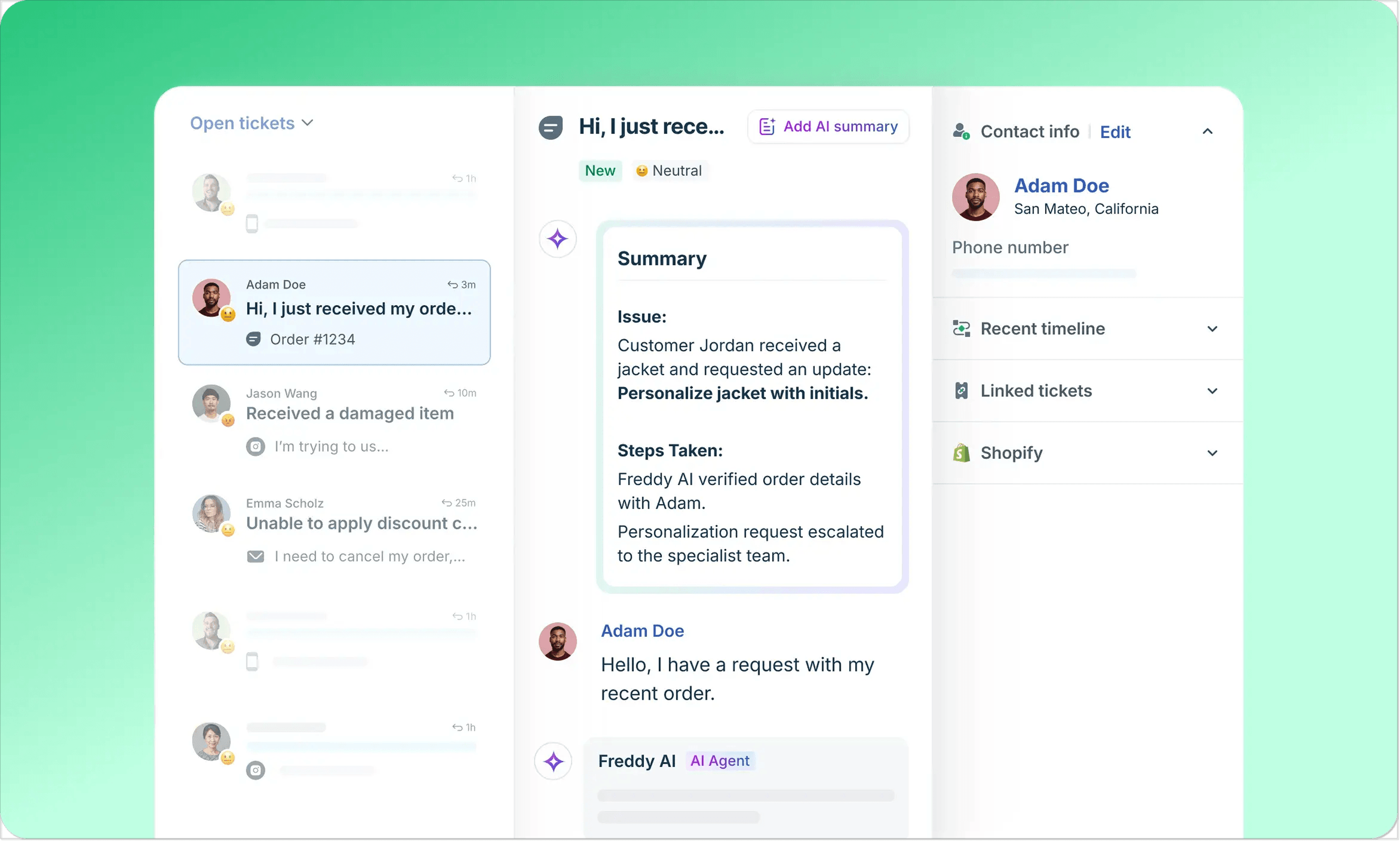
Freshdesk brings heavy-duty structure to customer support operations that need strict process control. Instead of agents picking the messages from an open inbox, automated routing distributes incoming tickets based on skills or workload. Managers get real-time tracking with SLA countdown timers, automated escalations, and parent-child ticketing to split complex requests across different teams.
Key features:
- Ticketing system. Requests come in as tickets with priority, ownership, and status, so the state of every open issue is visible.
- Threads and tasks. Internal discussions attach to a ticket without appearing in the customer conversation, and linked tasks spell out what still needs to be done and by whom.
- Customer portal with a knowledge base. A self-service space where customers submit tickets, search articles, and check the status of what they’ve already reported.
- Freddy AI Agent. Resolves customer questions automatically from your help content. On Freshdesk Omni it comes with all three paid plans, with the first 500 sessions included once per account.
- Freddy AI Copilot. The agent-side assistant, drafting replies and summarizing long tickets.
- Routing and SLAs. Intelligent routing and multiple SLA policies, with skill-based routing, so tickets reach the right person quickly rather than sit in one shared pile.
- Collaborators. Invite developers, vendors, or anyone else outside the support team into a specific ticket without giving them a full agent seat.
- Day passes. Buy a single day of agent access instead of a monthly seat, which is the cheapest way to handle a holiday rush or a colleague covering someone’s leave.
- Reporting. Out-of-the-box analytics, custom dashboards, and Freddy AI Insights.
Why is it a strong alternative?
Freshdesk replaces manual workload balancing with systematic ticket assignment and SLA tracking, making it a reliable foundation as your request volume grows. For teams debating Freshdesk vs Zendesk to bring corporate-grade structure to their support, Freshdesk gives complex routing and SLAs without feeling as overwhelming to set up. Just pay attention to plan coverage: core plans focus strictly on email and web forms, while live chat, WhatsApp, and social messaging live in the separate Freshdesk Omni suite.
Pricing: three plans, priced per agent. Growth at $23, Pro at $66, and Enterprise at $107 per agent per month. The omnichannel Freshdesk Omni line is a separate price list: $35, $95, and $143. Freddy AI Agent includes 500 sessions once per account, after which sessions cost $49 per 100, and Freddy AI Copilot is a $29 per agent add-on from Pro. Day passes cost $5, $10, or $15 depending on your plan. The trial runs for 14 days on the Enterprise plan. If you like everything except the price, I’d check a few Freshdesk alternative options.
Zoho Desk
Best for companies already inside the Zoho ecosystem, where CRM data belongs in the ticket screen by default.
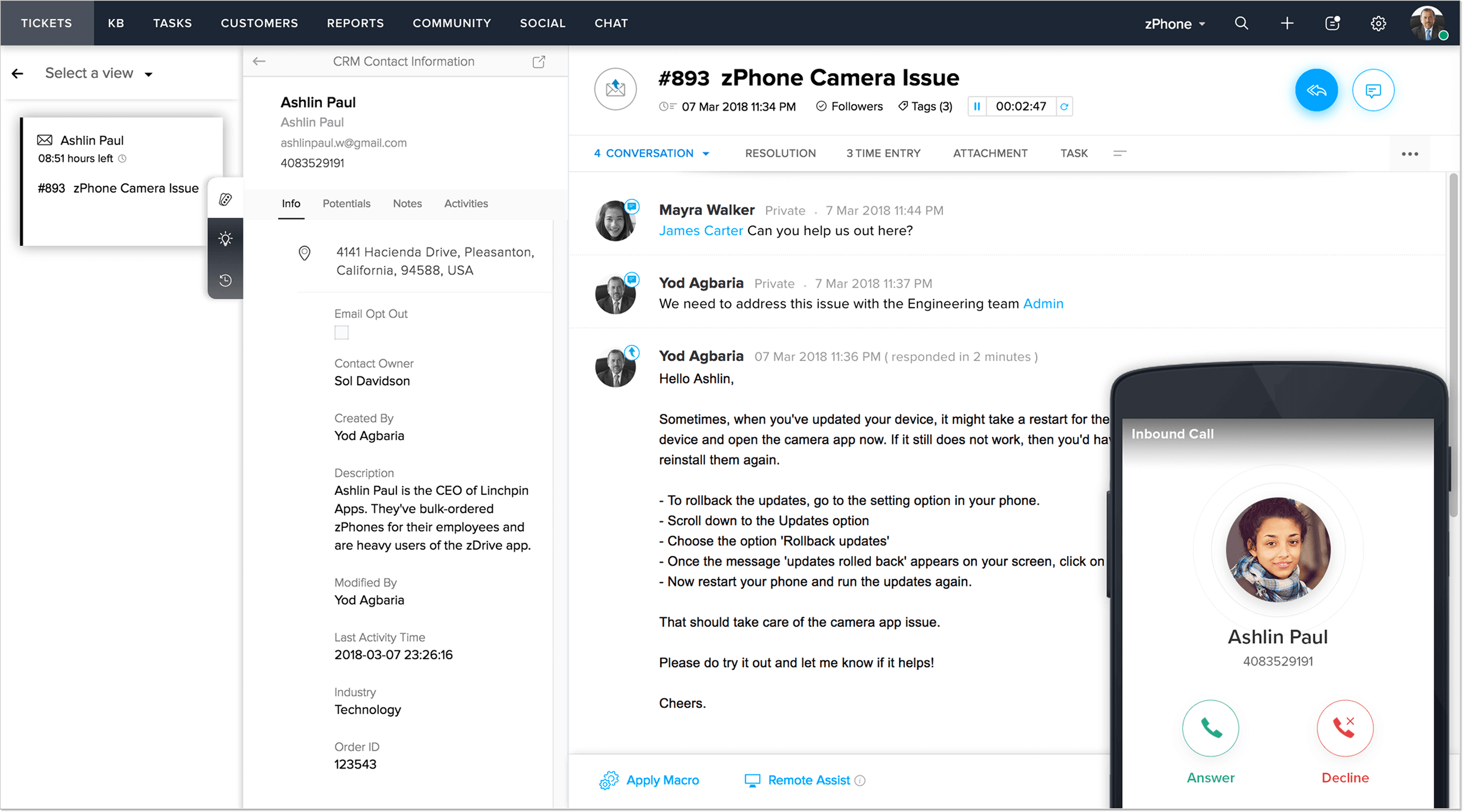
Zoho Desk offers some of the lowest pricing on the market, but it works differently from GrooveHQ. Instead of a clean shared inbox where everyone jumps in to answer emails, it routes tickets through separate departments and automated assignment rules. If you make the switch, expect to spend time configuring your workflow before your team can start handling tickets.
Key features:
- Shared inbox. Every request becomes a ticket in one queue, whatever channel it came from, with customer history attached so an agent sees the full picture before replying.
- AI Agents. Build and deploy agents using Zoho’s own model or your own API key.
- Answer bot. Replies to customers by pulling relevant content out of your knowledge base articles.
- Knowledge base and the ASAP widget. A help center you can embed directly into your website or mobile app, so customers get self-service, chat, and article search without leaving the page they’re on.
- Departments and parent-child tickets. Split the help desk by team, brand, or product line, and break complex requests into linked sub-tickets that different people resolve in parallel.
- Zoho CRM integration. Customer history, deal stage, and account details appear inside the ticket.
Why is it a strong alternative?
The interesting part is what Zoho Desk does with AI pricing. The AI agents come with the plan and a monthly token allowance. Combined with a ceiling that reaches further than Groove’s in automation and reporting, that makes it one of the few tools here where scaling AI doesn’t add a separate per-resolution line to your bill. The honest counterweight is setup. This is a configuration-heavy tool, and the simplicity that made GrooveHQ pleasant to use is exactly what you’re trading away.
Pricing: five editions, priced per user. A Free edition covers three users with basic email ticketing and stays free permanently. Paid plans run $9 (Express), $20 (Standard), $35 (Professional), and $50 (Enterprise) per user per month. Standard includes knowledge base, chat widget, instant messaging channels, the Answer bot, and custom reports. Professional adds telephony, Zia AI, Blueprints, multiple departments, and round-robin assignment. Every plan comes with a 15-day trial that requires no credit card and drops to the free edition when it ends. Zoho Desk provides migration assistance at no cost when you switch from another help desk.
Hiver
Best for customer support that already runs in Gmail and shouldn’t have to move anywhere else.
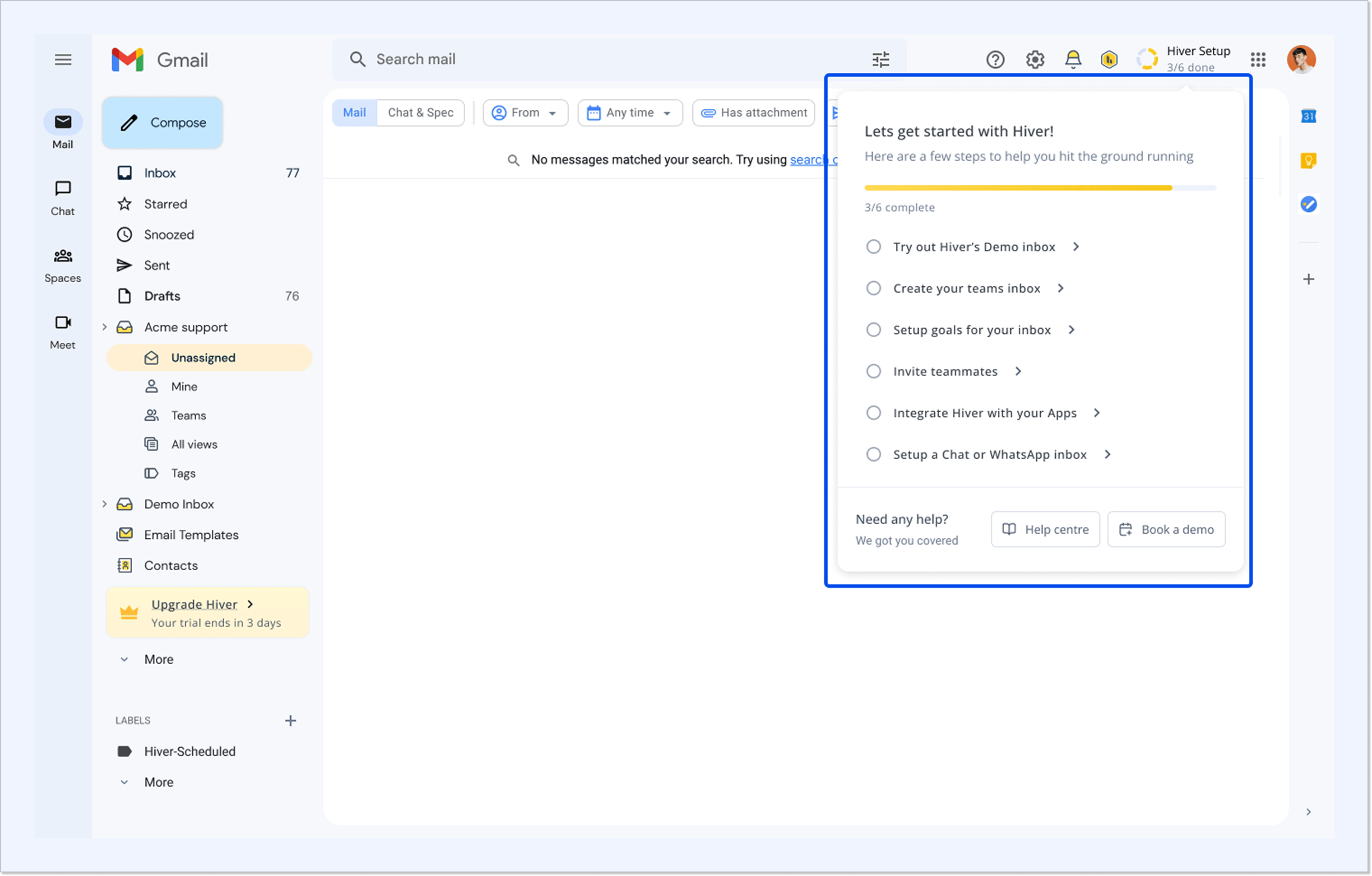
Hiver’s original idea was that the help desk should come to your inbox rather than the other way around, and it still works like that. A Chrome extension turns Gmail into a shared workspace where support@ and info@ get owners, tags, SLAs, and AI, eliminating the need to onboard your team onto a completely new platform.
In 2026, the company added a second product, Hiver Omni, a standalone platform that runs independently of Gmail and handles chat, Slack, voice, WhatsApp, and social alongside email.
Key features:
- Shared inboxes with clear ownership. Every email gets an assignee, a status, and a full history, with collision detection stopping two agents from answering the same customer at once.
- Collaboration. Private notes with mentions, collaborators you can loop in from outside the inbox, and shared drafts your team co-writes in real time before anything goes out.
- AI Agents. They resolve requests end-to-end and act across your connected tools, like looking up an order or issuing a refund instead of just writing about it, and pause for approval on any action you mark sensitive.
- AI Copilot. Summarizes long threads, polishes replies, answers questions from your internal docs, and suggests ready-to-send responses drawn from your knowledge sources.
- Help Center. A public knowledge base with nested categories, custom branding and domain, contact forms, and AI-powered search.
- Automations. Rules that fire on conditions you set, round-robin assignment, and scheduled actions for reminders and handoffs.
- SLAs and CSAT. Response and resolution targets with reporting on breaches, plus customer satisfaction surveys.
- Free migration. Hiver moves your data from your current help desk at no extra cost.
Why is it a strong alternative?
The argument for Hiver is that the migration barely registers for your agents. If your customer support team runs on Google Workspace, they keep the interface they use all day. The limit worth knowing is that the Gmail version handles email, so the Instagram and Messenger conversations you run in Groove Classic need Hiver Omni instead.
Pricing: both products cost the same. Growth is $35/mo per user and covers shared inboxes, ticketing, AI Agents, AI Copilot, the Help Center, rule-based automations, and pre-built analytics. Pro at $65/mo removes the user cap and adds SLAs, CSAT surveys, the customer portal, custom reports, premium integrations, and API access. Elite at $95/mo brings AI QA, skill-based routing, SSO, and HIPAA compliance. There’s a 7-day trial with full Elite access and no credit card required.
Re:amaze
Best for eCommerce support built on order data, proactive chat, and bots.
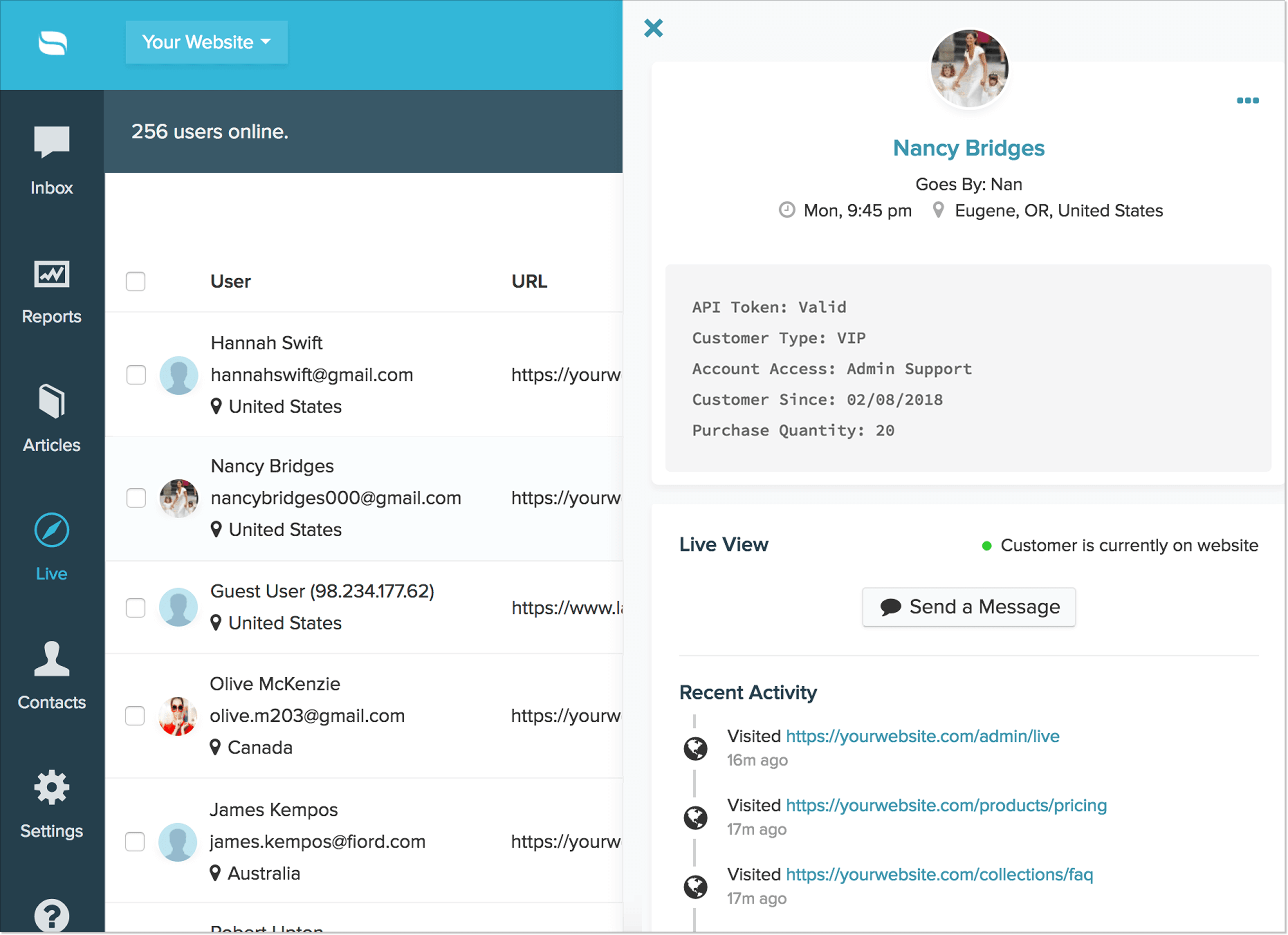
I honestly don’t know why so few roundups mention Re:amaze, as it really is a strong GrooveHQ alternative. You get a shared inbox, live chat, chatbots, proactive messaging, and an FAQ center, built with eCommerce in mind. The platform adds AI chatbots that answer order questions, plus messages that pop up for visitors on specific pages.
Key features:
- Shared inbox. Every plan allows unlimited email inboxes and unlimited social channels.
- Live chat with website and app integration. Real-time conversations that land in the same inbox as email, with SDKs for embedding chat into a web or mobile app.
- Cues. Proactive messages triggered based on what a visitor is doing.
- Chatbots, including an Order Bot. Pre-built bots handle greetings and order status questions by pulling real data from your store.
- Re:amaze AI Agent. Resolves repeated customer questions without an agent, currently in beta version.
- FAQ center. A public knowledge base you can place on your site with a custom domain and article edit history, plus an internal one for your team.
- Staff scheduling built into the help desk. Departments, custom roles, shifts, and vacation days, which is useful if your coverage changes week to week.
- Peek and video calls. Live screen sharing to watch what a customer is stuck on, plus in-chat video when typing isn’t getting anywhere.
Why is it a strong alternative?
Re:amaze sells a flat monthly rate with unlimited team members capped by conversation volume. The eCommerce depth is real too, with order data and bots that act on it rather than just talk. What you won’t find is SLA management; additionally, customer satisfaction ratings sit on the most expensive plan, so teams that answer to response-time commitments will feel that gap quickly.
Pricing: three per-seat plans. Basic at $29, Pro at $49, and Plus at $69 per team member per month. Basic covers the shared inbox, live chat, social channels, FAQ, chatbots, proactive messages, and workflow automation for a single brand. Pro adds multiple brands, SMS and voice channels, advanced reporting, a custom domain, and a status page. Plus brings CSAT ratings, staff performance reporting, shifts, screensharing, and video calls. Separately, a Starter plan runs at $59/mo with all Basic features and unlimited team members, capped at 500 responded conversations a month. The AI Agent includes 5, 10, or 20 resolutions per user per month depending on plan, then charges $0.85 each. The trial lasts 14 days with full Plus features.
Enchant
Best for small businesses that want omnichannel inbox capabilities without paying extra for basic tools.
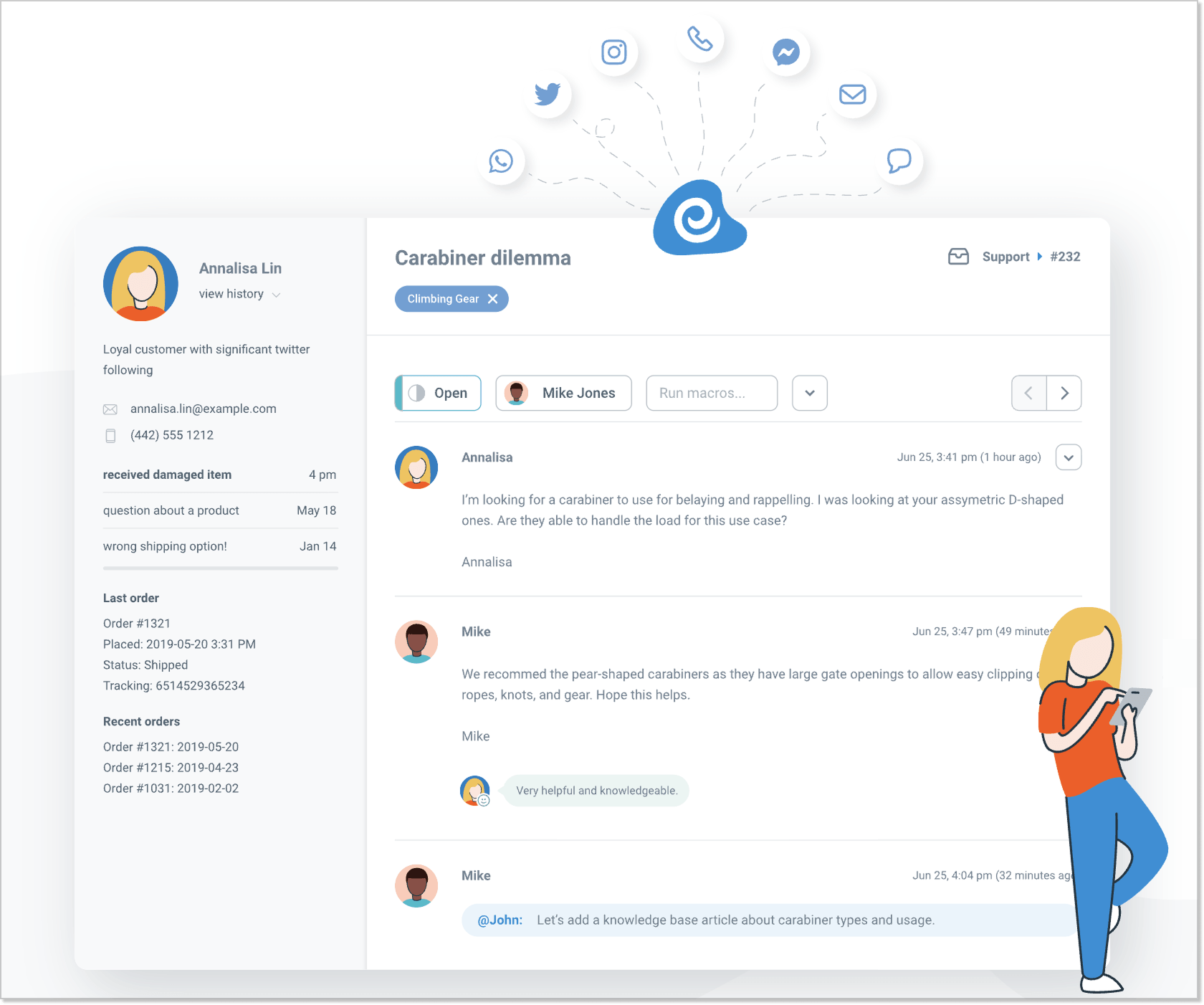
Enchant feels like a natural step up for teams that don’t want heavy, complicated software. It unites email, live chat, phone, and messaging apps into one workspace. You get all the essential functionality small businesses need to track customer service performance and collaborate on tickets, without a settings menu your team has to grow into.
Key features:
- Omnichannel inboxes. Email, phone calls, SMS, and socials arrive in one queue, and you can run separate inboxes for different brands, departments, or languages.
- Messenger widget. Live chat, knowledge base search, and a contact form in one widget on your site. A visitor starts a chat, available agents get pinged, and when nobody’s around, the widget offers the contact form instead.
- Plain email replies. Answers reach customers as ordinary emails, with no ticket numbers, reply separators, or unfamiliar sender addresses.
- Knowledge bases. Public and internal, hosted on their own site or added to the widget.
- Workflow automation. Rules that assign, route, and act on conversations as they arrive, plus response templates for repeat questions.
- Enchant AI. The base plan includes AI Starter, while the Standard AI tier adds an AI Writer, translation, summaries, drafts, and reply suggestions. An AI Agent that resolves conversations end-to-end and hands off to a human when needed is currently in beta.
- Satisfaction ratings and reports. CSAT collection with reporting on team performance and conversation trends.
Why is it a strong alternative?
Switching from Groove to Enchant feels natural because it doesn’t force your support agents to learn a complicated new system. The real draw is its ease of use and personal feel. It’s also a very cost-effective customer support platform. The trade-off is a short integration list and reporting that stops at the basics.
Pricing: a single no-contract plan at $20/mo per user, with adding or removing users whenever your team changes. Users are only the people who log in to answer customers, so your customer count doesn’t affect the bill. Four add-ons sit on top: Advanced Security at $5/user/mo, Enchant AI Standard at $30 per 500 customers helped, branding removal at $50/mo, and Campaigns, free while in beta. The trial runs for 30 days with no credit card.
Zendesk
Best for enterprise support operations and companies that have outgrown the mid-market, running high volume across many channels, brands, and regions.
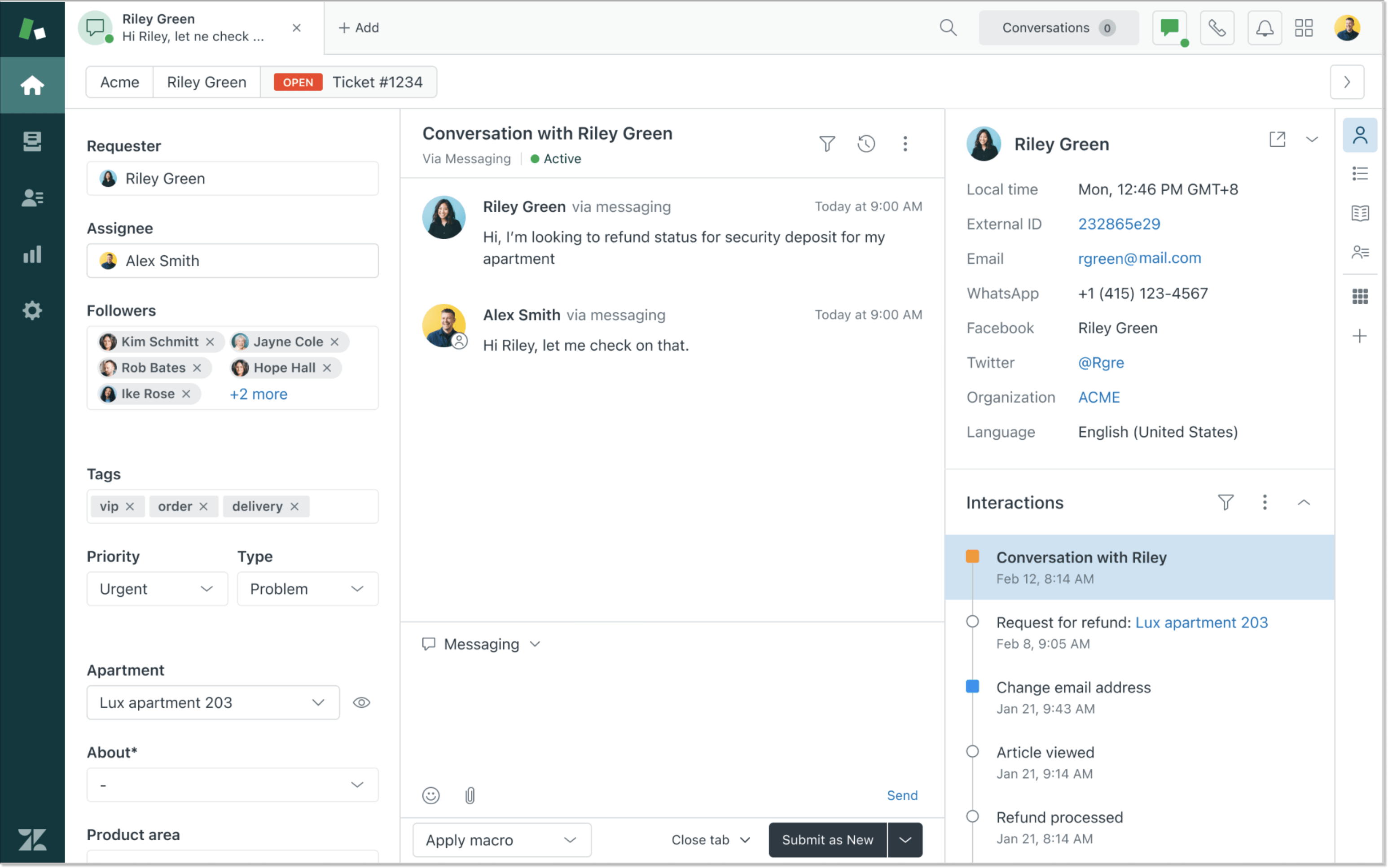
No list of popular GrooveHQ competitors gets written without Zendesk on it (and for good reason). It earns its place on the list because it’s where Groove teams tend to land once they outgrow a small help desk. It’s a full customer service software that handles email, chat, social, and phone in one place, with the automation and analytics to run all of it at volume. Companies usually move here when they need rules: who answers what, response time targets, and full audit tracking to prove it.
Key features:
- Agent workspace. Email, live chat, social messaging, and voice conversations sit in one screen with the full customer history attached.
- Ticketing with deep automation. Triggers, automations, and macros that act on tickets as they arrive, with conditions specific enough to encode most of what your team does by hand.
- Routing. Skills-based routing and IVR, which send a request to the person qualified to answer it.
- Help centers. Multiple self-service sites across brands and languages.
- AI agents. Resolve customer conversations without a human.
- Copilot. The agent-side AI layer, covering suggested replies, intelligent triage, and admin assistance.
- Reporting and analytics. Prebuilt dashboards with custom reporting, which is where Zendesk genuinely outpaces its competitors.
- App marketplace and APIs. A large catalog of integrations and the developer tooling to build what isn’t there.
Why is it a strong alternative?
Placing Zendesk among GrooveHQ alternatives isn’t quite right, frankly speaking. It’s an upgrade, and the kind you take when the workload and headcount have grown past what a small help desk was designed to carry. What you get is depth nothing else here matches: routing logic, enterprise controls, analytics, etc. What you accept is cost and setup complexity.
Pricing: Zendesk sells two product lines: one for customer support and one for internal employee service. The customer service has four plans, priced per agent per month: Support Team at $25, Suite Team at $69, Suite Professional at $149, and Suite Enterprise + Copilot, which has no public price at all. Copilot, voice, and workforce management are all sold separately on top. Untangling the real number takes a while, which is why we broke down Zendesk’s pricing in a separate piece.
How to choose the right GrooveHQ alternative for your support teams
Teams usually pick the wrong GrooveHQ replacement because they choose the platform with the longest feature list instead of the one that fits their actual workflow.
If you liked the software for its simplicity, switching to a complicated help desk might be a mistake. To pick the right tool, just look at what your team can’t work without, where your customers actually reach out, and what’s currently slowing your agents down.
Use this practical checklist to filter your options and find the GrooveHQ alternative that works for you.
□ Match your daily workflows against the features you actually use
Groove built its reputation on a lightweight, email-first feel. Before switching customer support software, test how each alternative handles basic ticket management. Have an agent draft a reply, apply a tag, and reassign a ticket during a live trial. If taking those basic actions requires five clicks and three dropdown menus for something that took 2 seconds in Groove, keep looking.
□ Check if live chat actually sits in your main inbox
If you are moving away from Groove to offer faster real-time support, pay close attention to how live chat is integrated into the workspace. Check if incoming chat messages arrive in the same unified inbox queue alongside email, like in HelpCrunch, or if your support agents have to keep multiple browser tabs open just to monitor different channels.
□ Make sure all customer interactions actually stay in one place
Groove handles standard email fine, but expanding into social media DMs, WhatsApp, and web messaging requires genuine omnichannel support. Avoid platforms that simply forward social messages into an email inbox without preserving original conversation threads or customer profiles.
□ Decide how much automation capabilities your team realistically needs
Not every business needs aggressive ticket deflection. If your customer service relies on high-touch, personal communication, basic assignment rules and canned responses might be plenty. However, if your agents spend half their day answering identical questions, advanced automation becomes necessary.
□ Calculate true pricing based on seat limits and automation fees
Headcount and ticket volume drive your bill in completely different ways. While per-seat costs stay fixed until your support team expands, usage-based AI fees scale directly with volume. Compare how different GrooveHQ competitors handle this: simulate what happens if your customer inquiries double next quarter with the exact same team size. Does the pricing scale predictably, or do per-resolution AI fees create unexpected budget spikes?
□ Identify the trade-offs you are willing to make
No help desk software is perfect at everything. The goal is not finding a tool with zero drawbacks, but finding trade-offs your business can happily live with. Write down your non-negotiable features alongside capabilities you are comfortable giving up. Use this simple benchmark to eliminate mismatched platforms immediately during live demos.
□ Ask what actually survives the migration
Moving help desks isn’t just moving emails. Ask each vendor exactly what comes across: conversation history, tags, custom fields, saved replies, and the customer profiles those conversations hang on. If the answer is “email threads only,” your agents lose the context they rely on. Don’t forget to check whether migration is included in onboarding or billed as a separate service.
Conclusion
That’s the full menu. Nine tools, and not one of them is the right answer by itself. The way to get to an answer is to narrow the options down to two.
Start from the gap you actually have. If it’s SLA management and reporting a supervisor can act on, Freshdesk and Zendesk are the top tools to put side by side. If it’s eCommerce order data, or omnichannel support that keeps chat, email, and social in one queue, your shortlist looks completely different.
Then test instead of reading. Put both finalists on real tickets for a week, with your own agents, not a demo account. Price each one at double your current volume, AI line included. And ask what happens to your customer support history on the way in.
That’s how you end up with help desk software you won’t be replacing again next year, rather than the one with the longest list of capabilities. The top GrooveHQ alternatives here are all solid products. The right option matches how your customer service already runs.
FAQ
Is GrooveHQ shutting down?
No. GrooveHQ now lives under the Helply brand as Groove Classic. Treat it as a stable product rather than one about to leap forward on AI.
Should I switch from Groove Classic to Helply?
Probably not, unless you’re a B2B software company – that’s the profile Helply is built and sold for. Its pricing page is open to anyone, but the product and the roadmap are aimed at B2B SaaS. And moving there is a new purchase, not an upgrade.
Is Intercom a good GrooveHQ alternative?
For most GrooveHQ teams, no. Intercom is simply too expensive and overly complex if you’re looking just for a shared inbox. Its whole model is built around enterprise AI automation rather than simple, human messaging.
Does HelpCrunch have email ticketing like GrooveHQ?
Yes, absolutely. You get the same email-centric workflow as Groove (a shared inbox, ticket assignment, private notes, and tagging). What HelpCrunch adds on top is AI Agents in that same workspace.