10 Shared Inbox Software: The Simple, the AI-Powered & the All-in-One
Powerful shared inbox software can turn scattered customer conversations into a well-organized workflow. Check these 10 tools and find the one that will bring order to the chaos.
Written by Mariia Yuskevych

When your support team is larger than one person, you inevitably face the question of effective collaboration. A customer service team is interacting with lots of people at once and needs to address each request as fast as possible. Such a party can get out of hand very easily.
That’s why your support team’s productivity depends on healthy collaboration between its members. Shared inbox software solves this by providing a centralized platform where teams can manage the requests, assign them to the right teammates, and filter them into custom inboxes. As a result, agents spend less time finding the tickets relevant to them and more time actually resolving them. Less noise means better focus and a more efficient support team.
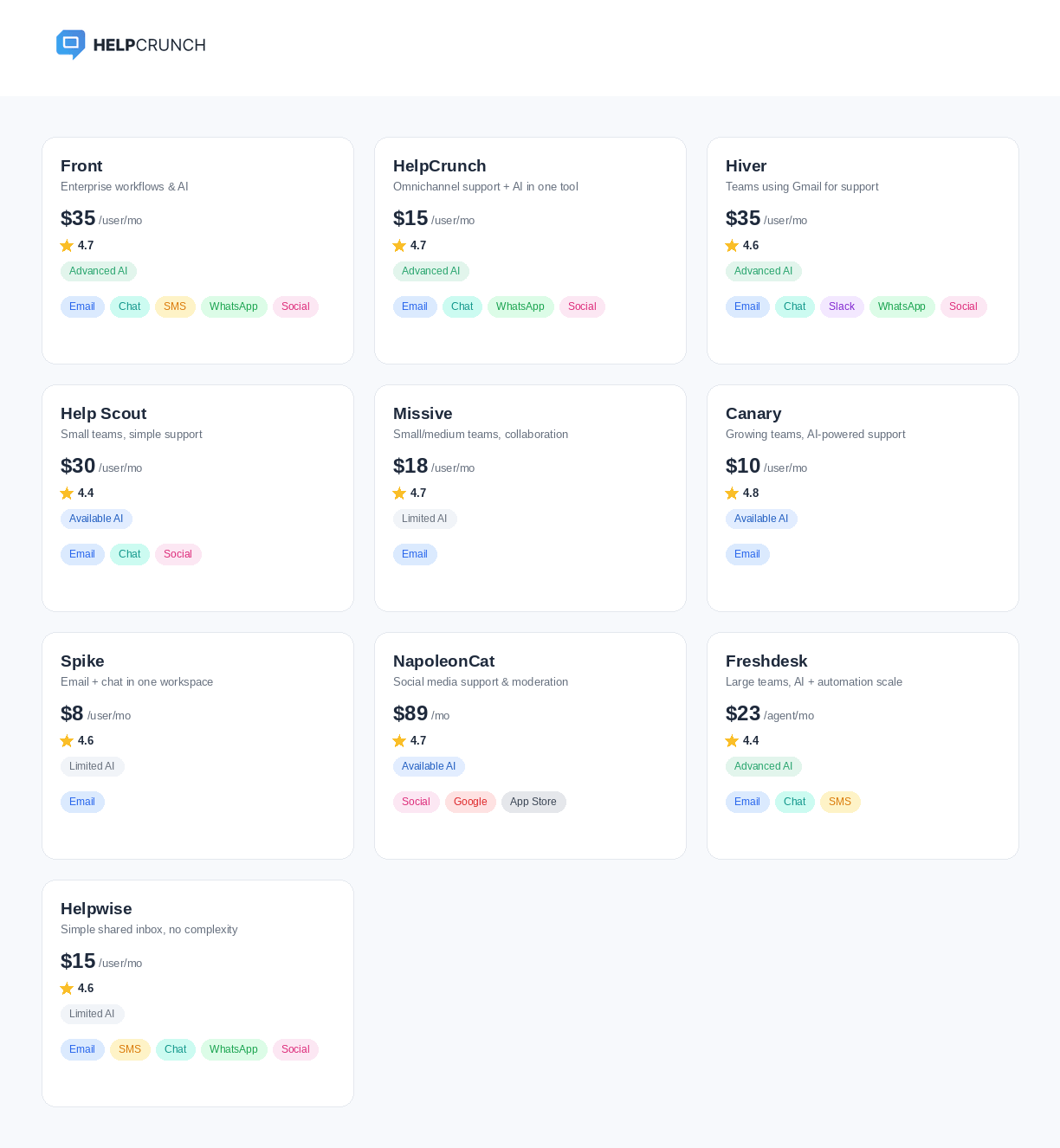
I reviewed HelpCrunch, Front, Hiver, Help Scout, Missive, Canary, Spike, NapoleonCat, Freshdesk, and HelpWise to find out what each platform actually delivers. I checked whether familiar names live up to the hype and discovered a few hidden gems that might end up stealing the show and being exactly what your support team needs.
Shared inbox is a unified dashboard where multiple customer service representatives can access, manage, and answer emails from clients. It allows agents to distribute work fairly while staying on top of every conversation with the help of built-in collaboration and productivity features.
Why do you need shared inbox software? Top benefits
Shared inbox software maximizes customer support performance by eliminating the clutter, missed messages, and duplicate responses common to standard email accounts.
Inbox tools can deal with these frustrating problems in a few different ways:
- Smart automation. Advanced inbox tools also allow support departments to automate ticket routing based on various rules and distribute them equally.
- Effective team communication. People want to get a prompt response without repeating themselves over and over again: 66% of customers expect you to answer within 5 minutes, and a staggering 56% complain that they have to repeat the same information to different reps. Being able to discuss complicated issues on the go without leaving a shared email inbox speeds up every process dramatically and diminishes the need to transfer clients from one department to another.
- Better collaboration. From collision detection to tags, private notes, and full communication history, your team will be constantly aware of the request’s status.
- Optimization of routine processes. Dealing with repetitive tasks can kill motivation in the blink of an eye. The remedy is a shared inbox where you can generate answers with AI based on your knowledge base, set up reminders, check detailed user information instead of asking for it, and use canned responses for common questions.
Now, there are several aspects that you may want to consider while choosing a shared inbox. Reliability and scalability are a must, but there are also some crucial features that can make your work easier:
| Feature | How to understand if it’s the right fit? |
|---|---|
| Automation capabilities | Does the platform offer canned responses and ticket routing based on set parameters? |
| Collaboration features | Are there features like private notes, collision detection, statuses, etc? |
| AI features | Are there any AI capabilities, like AI agents for customer service, copilots to help the team work faster, or AI grammar and translation assistance? Can you set up separate AI agents for different departments and tasks? |
| Integrations | Will you need a CRM integration or to connect a shared inbox to email marketing tools, outreach software, etc? |
| Reporting and analytics | Does the platform offer SLA tracking and reports about team performance, customer satisfaction, ticket volume, etc? Can you get custom reports or access raw data through an API? |
| Ease of use | How fast is the setup, and how intuitive is it to use the tool? |
| Reviews | Does the software have mainly positive reviews? Are there any persistent complaints? |
| Value for money | Does the platform offer good value for its price compared to alternatives? Does the pricing match the features, scalability, and team needs? |
Now, there are hundreds of different shared team email management tools available on the market. Some offer just inbox functionality, while others also throw in additional features for all-around customer communication.
I’ve picked up the 10 most promising and interesting shared inbox solutions that will help you tackle employee burnout and bring harmony to the customer support chaos.
1. Front
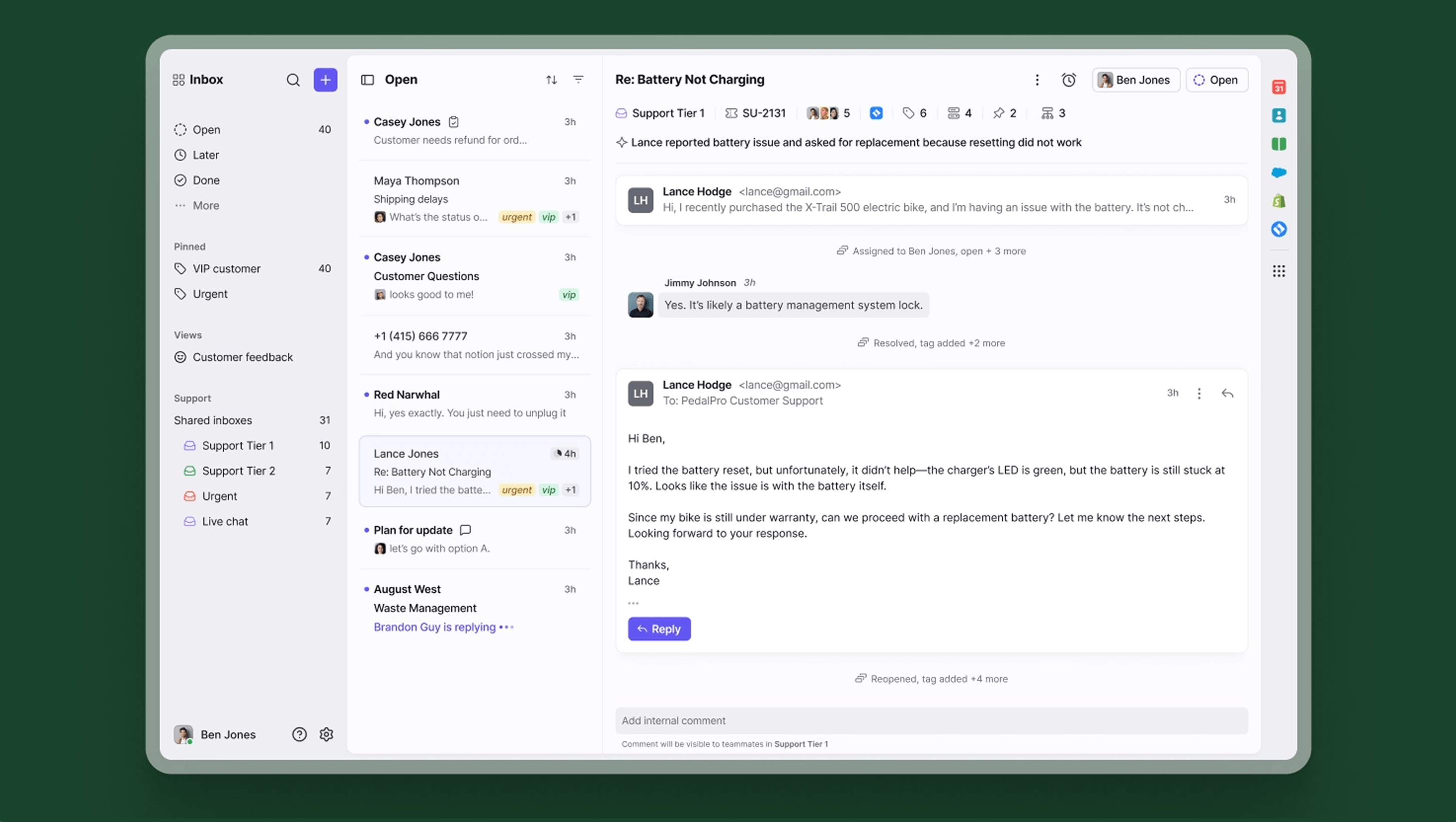
Front is one of the oldest shared inbox tools out there. These days, the company has transformed into an AI-powered, multichannel support tool covering not only email but also SMS and social media channels.
Key features:
- Inbox and collaboration features such as assigning tickets, accessing user information, leaving internal comments, and initiating conversations with teammates.
- Shared drafts to collaborate on more complicated issues.
- AI triage of messages based on language and urgency.
- Workflow automations allow for speeding up a lot of routine tasks, like load balancing.
Best for: big, enterprise-level companies needing a mature tool, organization, and AI assistance.
Reviews: 4.7 / 5 ⭐⭐⭐⭐⭐ (based on 2,492 reviews on G2)

Front is super easy to use and allows teams to work together! We can keep track much easier and best of all, I can have several accounts connected, so I can keep track of everything. The sequences are super useful to send notifications to customers and to capture even new leads. It is very easy to automate.
Pricing:
The basic subscription plan starts at $35/mo/user with up to 10 seats for shared inbox, AI Topics, and up to 10 automation rules.
2. HelpCrunch
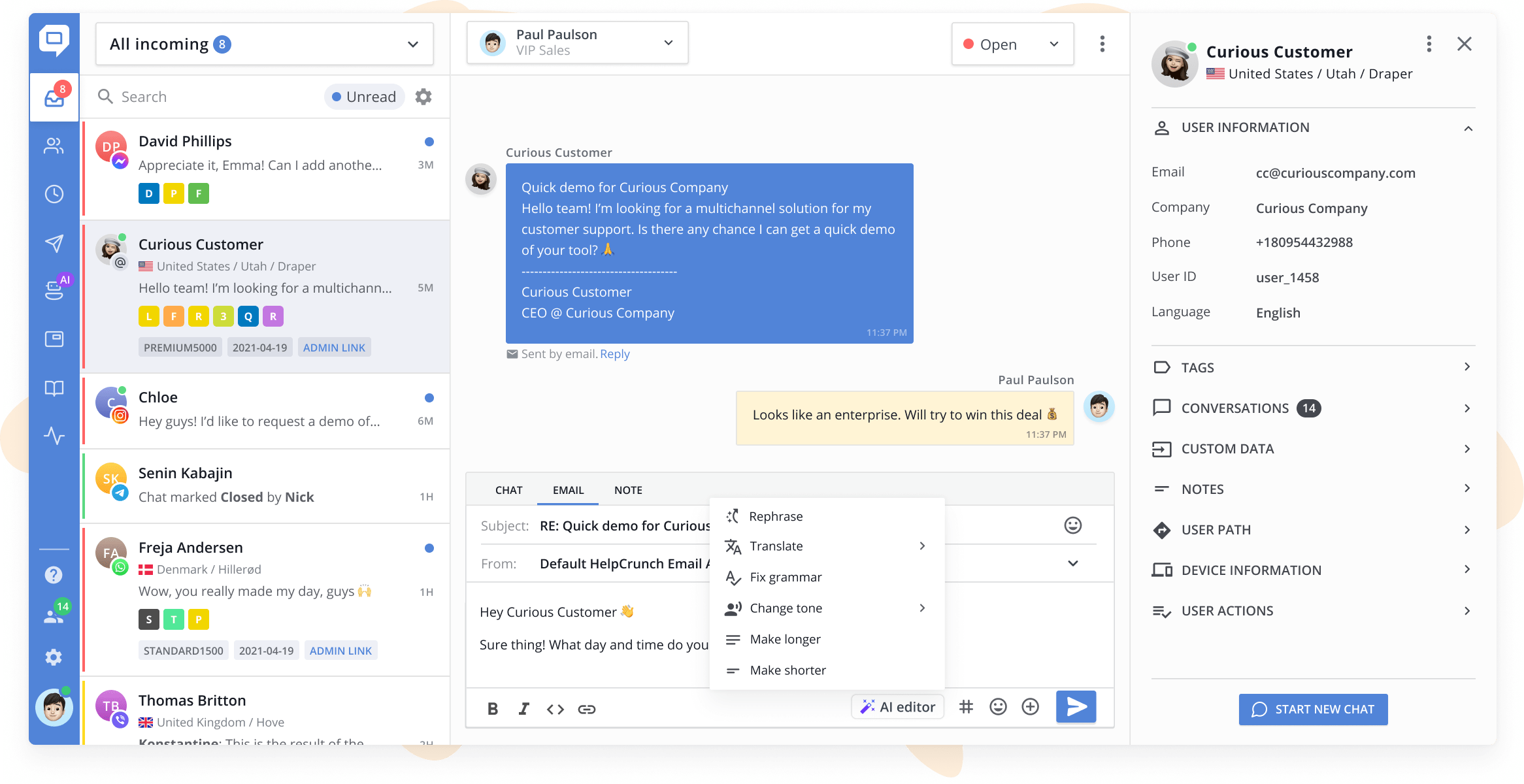
HelpCrunch is an all-in-one AI customer service software offering a shared inbox for incoming emails and chats from live chat, WhatsApp, Instagram, and more. You can set up email forwarding from your support@ email address to the HelpCrunch shared inbox so that every conversation ends up in a queue in chronological order with customizable customer cards. What’s more, you can set up for customers waiting for the answer the longest to be on top of the list, so you get a clear prioritization.
Support team agents and managers can sort them out any way they need – filter unread messages, mark customers with tags, and set up assignment rules on the go. Plus, you can create custom inboxes, including private ones, to track the agents’ activity or simply distribute the work more effectively.
Key features:
- Real-time user info, including full communication history, device information, recent actions, plus custom data you can add.
- Tags, statuses, and private notes for teammates.
- AI editor for translating, paraphrasing, or improving the tone of messages.
- Departments and the ability to assign and re-assign conversations.
- Email transcripts for agents and customers.
- Individual and department productivity, workload, and customer satisfaction reports.
On top of email inbox tools, HelpCrunch offers a knowledge base, AI Agents, chatbots, popups, and email marketing features for connecting and engaging with customers throughout their journey in one unified platform.
Best for: HelpCrunch is a shared inbox for teams looking for an omnichannel experience that is easy to use and has AI and automation features.
Reviews: 4.7 / 5 ⭐⭐⭐⭐⭐ (based on 238 reviews on G2)
We like the easy-to-use interface, the features that allow us to efficiently handle all customer interaction (chat & email) as well as proactive chats and emails for our onboarding process. A great plus is that their support is great, having extensive documentation and a very responsive and knowledgeable team.
Pricing:
Pro subscriptions with AI Agents start at $25/mo/team member, whereas you can get shared inbox, live chat, and knowledge base tools for only $15/mo/team member.
3. Hiver
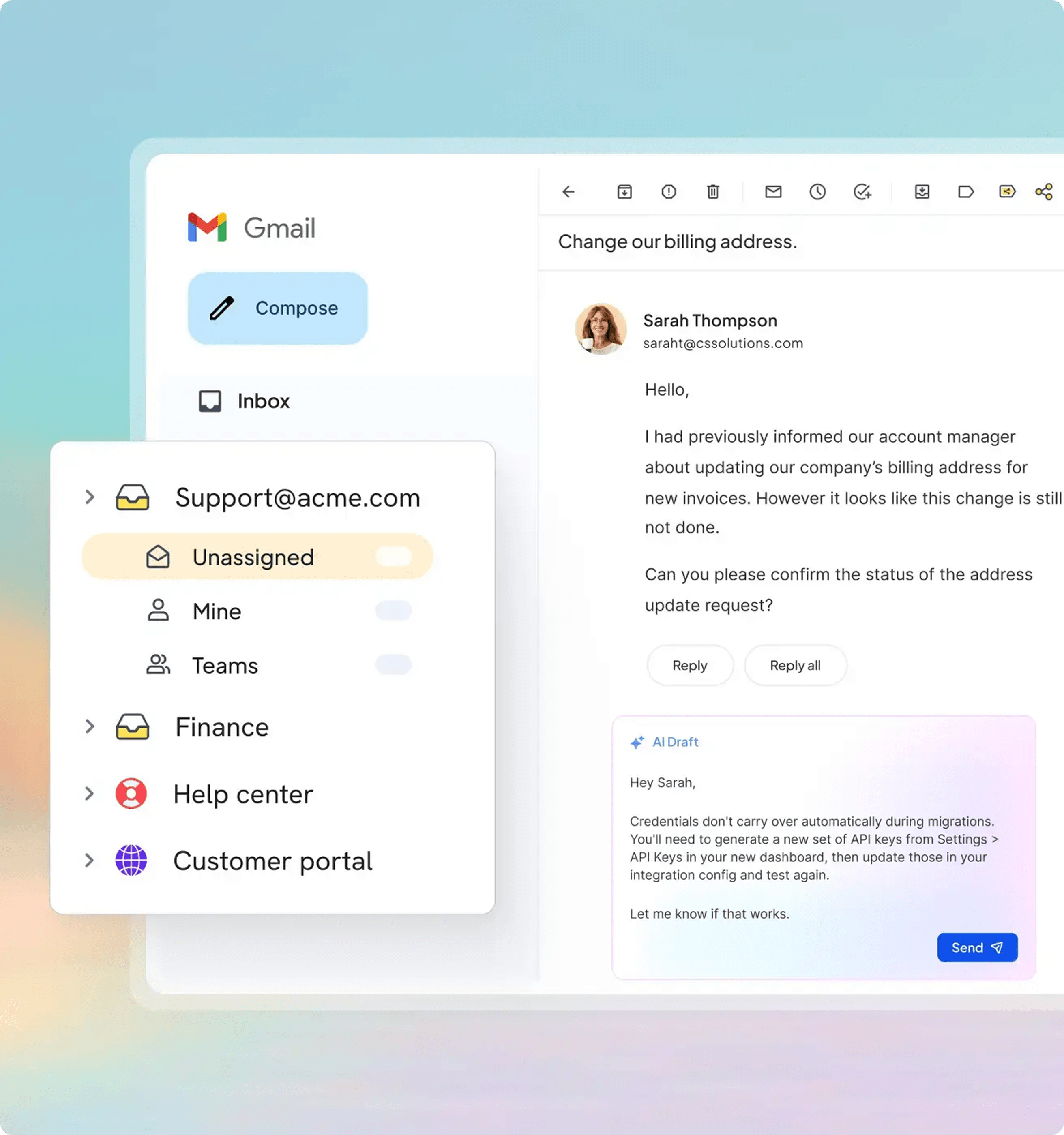
Hiver takes a different approach when it comes to shared inbox customer service. It provides a wide range of features for managing support emails without ever needing to leave Gmail. Hiver functions as a regular Chrome extension.
Key features:
- Turns Gmail into a full-scale shared inbox with folders, private notes, and assignment options.
- Change statuses and enter into discussion with the teammates on the go.
- Automations and reports for optimizing your workflows.
- Hiver Omni for email, Slack, and voice support available.
Best for: Customer support teams using Gmail for incoming requests.
Reviews: 4.6 / 5 ⭐⭐⭐⭐⭐ (based on 1,283 reviews on G2)
I like the ability to coordinate emails within a large team. We receive emails constantly from clients and our old workflow would require siloed responses. For example, if one team or member was being overwhelmed with emails, it was not easy to balance workloads and help them. With Hiver, teams are able to all work off of a shared inbox, claim/assign email threads, and work more efficiently by balancing workloads and ensuring prompt replies.
Pricing:
There is a free plan for teams needing only the shared inbox without automation in Gmail. More inclusive subscription plans for Gmail shared inbox start at $35/mo/user and include rule-based automation, AI Agents, and AI Copilot. The price for more advanced features can reach $95/mo/user.
4. Help Scout
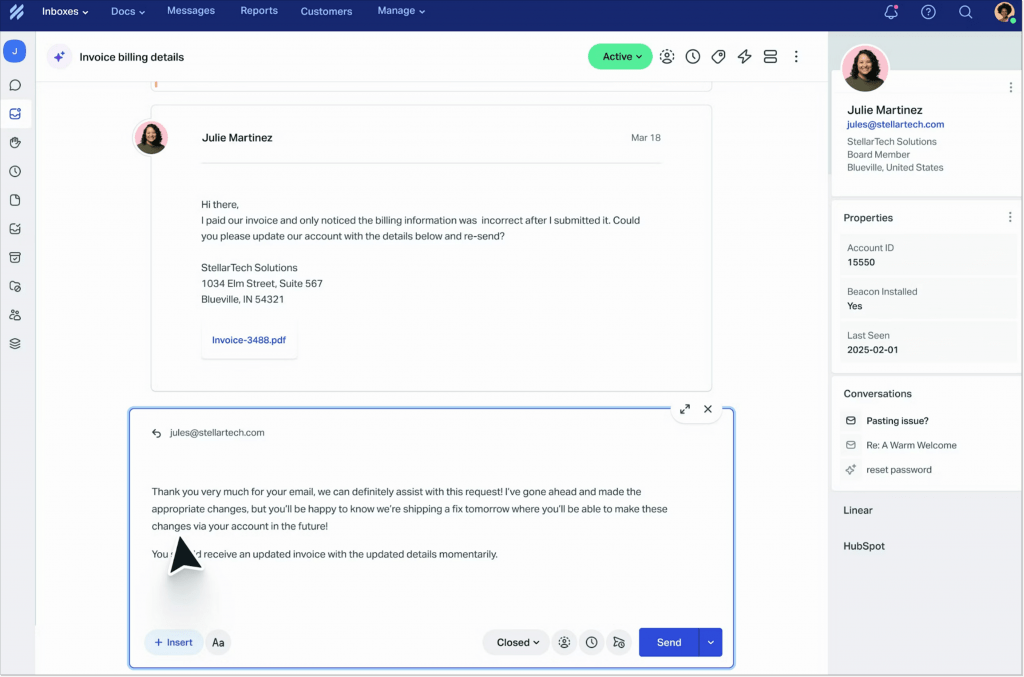
Help Scout is a straightforward, comprehensive shared inbox tool for email and live chat support. Your team can create separate mailboxes and effectively manage incoming emails with the help of a variety of automation features.
Key features:
- Private notes and collision detection for effective teamwork.
- Auto message assignment.
- Saved replies and AI thread summaries to respond to requests faster.
- Workflow automations.
- Customer information.
Best for: smaller teams needing a simple, automated shared inbox interface without frills.
Reviews: 4.4 / 5 ⭐⭐⭐⭐ (based on 428 reviews on G2)
Given that our company was primarily relying on emails to offer support and that we required integration to tools such as our CRM and Jira, HelpScout looked like an excellent product for us and had a competitive price. It is straightforward to set up and use. The UX is excellent, with helpful keyboard shortcuts and workflows to make our team more efficient.
Pricing:
The Standard subscription starts at $30/mo/user. The Plus plan with advanced workflows, round-robin routing, and unlimited AI Drafts is available for $54/mo/user.
5. Missive
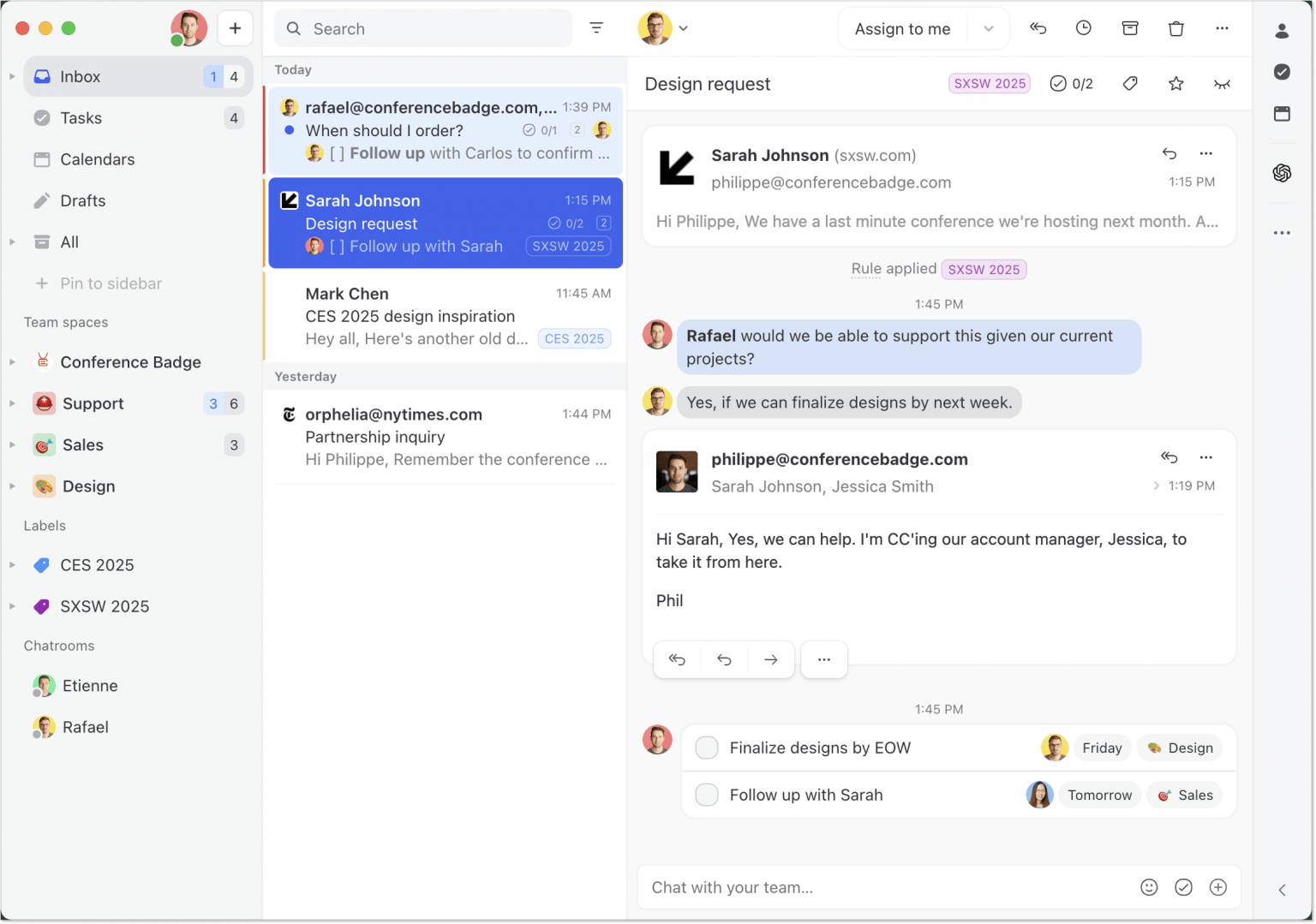
When it comes to Front alternatives, Missive is similar and started around the same time, but its focus has stayed on serving smaller teams instead of larger customer support organizations.
Key features:
- Teams can share conversations and assign emails to specific members.
- Integrated team chat for writing drafts collaboratively and discussing complex issues without switching applications.
- Automations and AI functionality allow teams to build workflows.
- 25+ integrations and an API to allow you to build your own.
Best for: small and medium businesses looking for just a shared inbox with collaboration features.
Reviews: 4.7 / 5 ⭐⭐⭐⭐⭐ (based on 845 reviews on G2)
One of my favorite features is the ability to draft emails collaboratively in real time. This makes the review and approval process smooth and efficient, saving us a lot of back-and-forth. Overall, Missive has significantly improved both my productivity and my boss’s workflow. I can’t recommend it enough, especially for assistants or teams managing complex inboxes.
Pricing:
Plans start at $18/mo/user for shared inboxes without automation or integration with external tools.
6. Canary
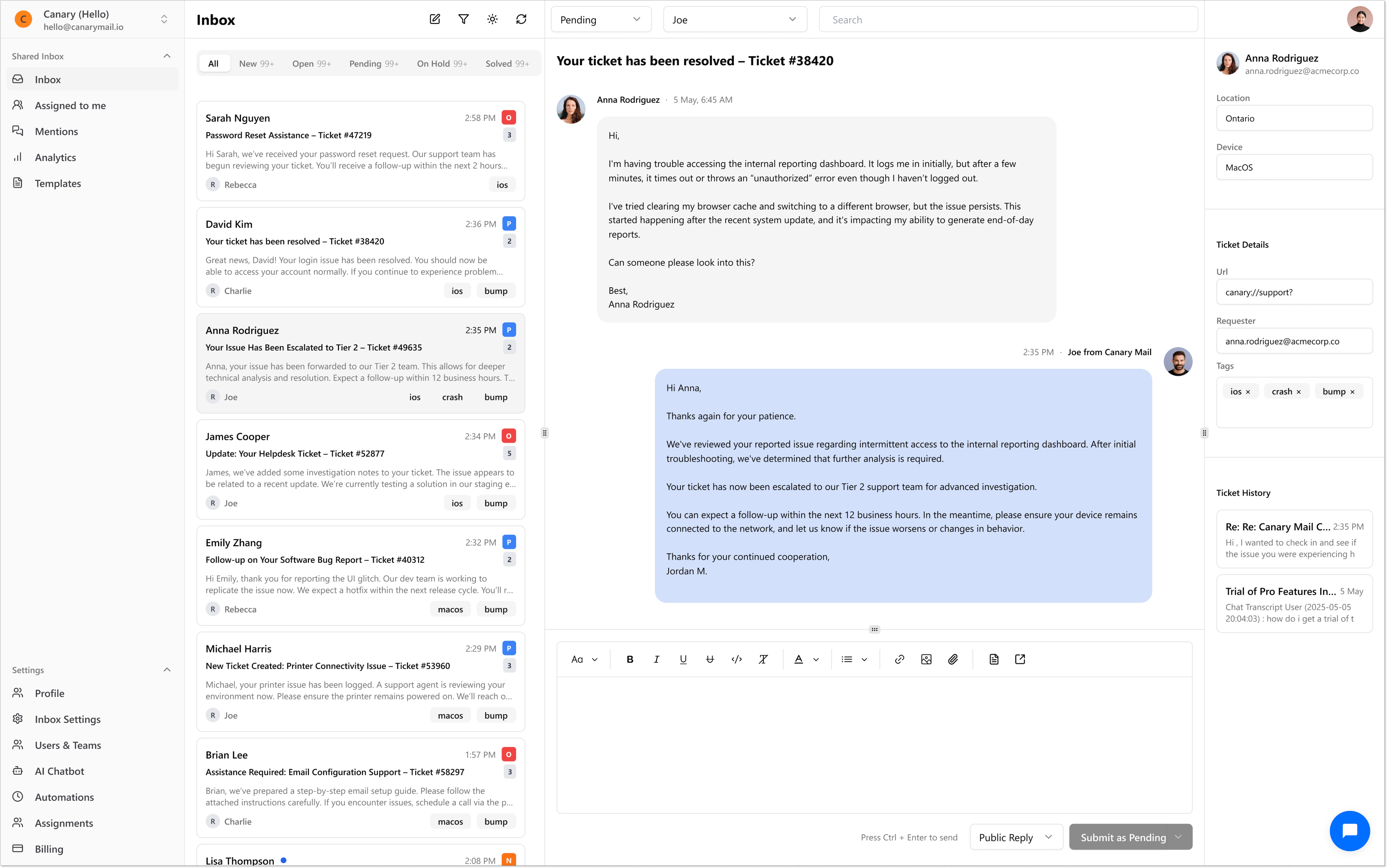
If you are looking for Help Scout alternatives, it’s worth looking into Shared Inbox by Canary. It is a modern, AI-driven alternative to traditional help desks and shared inbox tools. Unlike older platforms that often feel heavy and over-engineered, Canary focuses on simplicity, speed, and collaboration while still giving you the power of advanced automation and insights.
Key features:
- Managing customer conversations across email in one place.
- Tickets assignment and tracking.
- Internal notes and shared drafts for team collaboration.
- Built-in chatbot helps deflect repetitive queries.
- AI-suggested replies boost response speed.
- Analytics highlight your top issues automatically.
Best for: Canary is built for teams who want the power of AI without the complexity of a bulky support suite. Whether you’re a startup or a growing business, it helps you scale support while keeping operations simple and efficient.
Reviews: 4,8 / 5 ⭐⭐⭐⭐⭐ (based on 4 reviews on G2)
As a sales and marketing executive at a small business in the Sales and Marketing vertical, Shared Inbox by Canary has totally changed the way we handle our customer interactions. The tagging and shared inbox features are invaluable – we’re able to seamlessly assign conversations to our sales and support teams, add internal notes, and have visibility to client history without going back and forth between other tools. And the analytics dashboard allows us to track engagement trends, which is key to refining our outreach strategies.
Pricing:
Shared Inbox by Canary offers straightforward pricing with a 7-day free trial (no free plan). Plans start at $10/mo/user.
7. Spike
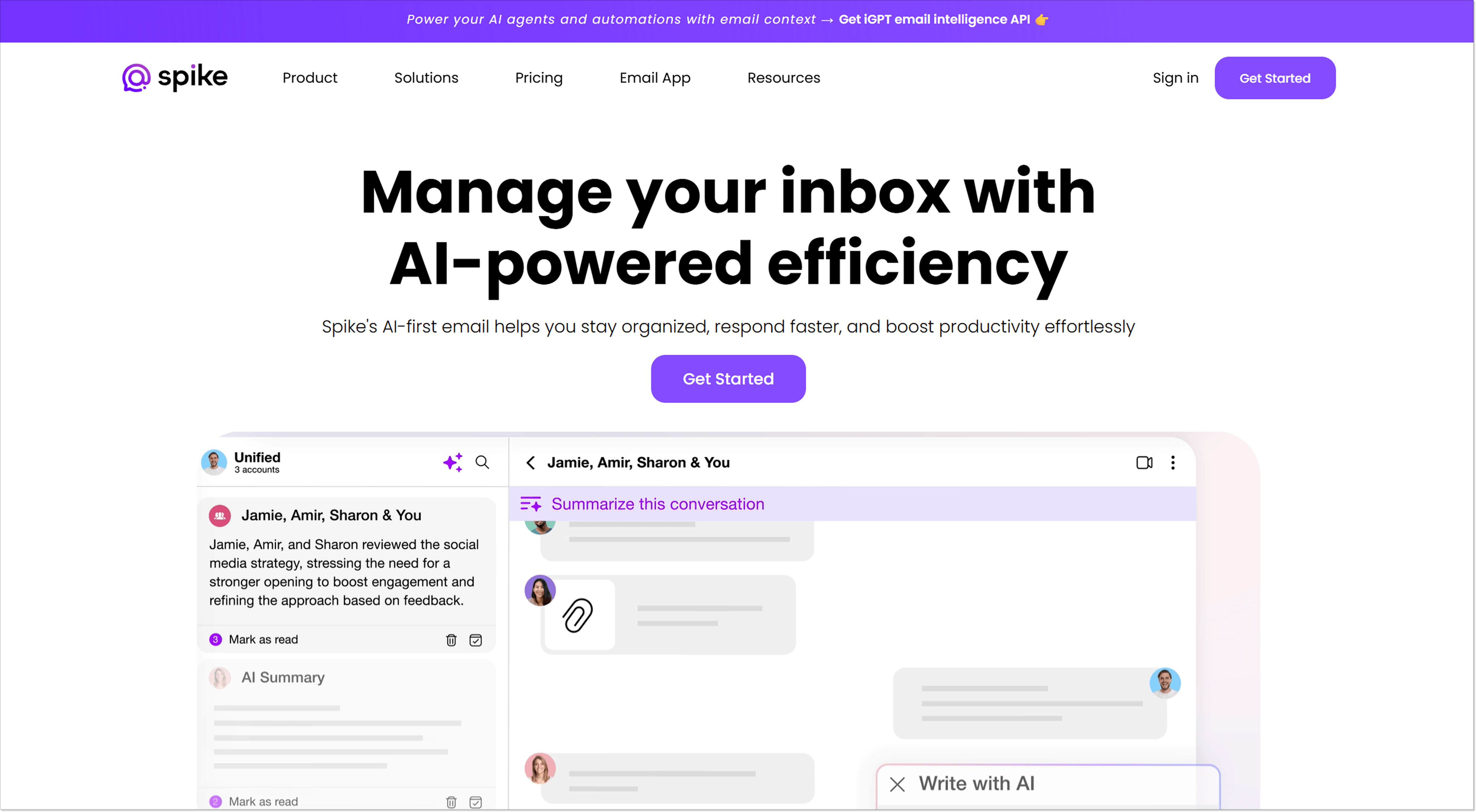
Spike takes a different approach to the shared inbox experience by combining email, team chat, and collaboration tools into a single, unified workspace.
Instead of treating emails as tickets, Spike transforms them into natural, chat-like conversations that are easier to follow and faster to manage.
Key features:
- Multiple team members can access and respond to customer emails simultaneously.
- Assigning conversations to specific teammates.
- Status labels to track progress.
- The conversational interface eliminates cluttered threads and repetitive signatures.
- Built-in collaboration features like notes, tasks, and video calls to resolve issues without jumping between apps.
- Integration with your existing email accounts (Gmail, Outlook, and more), your customers don’t have to use Spike.
Best for: teams who want email, chat, and collaboration in one place.
Reviews: 4.6 / 5 ⭐⭐⭐⭐⭐ (based on 262 G2 reviews)
Spike improved workflow between our teams and clients since they had a collaborative workspace. The entire project history & needed files in one place.
Pricing:
Shared inbox functionality is available on the Team plan starting at $8/mo/user, which includes a unified inbox for up to 3 email addresses, AI-powered tools, and collaborative features.
8. NapoleonCat
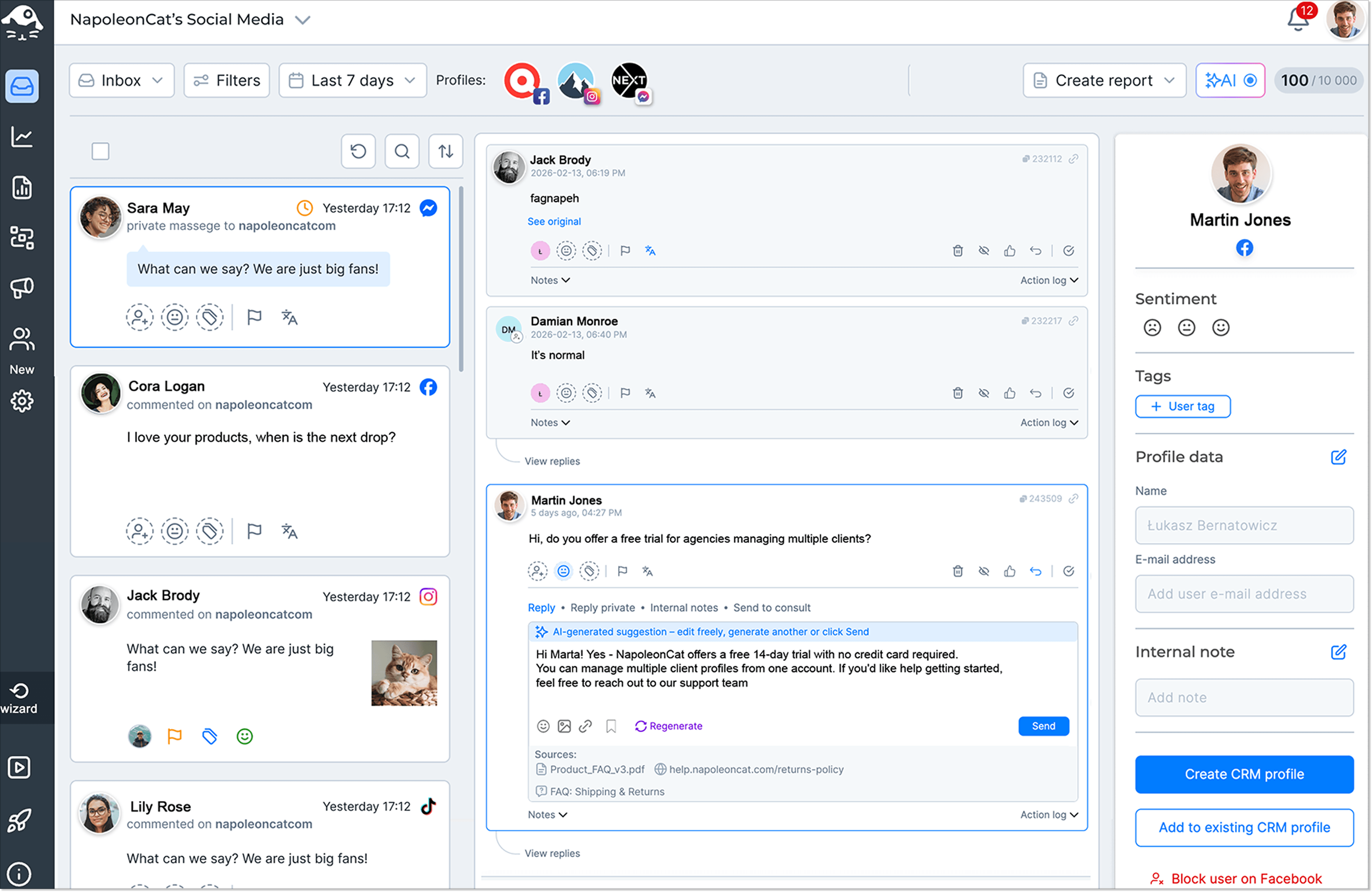
NapoleonCat approaches the shared inbox from a different angle: instead of email, it unifies everything happening on your social media.
Comments, DMs, reviews, mentions, and comments under Facebook, Instagram, and TikTok ads all land in one Social Inbox, so your team can manage all those conversations from a single view instead of jumping between native apps.
Key features:
- AI-powered auto-moderation that hides or deletes spam comments and hate speech.
- AI-powered, on-brand auto-replies.
- Assignments, internal notes, and workspaces for team collaboration.
- Saved replies and automatic translation for 100+ languages.
- Social CRM with full interaction history for every contact.
- Team performance reports with response rates and times.
Best for: It’s a strong fit for support and community teams whose ticket volume comes mostly from social media rather than email – especially brands running ads at scale, where spam and hateful comments can pile up faster than any team can moderate manually.
Reviews: 4.7 / 5 ⭐⭐⭐⭐⭐ (based on 148 reviews on G2)
What I like most about NapoleonCat is how it centralizes all social interactions in one unified inbox, making moderation, customer care, and team collaboration efficient.
Pricing:
The Social Inbox is available on the ‘Pro’ plan starting at $89/mo (2 users and 5 social profiles included), with Auto-moderation and AI tools on the ‘Expert’ plan from $119/mo. A 14-day free trial requires no credit card.
9. Freshdesk
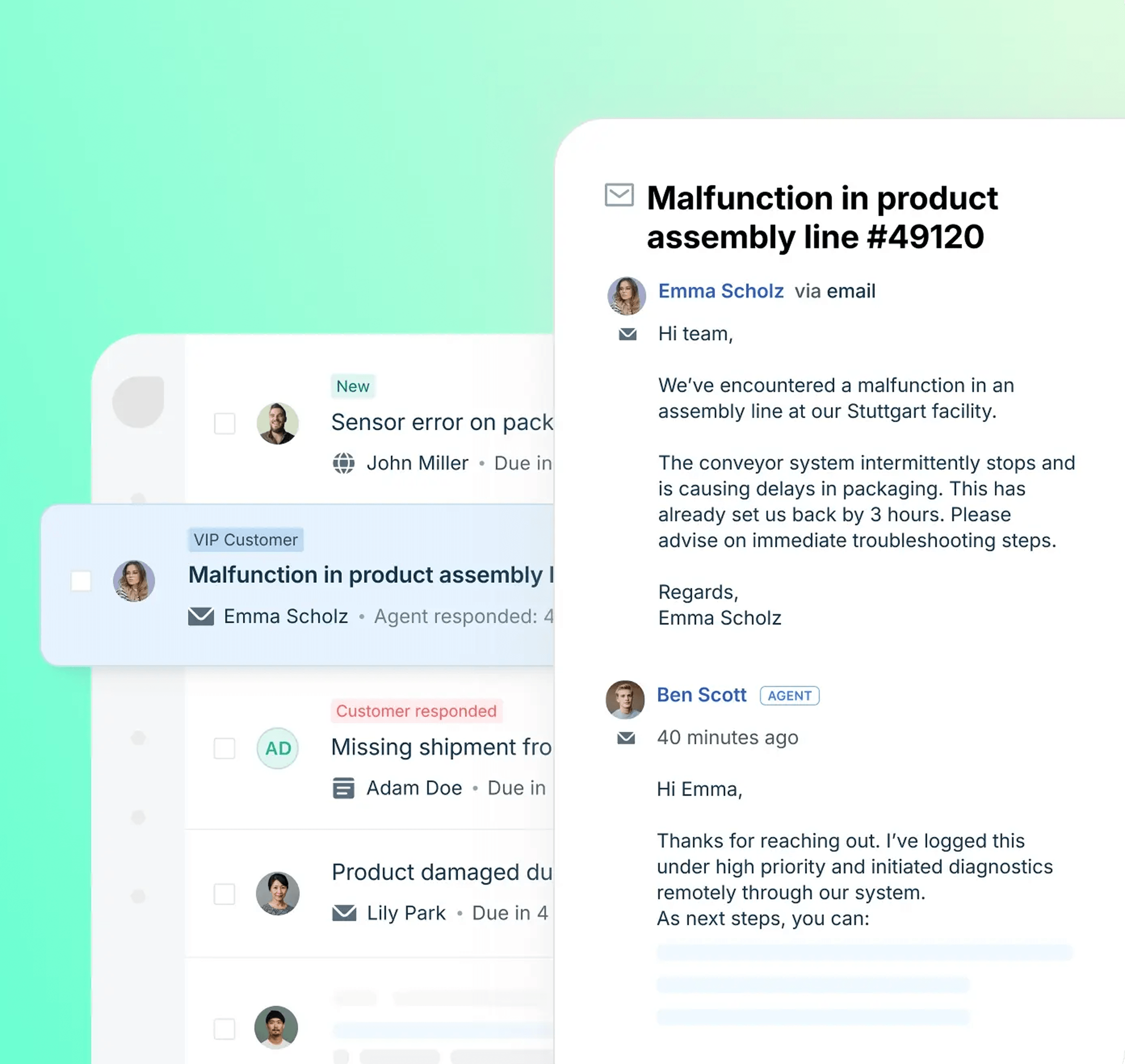
Freshdesk is a shared inbox platform that takes AI seriously and encourages teams to implement AI into their shared inbox workflow.
The shared inbox in Freshdesk holds the name of Command Center, where you see all the incoming messages, customer information, and the AI recommendations.
Key features:
- Unified inbox with ticket organization, prioritization, and collaboration for agents.
- AI Copilot and AI Insights to evaluate the customer’s sentiment and get ready-made answers from the knowledge base.
- Omnichannel support with email, WhatsApp, and social media.
- Channel-specific, complex SLA-based rules for routing.
Best for: teams looking for a high level of automation and AI assistance.
Reviews: 4.4 / 5 ⭐⭐⭐⭐ (based on 3,750 reviews on G2)
Freshdesk has a user-friendly interface and an efficient ticket management system. It helps support teams organise customer queries, prioritise issues, and track resolution in one place. I also appreciate its automation feature, knowledge base integration, and multi-channel support, which improve productivity and enhance the overall customer experience.
Pricing: Plans for customer service start at $23/agent per month for shared inbox and ticketing. AI features are included in the Pro plan for $66/agent.
10. Helpwise
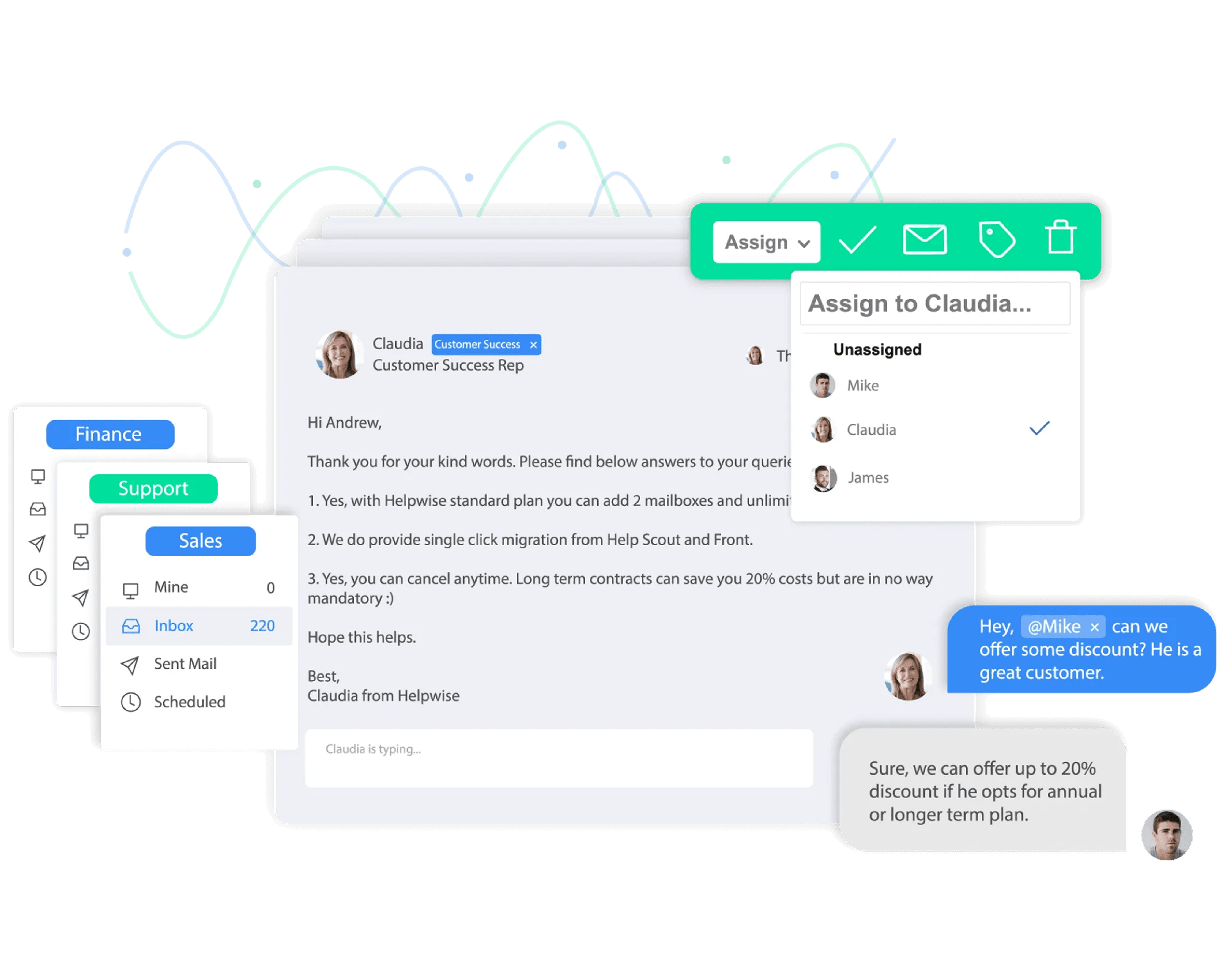
Helpwise is among the easier-to-use Freshdesk competitors. This easy-to-set-up shared inbox that doesn’t offer anything out of the ordinary or require much effort to get started. The main purpose of this customer service platform is to foster collaboration between team members, which it does well.
Key features:
- Team member mentions and notes.
- Assigning messages to team members.
- Sharing drafts to work on a message together.
- Collision detection.
- Automation rules for assigning, tagging, and closing conversations.
- Chats for team members.
- Slack, Microsoft Teams, and Basecamp integrations.
Best for: Teams needing a clear, easy-to-use shared inbox without AI.
Reviews: 4.6 / 5 ⭐⭐⭐⭐⭐ (based on 181 reviews on G2)
Helpwise is quite efficient for our team, the colorful tags allows to be organized, and the internal notes/discusions allows my team to collaborate on the tickets. We use both the inbox and chat support features every day and are generally quite satisfied with the tool.
Pricing: $15/user/month for a minimum 2 and maximum 10 users. Includes 3 shared inboxes and 15 saved replies. To get automation rules, you would need to pay $29/user/month.
No matter which customer service you pick, there are some tips and tricks that will help you manage all those incoming requests more effectively.
Use a knowledge base
Most likely, your customer service team gets similar questions multiple times, like pricing, return policy, or tech issues. Why not write down all the useful information, add visuals, like screenshots, and let that organized knowledge work for the agents and customers?
Agents can look up any question and simply copy the information or even use the article for saved replies or AI answers. And the customers can find the answer without even reaching out to customer support. Many shared inbox platforms, like HelpCrunch, include a knowledge base feature.
Set clear goals for agents
You can’t move forward without knowing where you’re going. That’s why it’s important to track your support team’s performance using metrics like first response time, resolution time, customer satisfaction (CSAT), and ticket volume.
69% of agents report difficulty balancing speed and quality. Not having clear goals and priorities is a part of it. Once you know where you stand, you can set realistic goals that gradually improve your team’s performance and raise the overall quality of your customer service. You can check the metrics in the analytics dashboard in many of the tools mentioned above.
Rely on automation and AI features
Your agents don’t have to handle everything on their own, especially repetitive and time-consuming tasks. AI-powered translation and message paraphrasing help make replies clearer and more natural. AI agents can fully take over routine customer questions. Automation significantly improves both response and resolution times without overwhelming your team.
Define roles and responsibilities for better collaboration
No matter how talented your customer support agents are, they shouldn’t be jacks of all trades juggling every type of request. This can quickly create chaos and lower the overall quality of customer service.
Many shared inbox tools include assignment rules and tagging, so why not use them? One agent can handle premium subscribers, while another can specialize in pricing questions or technical issues. This reduces the load on individual agents and creates a clear structure that leads to faster, more accurate responses.
Conclusion
The perfect shared inbox for your business lies somewhere between clients’ preferences and your team’s wishes. Support agents should have all the necessary inbox software tools to mitigate distractions and collaborate on tickets as fast as possible to provide an excellent customer experience.
If you’re more accustomed to answering emails from your Gmail account, then Hiver would be a smooth transition towards more organized processes.
HelpCrunch, Front, and Help Scout are modern shared inbox tools with a vast choice of support features and additional channels. Choosing one of them would mean you could easily scale any process in the future.
Either way, you should try a shared inbox to see if it will improve your team’s productivity. Sign up for HelpCrunch today and try its features for 14 days for free.
FAQ
Can shared inbox software work with Gmail or Outlook?
Yes, most shared inbox platforms integrate with Gmail and Outlook. Some tools, like Hiver, work directly inside Gmail, while others, such as HelpCrunch, Front, and Help Scout, connect to your mailbox while having their own interface.
Does a shared inbox software need a ticketing system?
Not always. If your team mainly handles customer emails and chats, a shared inbox with conversation assignments, collision detection, and automation may be all you need. However, as your support volume grows, ticketing features become more valuable.
What are the must-have features for a shared inbox platform?
At a minimum, a shared inbox should include collaboration features like internal notes and conversation assignments, automation for repetitive tasks, analytics to measure team performance, and integrations with your existing tools. If you handle a high volume of support requests, AI capabilities and omnichannel support are also worth considering.