Intercom Pricing Explained: All the Hidden Fees
Intercom pricing is super confusing, so we show it in all its glory 😏
Written by Mariia Yuskevych

Intercom pricing shouldn’t be this confusing.
I’m sorry, but this is true. If you think you just pick a plan and the number there is exactly what your monthly bill will look like…well, you’re in for a surprise.
Currently, Intercom goes with a multi-layered pricing structure, combining a per-seat monthly fee, usage-based add-on fees, and per-outcome payments for the Fin AI Agent.
Once you try to figure out how much it will actually cost your customer support team, things get messy rather quickly.
Of course, no one will argue that Intercom helpdesk is a robust tool that offers great value. But at what cost (I refer here both to the price and mental overload from all the calculations you are to make)?
Considering that Fin the company (formerly Intercom) was acquired by Salesforce, there is even more uncertainty around pricing models that will be implemented and the company’s future development. So, is all that cost and complexity actually worth it?
What’s more, there are other customer support tools out there that offer similar core features with simpler pricing, fewer surprises, and much less mental overhead.
Take HelpCrunch: pricing plans that start from only $15/mo per team member. Plus, you can get a plan with 5 AI Agents for just $25/mo per team member. You’ll get a predictable, clear receipt with the possibility to get extra AI conversations at a fixed price. Just sign up for a 14-day free trial to test before you commit.
Anyhow, are you ready to crack that murky secret called Intercom pricing?
What is Intercom today?
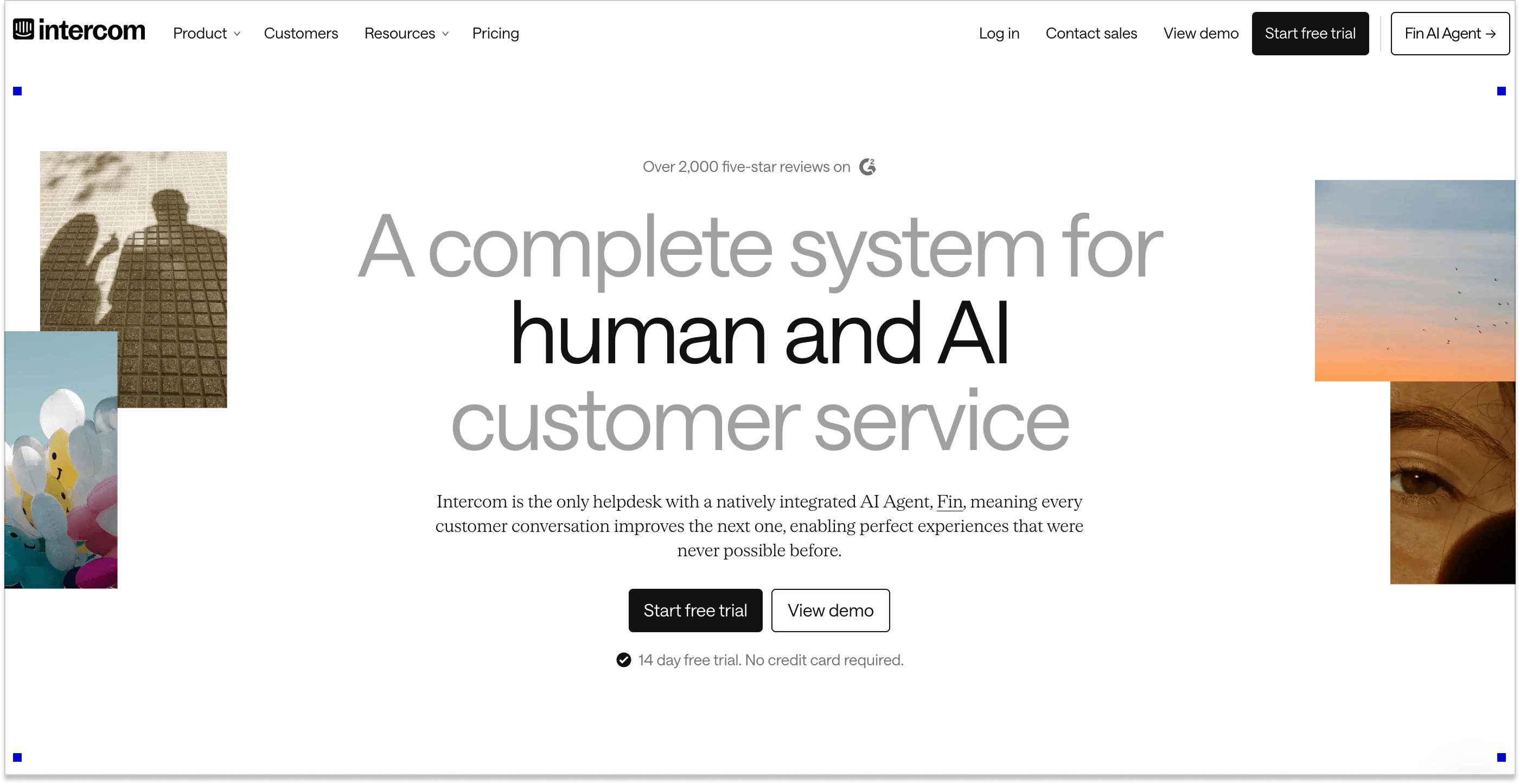
Today, the company goes by Fin, having rebranded from Intercom, and presents its Fin AI Agent as the first point of contact, handling customer questions and actions, while Intercom helpdesk supports agents with AI-powered workflows for more complex cases.
Sure thing, the company still offers a live chat feature, noting that you can customize it how you see fit: enhance it with different AI chatbots, apps, knowledge base articles, etc.
Plus, now, live chat is by default enhanced by an AI assistant, Intercom’s very own Copilot, which assists support agents in real time right inside the chat.
Intercom helpdesk offers a great number of other key features as well:
- Help desk software (Team Inbox)
- Basic CRM
- Email marketing (Outbound Messaging combined with multi-channel Campaigns)
- Knowledge hub (Help Center Articles)
- Product tours
- Bots
- Banners
Let’s now see what the cost of such all-inclusive AI-powered customer support by Intercom is.
Fin (formerly Intercom) acquired by Salesforce: What happens next?
If Intercom helpdesk’s feature list looks tempting and you’re ready to sign up, hold your horses. Intercom is undergoing big changes, and that’s something you definitely need to be aware of.
Fin (formerly Intercom) was acquired by Salesforce in September 2026 and has become a part of Salesforce’s AI agent suite. Salesforce positions Fin AI Agent alongside Agentforce, which is designed for enterprise companies that need deeper customization. Fin, on the other hand, is created to get up and running faster on the systems you already use, which makes it a better fit for smaller and mid-market businesses. That means two things.
First, there’s the question of pricing. Will Fin keep its current model, or will Salesforce eventually bring it closer to its own pricing structure? For example, Salesforce charges $2 per Help Agent resolution. So, if Fin AI Agent eventually moves to Salesforce’s pricing model, the $0.99 per outcome Fin fees might be nowhere to be seen.
That being said, for now, though, Salesforce hasn’t announced that Fin will move to Agentforce pricing. Fin may end up cheaper than Salesforce’s current Agentforce offering, especially if Salesforce wants to keep it accessible to smaller and mid-market businesses, as they state. But cheaper Agentforce doesn’t necessarily mean the same Fin pricing Intercom customers are used to today.
Salesforce’s acquisition history is worth keeping in mind. Slack remained a separate product after the acquisition, but its first price increase came about a year later, and Salesforce has since brought it increasingly into its broader AI and Agentforce strategy.
Second, there’s a question about what happens to the standalone product. Salesforce has already positioned Fin within its Agentforce portfolio, so it’s reasonable to ask how long the standalone Intercom helpdesk experience will remain a priority. After all, how will Salesforce balance Fin with its broader Service Cloud and Agentforce offering?
Look at Drift, once a major player in customer engagement. Back in the day, Intercom and Drift were two of the big names in customer messaging. After Salesloft acquired it in 2024, the product gradually became less of a standalone priority, and Salesloft now plans to gradually sunset the Drift product and refers existing customers to 1mind as its successor.
That leaves existing SMB customers with a lot of uncertainty. Many choose Intercom because they wanted a relatively straightforward customer support platform, not a large Salesforce implementation. Even if Fin AI Agent remains available at a lower price than the wider Agentforce stack, the question is how much of that simplicity will remain and what pricing model awaits you.
Let’s now circle back to how things will be for at least the next couple of months and what the cost of such all-inclusive AI-powered customer support by Intercom currently is.
Intercom prices overview
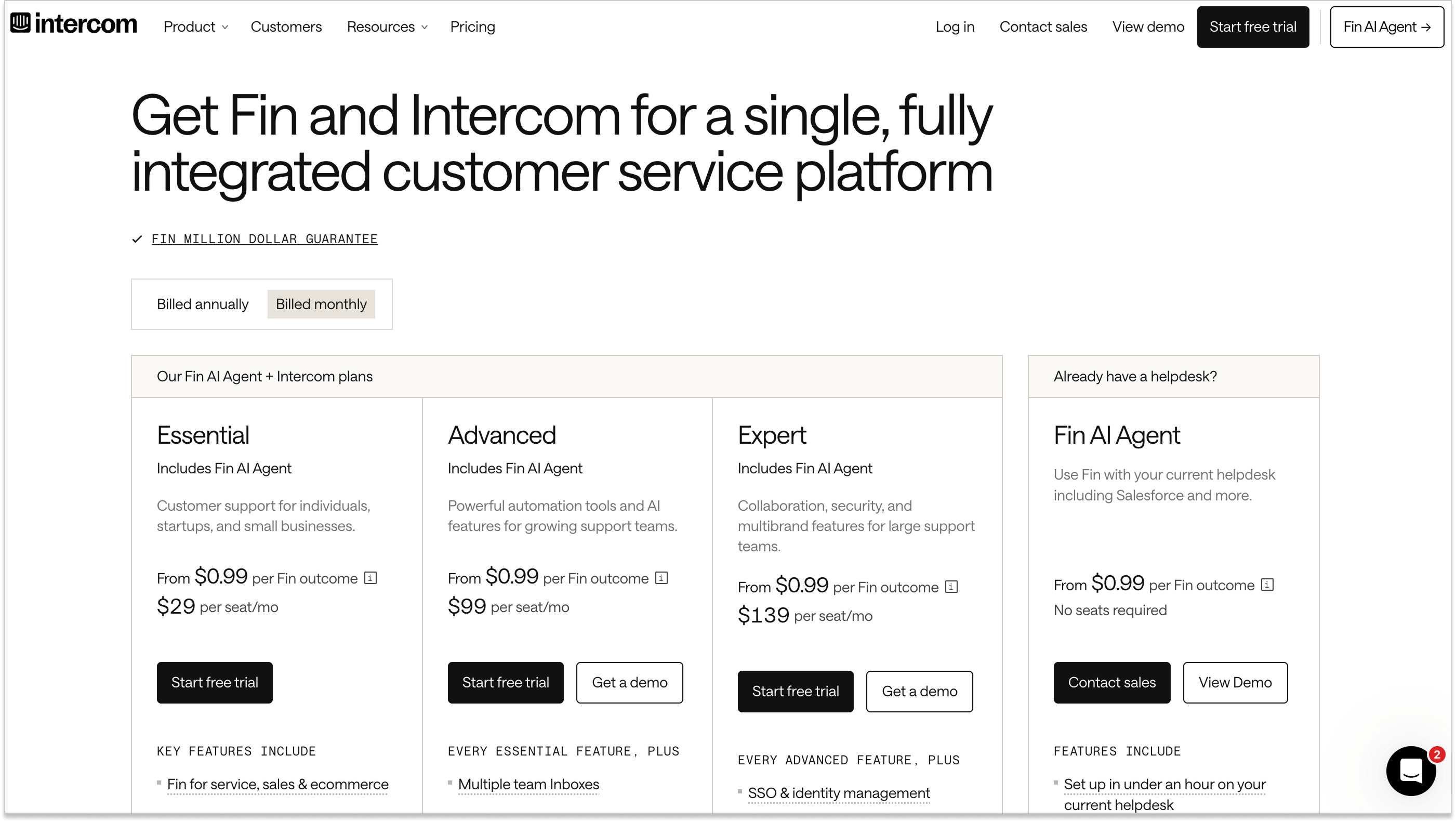
Currently, the Intercom customer service platform offers three main pricing packages:
- Essential—$29/month per seat
- Advanced—$99/mo per seat
- Expert—$139/mo per seat.
Plus, you can opt for using the Fin AI Agent only with your existing helpdesk. The Fin AI Agent pricing is $0.99 per outcome (the queries Fin resolves) or $9.99 for prospect qualification. Yes, things are already starting to get fun.
As I said, you should be cautious since these are not the final numbers you’ll see in your invoices.
So, why exactly are Intercom fees so complicated and unpredictable? Well, you can’t just choose a subscription plan with all the features you need and pay for it.
Remember that you will pay additional costs for every agent seat, almost every channel usage, and the number of Fin AI Agent outcomes. This complicates their pricing — you can’t predict your business growth and shouldn’t be “punished” for it.

Why is Intercom so expensive, you will ask? Let’s dive a little deeper and see.
Intercom pricing plans explained
Time to actually ask the question: how much does Intercom cost? Long story short: you pay for a subscription plan you choose, either monthly or yearly.
There are three plans to choose from:
The Essential plan
This plan costs $29/mo for every seat (billed monthly). It’s perfect for small customer support teams and ideal for using Fin AI Agent (I want to remind you that even though Fin service is included in every plan, you pay for it separately based on the number of outcomes).
As per its name, the Essential plan covers the essentials:
- Messenger
- Shared inbox
- Ticketing system
- Pre-built reports
- Public help center
- Simple automations
- Fin AI Agent
- AI Compose in Inbox
- Slack integration for team workflows
Plus, all plans include unlimited live chat (so Intercom chat pricing is included in the plan), support email, in-app chats, banners, and tooltips.
Think of Essential as a pizza base: everything else costs extra. Usage across channels is charged separately, and once you start relying on Fin AI outcomes or channel outreach more actively, the costs can grow quickly.
The Advanced plan
The Advanced plan costs $99/mo for every seat (billed monthly). It is built for growing customer support teams that have outgrown the basics and want more automation and structure.
Of course, it still includes Intercom Fin AI Agent, but now with additional tools to help with everyday support work and customer engagement.
On top of everything in Essential, you get:
- Multiple team inboxes to organize conversations by team or function
- Facebook and Instagram channels
- A workflow automation builder
- Round-robin assignment
- A private and multilingual help center
- 20 free Lite seats for teammates who need limited access
This is where Intercom starts to feel more “enterprise-ready.”
What’s more, in Intercom’s pricing model, each teammate who uses the platform needs a seat. All plans include full agent seats, while Advanced and Expert also come with lite seats for teammates who need limited access. The Advanced plan includes 20 lite seats.
Lite seats are useful for roles like managers, product owners, or occasional contributors who need visibility into conversations but don’t actively handle support tickets.
The Expert plan
The Expert plan costs $139/mo per seat and is designed for large support teams that need advanced collaboration, stronger security, and support for multiple brands.
It includes Fin AI Agent and everything from the Advanced plan, with extra features aimed at enterprise-scale operations.
In addition to all Essential and Advanced features, you get:
- SSO and identity management
- HIPAA support for compliance-heavy businesses
- Service level agreements (SLAs)
- Multibrand Messenger and Help Center to support multiple products from one workspace
- 50 free Lite seats for teammates with limited access
This plan targets complex organizations with high support demands.
You can use the pricing calculator on Intercom’s website to predict an approximate cost.
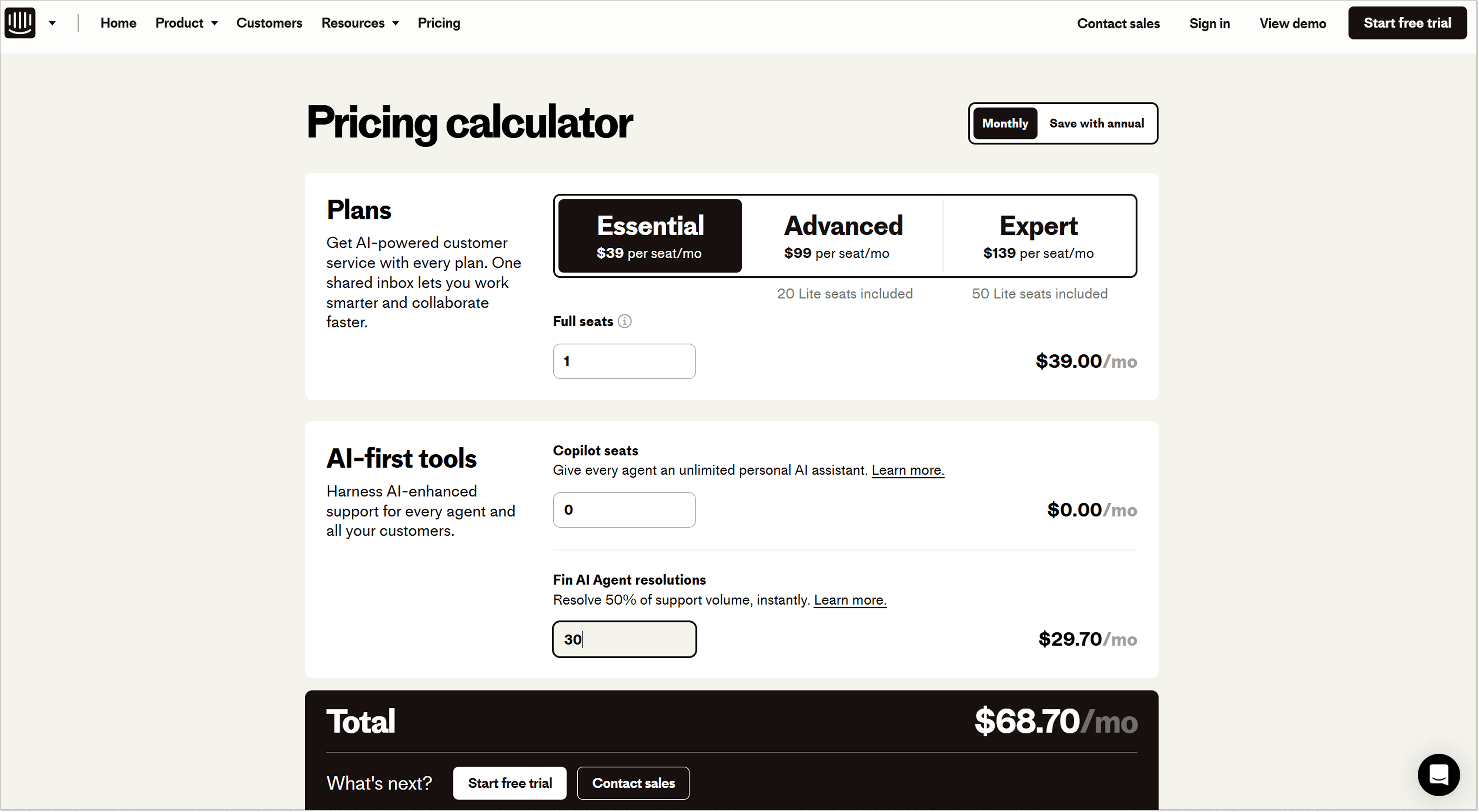
Usage-based fees: Fin AI Agent, WhatsApp messages, and other channels
Intercom’s pricing doesn’t stop at the base subscription. While every plan includes unlimited live chat, inbound email, in-app messages, banners, and tooltips, many of the most commonly used channels are billed separately.
In practice, this means you’ll start paying extra once you actively use features like the Fin AI Agent, WhatsApp, SMS, phone calls, or outbound messaging. And the more these channels are used, the faster usage-based fees begin to stack up.
To be more precise, here are the channels that require an additional usage-based payment:
- SMS
- Bulk emails
- Bulk WhatsApp messages
- Phone calls
- Messages (Posts, Product Tours, Mobile Push, Mobile Carousels, and Surveys).
Now, buckle up because we are going on a roller coaster of Intercom’s usage-based charges, or hidden costs, as one might call them. Spoiler: it can get pretty complicated.
I won’t bore you with breaking down every single channel’s spending tiers (yes, you read this right, there are multiple tiers for many channels).
In short, the more you use a channel, the lower the cost per unit becomes. The monthly bill is calculated by combining usage across multiple tiers.
Plus, some channels, such as SMS and phone calls, have different rates depending on the region.
As a result, predicting channel cost, like Intercom WhatsApp pricing, can quickly become tricky, especially when usage grows across several channels at once. Yes, you do need a spreadsheet, a calculator, and a strong coffee to at least approximate what awaits your budget this month. Or embrace the surprise.
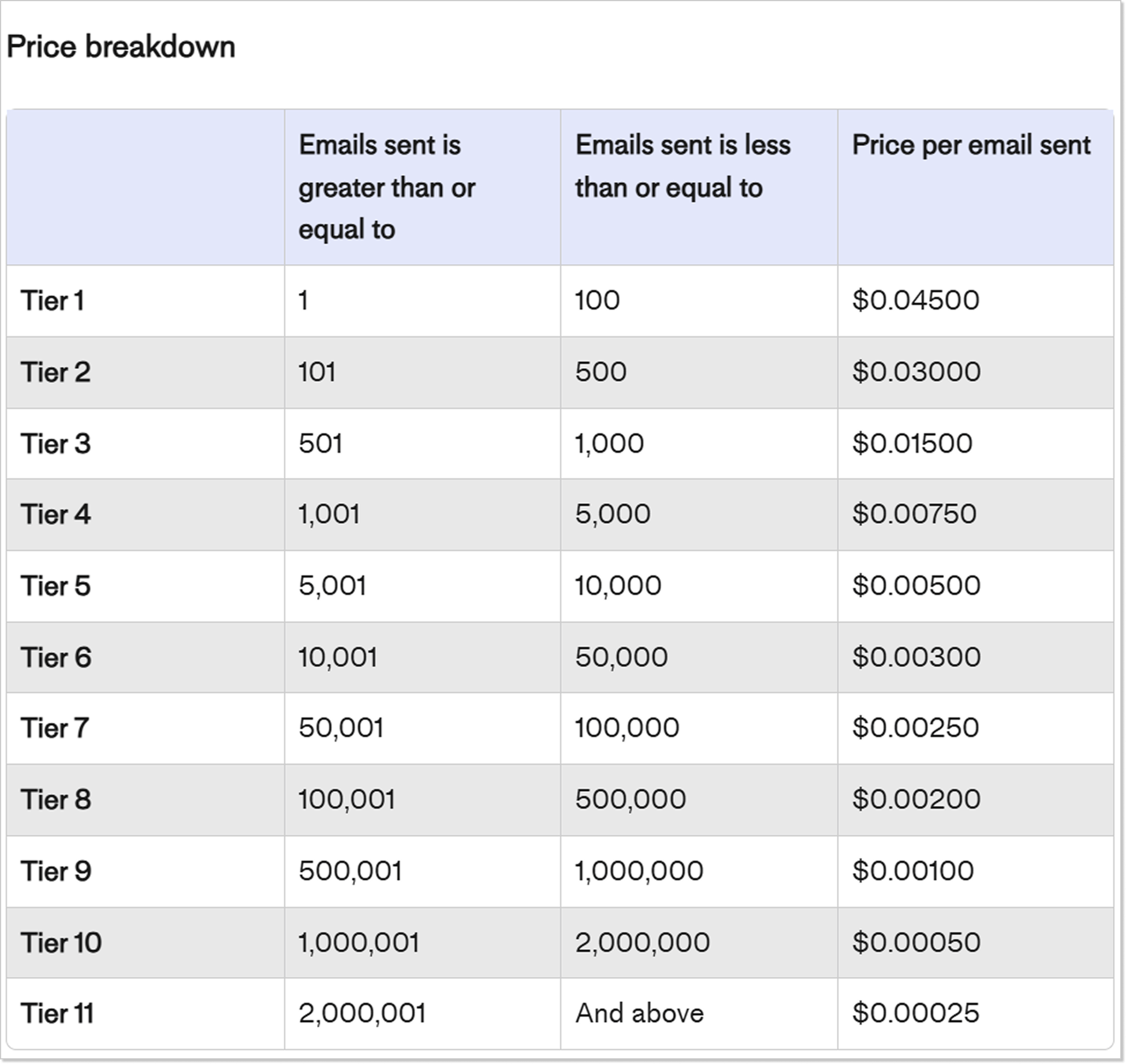
What’s more, let’s remember that Fin AI Agent pricing is $0.99 for each outcome. There are specific rules that determine whether a conversation counts as a successful Fin AI outcome. These include situations where a user no longer asks for assistance, marks an answer as helpful, or even fails to meet the qualification criteria you’ve set. What’s more, if a lead does qualify, you have to pay not $0,99 but a whole $9,99!
Plus, you will pay $0.99 every time Fin AI Agent successfully performs a procedure that you set up as a handoff to a human agent or leads customers to a self-service action, like trial sign up. You also need to get a minimum of 50 outcomes per month.
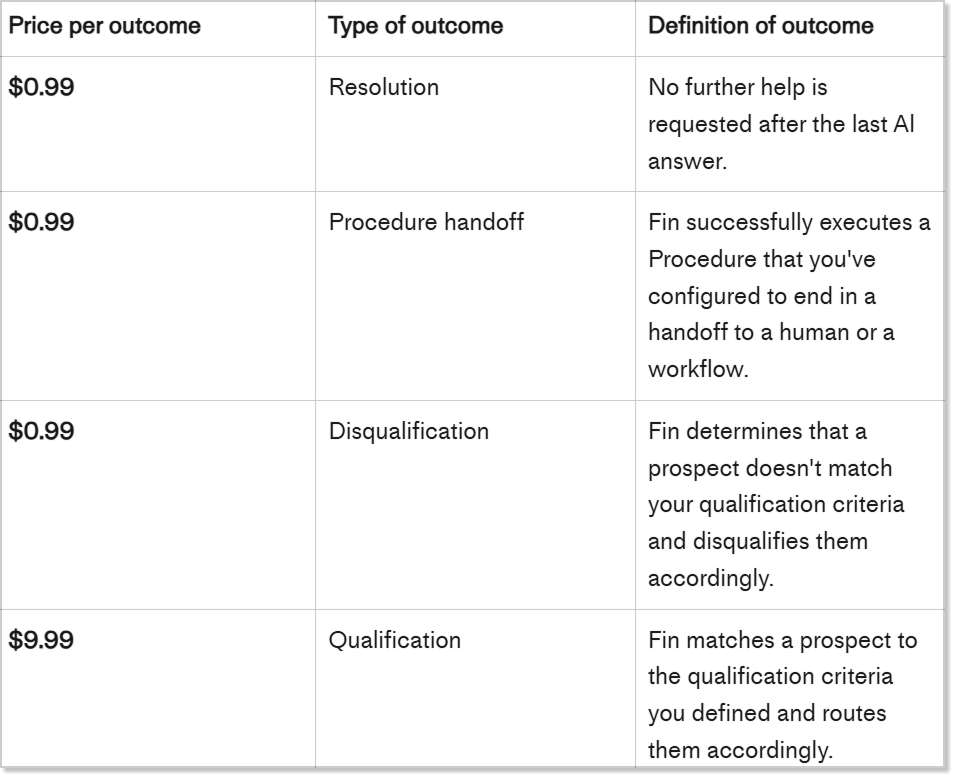
So, if you are planning to use it or any other usage-based tools, expect your final bill to be (a bit) higher than just the chosen plan rate.
Add-ons: Intercom Product Tours pricing and other options
Did you get tired yet? Hold on, that’s not all the complexities of Intercom support pricing.
If you want to use Intercom to the fullest, you will need to pay separately for add-ons.
At the moment, there are three add-ons:
- Proactive Support Plus
- Copilot
- Pro
Proactive Support Plus
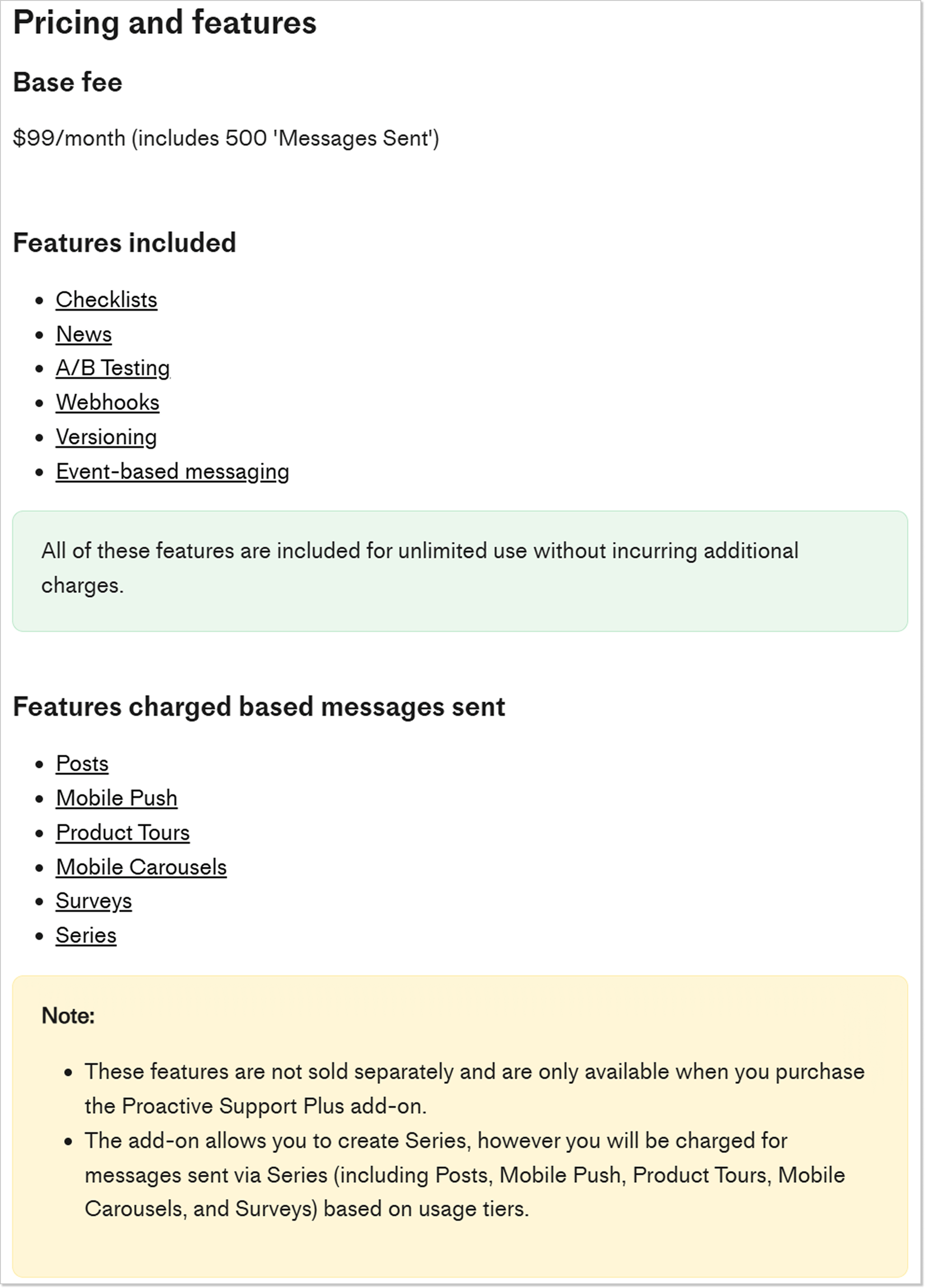
Proactive Support Plus is an add-on package and includes a bunch of extra features like News, Checklists, Product Tours, Posts, Mobile carousels, Surveys, and others.
It will cost your budget an additional $99/month for a minimum of 500 messages sent/mo.
With this add-on, there’s a base monthly cost, and some channels will add usage-based fees on top.
For example, you need to pay both the flat add-on fee and the extra usage fee to send mobile pushes or show posts.
Copilot AI assistant
Copilot AI assistant is another add-on you can purchase. It comes with limited usage per user by default in each plan (maximum 10 conversations per month), with an option to unlock unlimited access per seat as an add-on.
To have more conversations per month, you can sign up for unlimited Copilot usage. That will take $35 per seat per month out of your pocket.
Pro
One more recent addition to Intercom’s add-on list is Pro. It’s something like AI analytics for your conversations.
Pro add-on includes:
- AI Topics for conversation topic assignment and model training based on recent history
- CX Score assigned to conversations
- Recommendations based on Topics and resolved conversations
- Trends that detect changes overtime
Pro add-on costs $99 per month for up to 1,000 conversations. Everything above this number is charged per conversation plus extra tier payment. For example, if your conversation volume is more than 5,000, you will pay $579 plus $0.10 per conversation.
So, how do you feel after reading this? I dare you to calculate that monthly invoice for Intercom. It’s quite a task!
Intercom billing example
With Intercom, the price range can go over $1000. The Pro and Premium versions come with a set of prices for the subscription, agent seats, and add-ons. These prices can vary according to one’s requirements. It is common to find people paying anywhere between $500 and $1000 for Intercom’s incredible features. — Brian Hardesty with On Display Signs
So, how much is Intercom going to charge your business?
It will be easier to understand the Intercom final price if we look at an example.
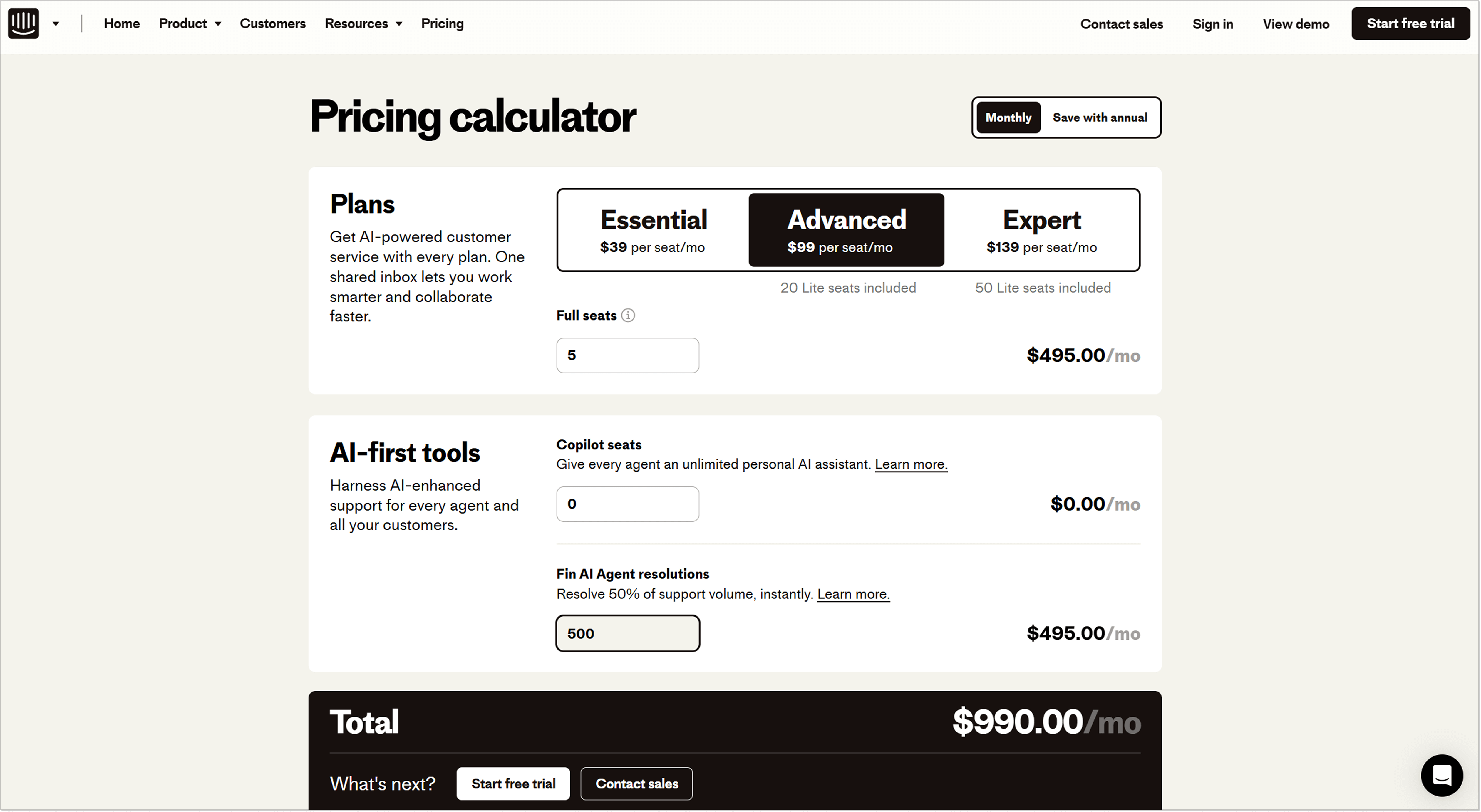
Imagine a growing SaaS company that chooses the Advanced plan. The team has five support agents, all using full seats. With a seat price of $99 per month, the base cost for seats alone comes to $495/month.
Since Intercom is now clearly AI-first, the company also uses Fin AI Agent to handle customer questions. Let’s say Fin resolves 500 conversations per month. At $0.99 per Fin outcome, that adds $495/month on top of the seat cost.
Apart from the support, the team sends some outbound messages, around 500 outreach emails per month. It adds roughly $16/month.
When you put it all together, the monthly bill looks like this:
- Seats: $495
- Fin AI outcomes: $495
- Outreach emails: ~$16
That brings the total to around $1006 per month.
And this is still a relatively simple setup: no phone support, no SMS, no WhatsApp outreach, and no heavy campaign usage. Yet the final price is already more than double the “per-seat” number you see at first glance. This is exactly where Intercom pricing starts to feel hard to predict, especially as usage grows across multiple channels at the same time.
Will Intercom help you save or overspend?
If you’re still wondering whether Intercom is worth splurging on, I’ve prepared a short reality-check list.
| Criteria | When Intercom makes sense ✅ | When Intercom is an expensive overkill ❌ |
|---|---|---|
| Communication channels | Your support team mainly sticks to website live chat and standard inbound emails. | You often conduct WhatsApp or SMS outreach campaigns. Intercom charges steep usage fees here. |
| Access control | Only customer service agents need access to the platform. | Devs, product managers, or founders need to log in. Intercom’s Essential plan has no free viewer seats, so you will have to upgrade to the Advanced plan for Lite seats. |
| Support volume | You have high and growing support volume where automation (Fin AI, Copilot) meaningfully reduces human workload. | You have low or inconsistent ticket volume. AI and automation features don’t reach enough usage to justify per-outcome and seat costs. |
| AI readiness | You have a comprehensive, updated knowledge base ready for Fin AI. | Your FAQs are messy or outdated. Fin AI relies heavily on your data. |
| Requirements | You plan to use Fin AI, Product Tours, advanced automation, and customer engagement features. | You only need a shared inbox, live chat, and a knowledge base. |
| Billing and budget | You have a highly flexible, enterprise-scale budget that can easily accommodate variable billing. | You need predictable monthly software costs. |
The verdict: If you want predictable software costs without hidden “AI taxes” and usage spikes, choose a transparent alternative like HelpCrunch.
Intercom alternatives: HelpCrunch for seamless support with transparent pricing
Just by looking at Intercom pricing, it’s pretty obvious that Intercom can be somewhat too expensive for many companies and startups.
Luckily, Intercom alternatives are not scarce, as hundreds of tools provide live chat, ticketing, knowledge base, and even chatbots either separately or in one package.
HelpCrunch is the closest when it comes to Intercom alternatives. It offers similar tools and features that Intercom does, including the AI agents:
- Live chat with the ability to send automated and targeted chat messages.
- AI-powered shared inbox with custom inboxes, real-time customer data, team collaboration features, etc.
- AI Agents that can automate up to 80% of queries.
- Chatbot with a no-code visual editor and bot templates that you can launch immediately.
- Integrated knowledge base with built-in SEO features, which is included in ALL pricing plans.
- Email marketing tools for automated trigger-based and manual campaigns.
- Popups for capturing more leads on your website.
HelpCrunch pricing options at a glance
HelpCrunch offers three pricing plans, with no unpredictable or hidden payments. You will know the final bill at the beginning of the month.
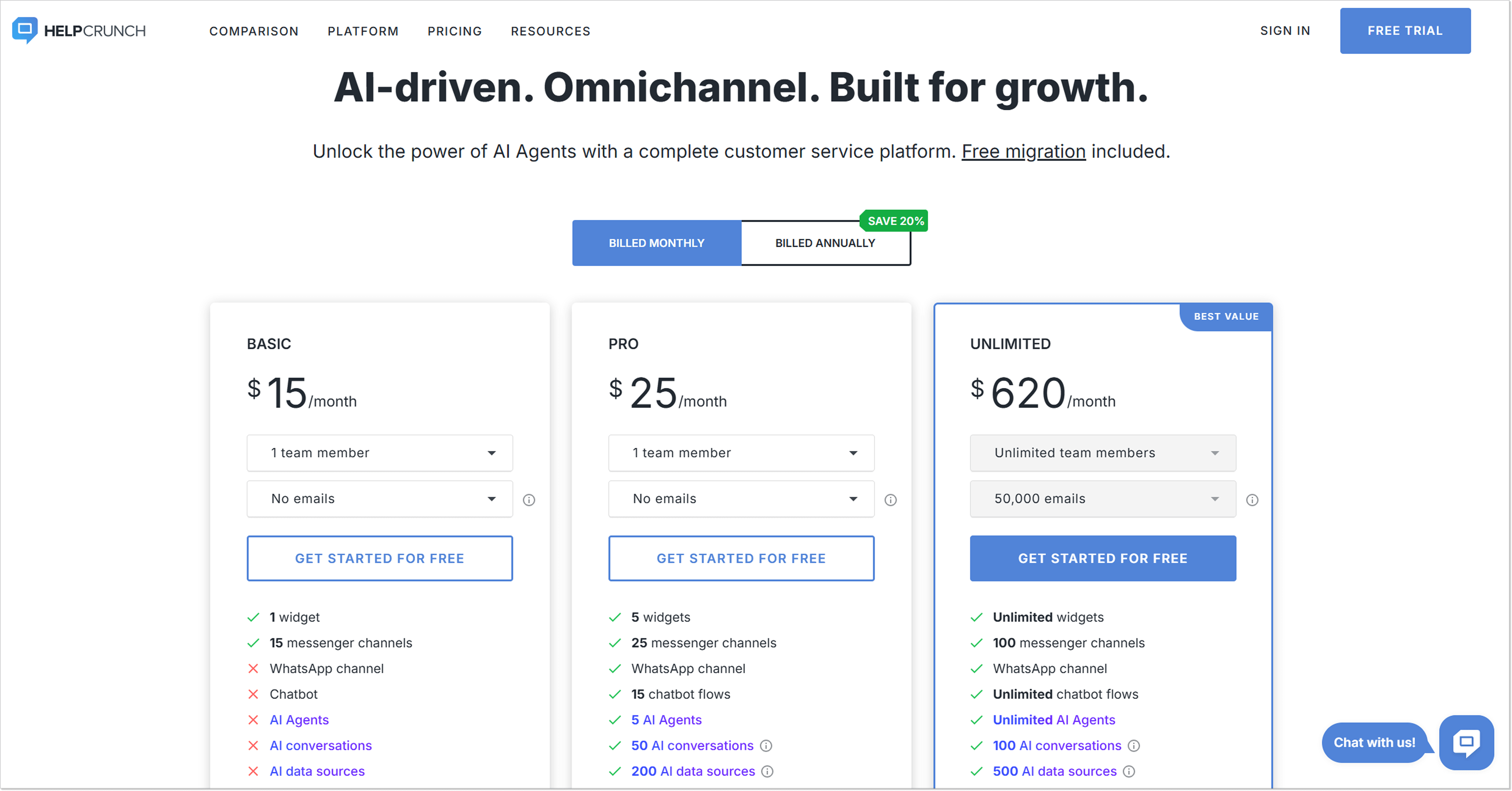
The Basic plan is just $15/mo/team member if billed monthly. You’ll get a live chat, a knowledge base, and an AI-powered shared inbox for this price. If you need email functionality, you can choose the limit (1,000, 5,000, etc.) ahead of time and know how much you will pay. That’s it, really.
If you’re looking for a premium all-in-one solution for your marketing, support, and sales team, it’s better to go with the Pro subscription, which costs $25/mo/team member if billed monthly.
Ten team members will cost only $250/mo in total. Now, the HelpCrunch vs Intercom comparison gets even more vivid: compare the prices to those $999999/mo (to eternity) for the latter.
This plan gives you access to 5 AI Agents and 50 AI conversations already included in the plan. How amazing is that? Say you need more AI Agent resolutions, you can get as many as 100 for $29.00 or 500 for $125.00. Now compare this to the staggering $99.00 for 100 and $495.00 for 500 for Fin AI! That’s way more than a few bucks saved for you, huh?
The Unlimited pricing plan costs $620/month (if billed monthly), and with it, you get the whole nine yards — unlimited team members, auto messages, popups, and chatbot flows, to name a few. Plus 50,000 emails and unlimited AI Agents included!
Bottom line: Is Intercom worth it for customer service?
Despite its complicated, unpredictable, and often impractical prices, Intercom can significantly help your business. But so can other similar customer service platforms, like HelpCrunch. The only difference is that with HelpCrunch, you know what you’re paying for upfront: your plan price plus clearly defined usage allowances, not a cent more. That is why, before rushing into anything with Intercom, just sign up for a 14-day free trial with HelpCrunch and try it.
FAQs
How does Intercom pricing work?
Intercom uses a subscription-based pricing model. The total cost depends on your chosen plan, the number of seats, and the add-ons you use. Core plans cover messaging and support features, while advanced capabilities like Fin AI Agent are priced separately or scale with usage.
Are there any additional charges in the Intercom cost?
Yes. In addition to the base subscription, Intercom applies usage-based charges. Costs can increase depending on how much you use certain features, such as Fin AI outcomes, outbound messages, or other activity-based tools.
Does Intercom offer discounts?
Yes, there is a special program for early-stage startups. In the first year, startups get a 93% discount and 300 Fin outcomes plus 15 Fin qualifications per month. The discount drops to 50% in year two with 150 free Fin outcomes and 15 qualifications, and to 25% in year three with 75 free outcomes and 15 qualifications included monthly.
Are there free plans for business in Intercom?
All the Intercom plans are paid. You can get a free trial for 14 days.