Zendesk Pricing: Full Breakdown + Hidden Costs (2026)
Zendesk pricing is super complicated with its plans and overpriced hidden features. We decided to figure it out once and for all.
Written by Kateryna Havrylenko

Verdict on Zendesk pricing: technically transparent, practically confusing, and almost always more expensive than it first appears.
What you see on the pricing page is the floor, not the ceiling. Most teams hit the real number only after adding AI tools, QA, and workforce management, which they can’t function without. So, the Suite Professional plan you signed up for, and the Suite Professional plan you end up paying for are rarely the same thing.
Currently, the market offers plenty of Zendesk alternatives with a cleaner, more intuitive interface, lower prices, and a bunch of additional features. For instance, the HelpCrunch pricing plans start from just $15/mo – shared inbox, knowledge base, live chat, and email marketing included. Easier to set up, easier to use, no add-on juggling required.
Zendesk pricing explained: the real costs
Look, I know what you’re thinking. “Just tell me how much Zendesk costs!” Well, buckle up, because Zendesk pricing is like an onion: lots of layers, and you might cry when you see the final bill.
Hope Zendesk has finally settled on their pricing structure, because honestly, it changes more often than a runway model changes outfits. Let me break this down for you in a way that actually makes sense.
Zendesk pricing plans
Here’s something Zendesk doesn’t always make crystal clear upfront. They have THREE completely different product lines:
- Zendesk for customer service = for supporting your external customers (the people who buy your products/services)
- Zendesk for employee service = for supporting your internal team (IT help desk, HR requests, facilities management)
- Contact center = for teams where phone support is the main event.
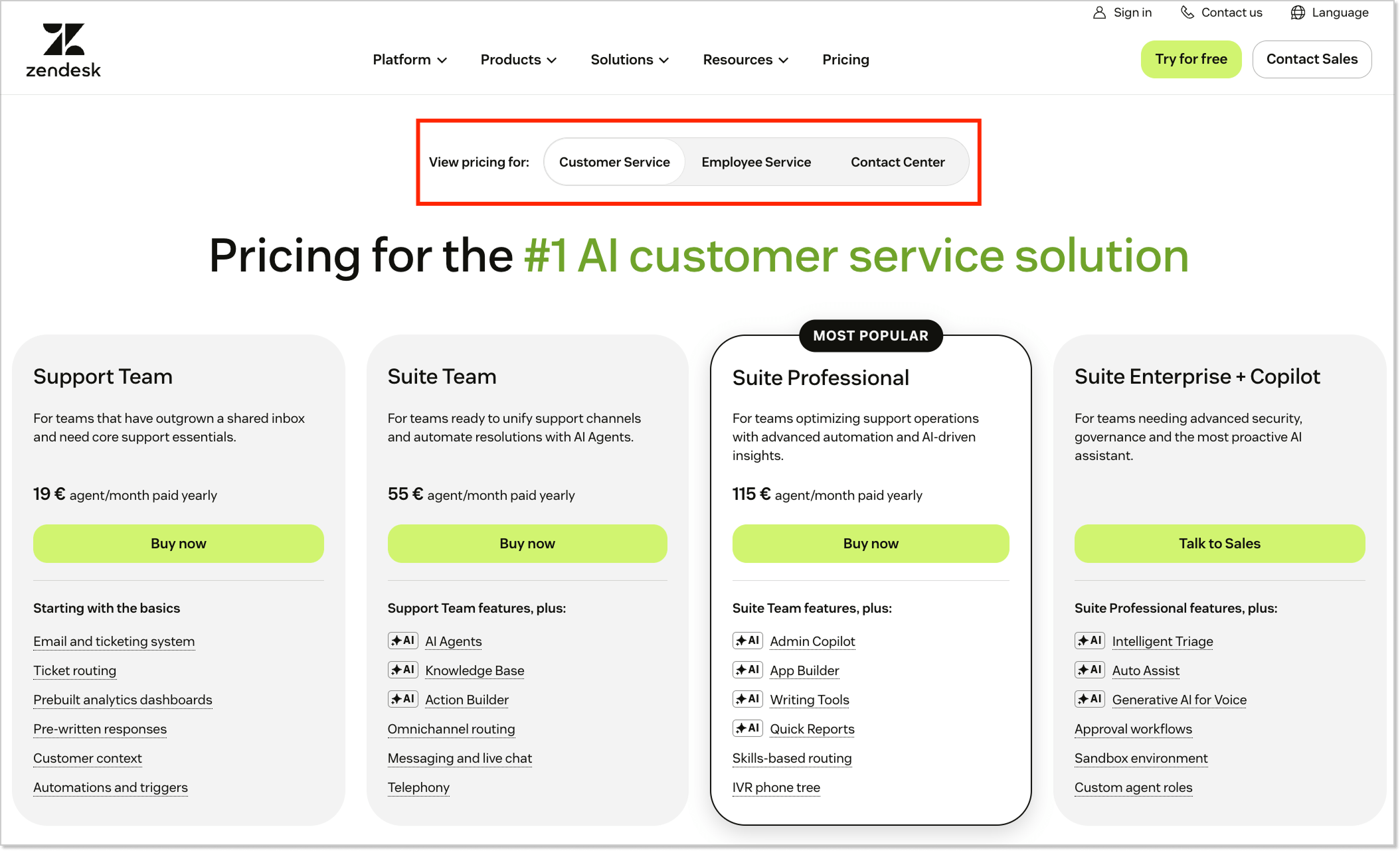
Critical detail: You CANNOT mix Customer Service and Employee Service in one instance. If you need both customer and employee support, you’ll need TWO separate Zendesk instances. Yeah, that means paying twice. Fun, right?
Now let’s dive into a detailed breakdown of each plan.
Zendesk Suite pricing plans: 2026 overview
This is the classic Zendesk you probably know – external-facing support for your customers.
| Plan | Annual | Monthly | Best for |
| Support Team | $19/agent/mo | $25/agent/mo | Small teams establishing multichannel support |
| Suite Team | $55/agent/mo | $69/agent/mo | Teams expanding with SLAs and self-service |
| Suite Professional | $115/agent/mo | $149/agent/mo | Mid-size ops with advanced routing and analytics |
| Suite Enterprise + Copilot | Contact sales | Contact sales (before $219/agent/mo) | Large enterprises with compliance needs |
Let’s look at what you actually get at each tier.
Support Team plan – $25/agent/month
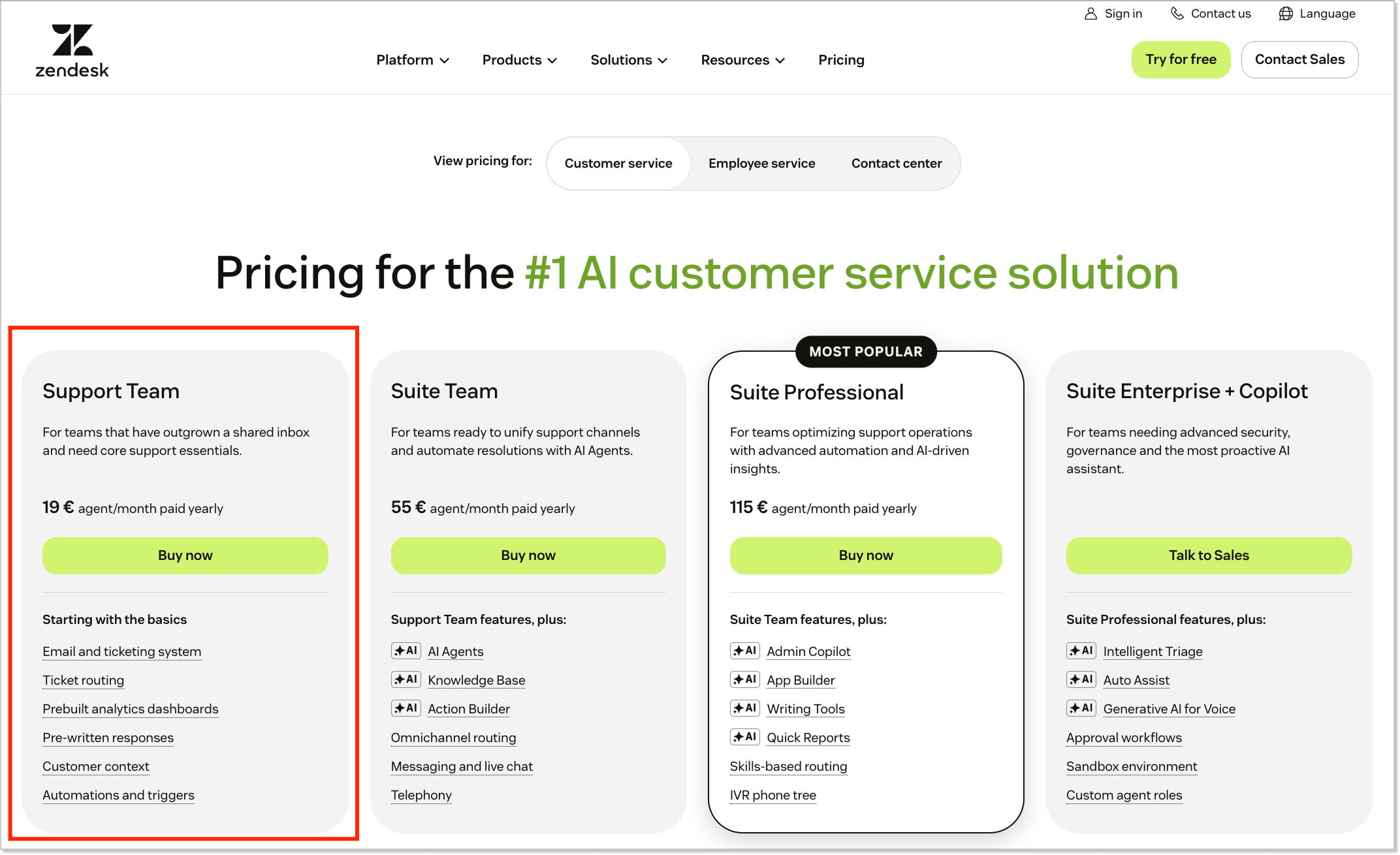
This is essentially a glorified email inbox. If you’re serious about customer support, you’ll outgrow the Support Team plan in about 3 months. Unless you’re a tiny startup that only does email support and has zero ambitions to expand, skip this.
What you get:
- Basic email ticketing system;
- Simple knowledge base;
- Reporting (very basic);
- Live chat (highly limited);
- Mobile app access.
What’s missing:
- No key features of live chat;
- No phone support;
- No messaging;
- No SLAs;
- No advanced AI.
Suite Team plan – $69/agent/month
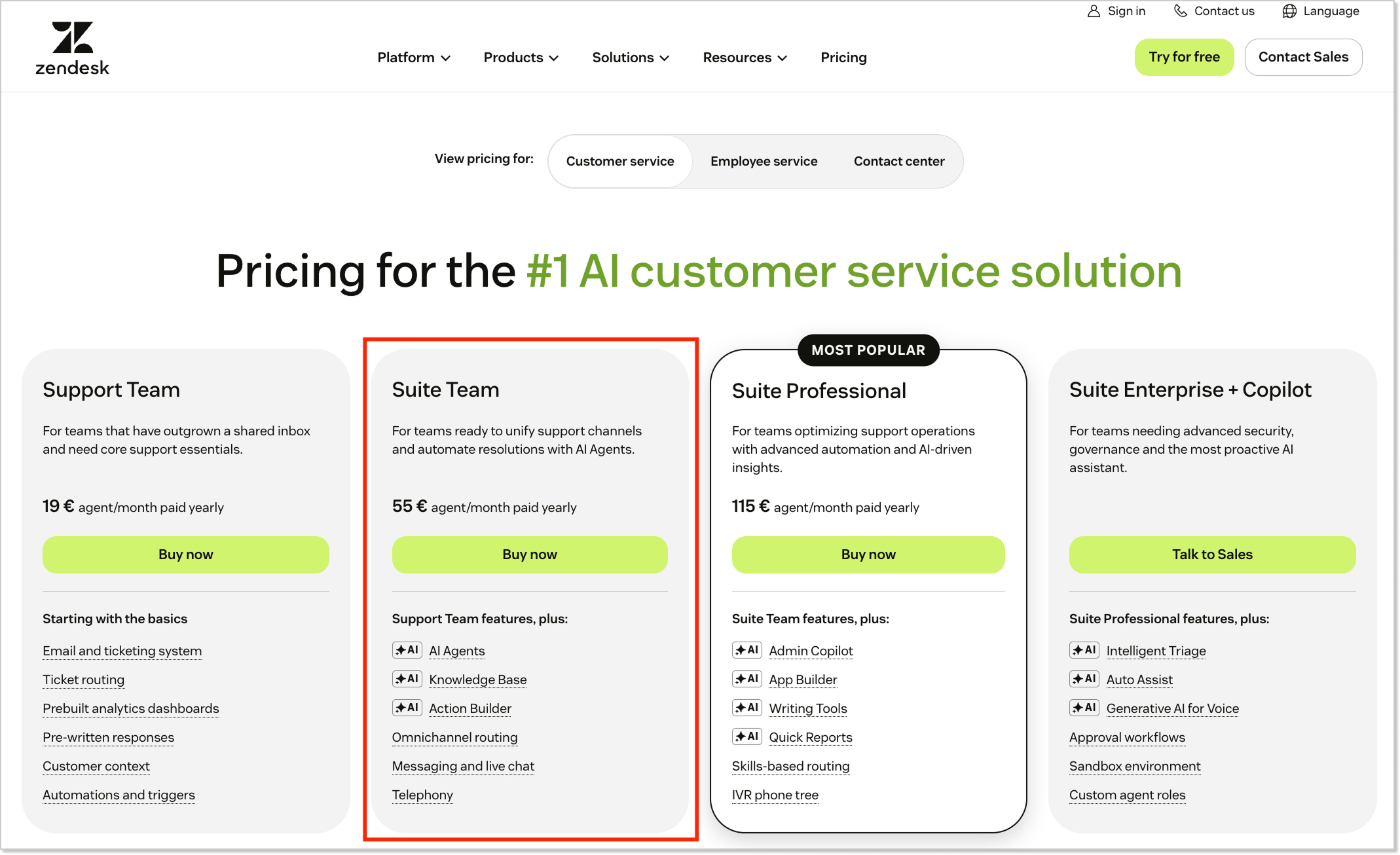
This is where Zendesk actually becomes useful for most businesses. Good for small teams (5-15 agents) who need to support customers across multiple channels. But you’ll hit the ceiling pretty quickly once you start scaling.
What you get above everything from the Support Team plan:
- Email, chat, social media, phone support (multichannel!);
- Basic AI automation;
- Help center (public-facing);
- Mobile SDK;
- Pre-built analytics;
- Basic automations.
What’s missing:
- No light agents;
- No SLAs;
- No custom roles;
- No multilingual support;
- No advanced routing;
- Limited reporting.
Suite Professional plan – $149/agent/month
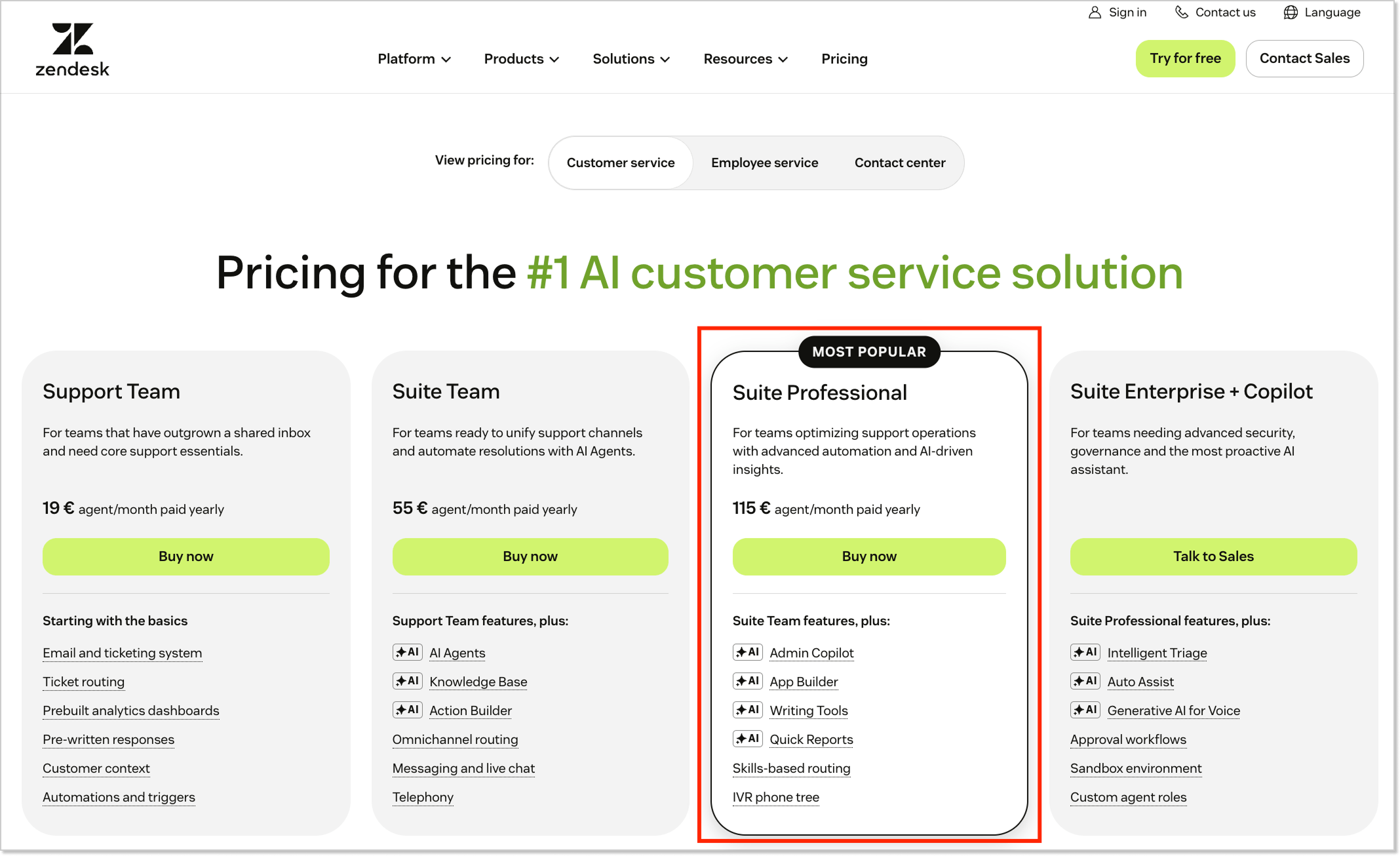
This is the sweet spot for most mid-sized businesses (50-200 agents). You finally get proper analytics, routing, and service level agreements. This is where Zendesk starts feeling like an enterprise-grade tool.
What you get above everything from the Suite Team plan:
- Light agents (view-only users);
- SLAs with tracking;
- Skills-based routing;
- Custom ticket fields;
- CSAT surveys;
- Advanced analytics;
- Multi-brand support;
- Custom agent roles;
- Business hours scheduling.
What’s missing:
- No sandbox environment;
- No contextual workspaces;
- Limited API rate limits.
Suite Enterprise + Copilot plan – Contact sales (previously $219/agent/mo)
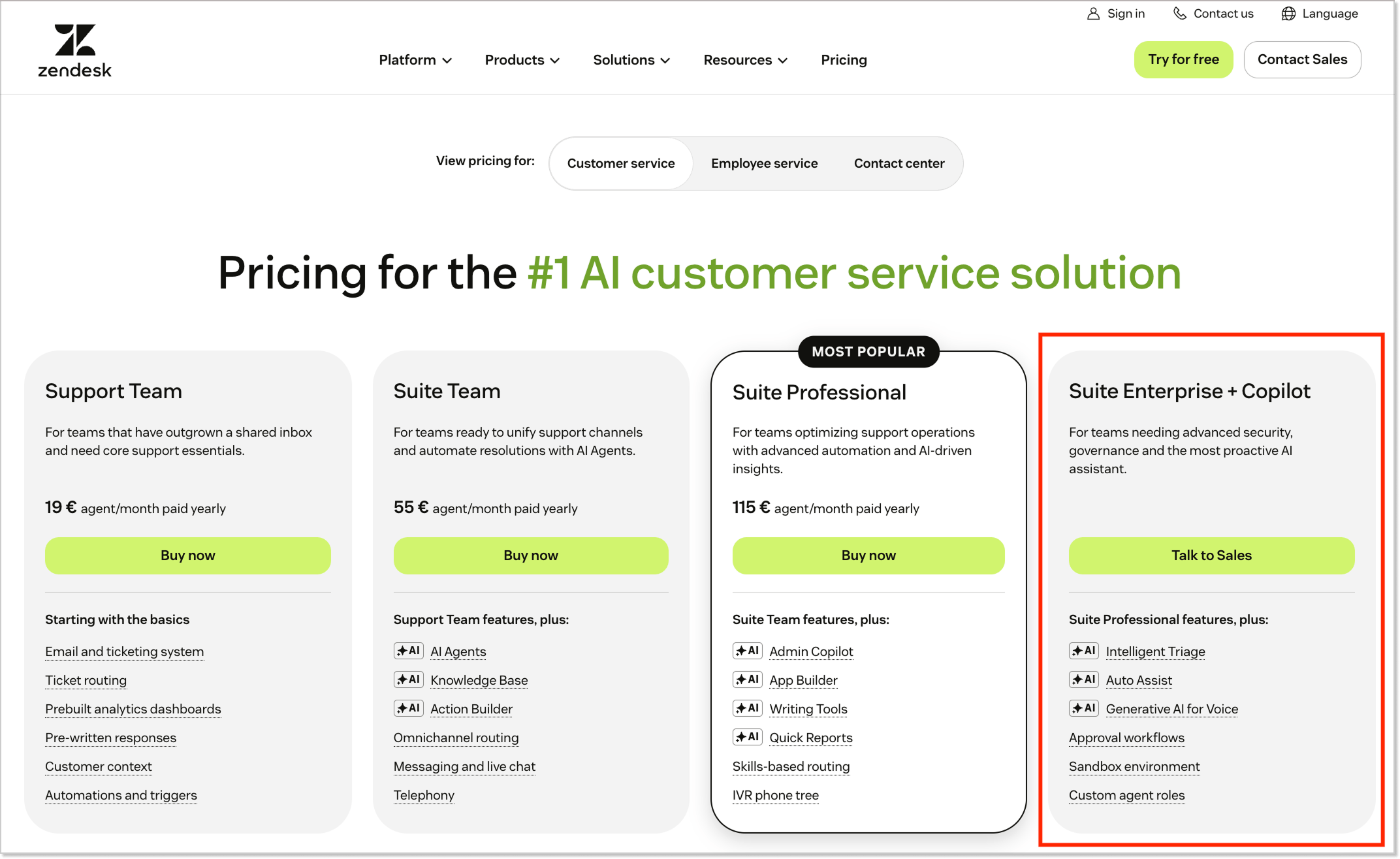
Built for large enterprises (200+ agents) with complex needs and compliance requirements. You’re paying for security, scalability, and peace of mind.
What you get above everything from the Suite Professional plan:
- Sandbox environment for testing;
- Contextual workspaces;
- Advanced data privacy controls;
- HIPAA compliance;
- Higher API limits;
- Custom agent workflows;
- Advanced security features;
- Disaster recovery options.
What’s missing:
You STILL need add-ons for advanced AI and other premium features.
Zendesk for employee service pricing overview
Now for the internal support side. Same Zendesk platform, but optimized for IT, HR, Finance, and Facilities teams supporting employees.
| Plan | Annual | Monthly |
| Suite Team | $29/agent/mo | $39/agent/mo |
| Suite Growth | $59/agent/mo | $79/agent/mo |
| Suite Professional | $99/agent/mo | $125/agent/mo |
| Suite Enterprise | Сontact sales | Сontact sales (approx $200/agent/mo) |
Suite Team plan – $39/agent/month
Good starting point for small IT or HR teams (5-15 people) handling basic internal support. Think laptop requests, password resets, and basic HR questions.
What you get:
- Basic ticketing for employee requests;
- Email, Slack, Teams integration;
- Simple service catalog;
- Internal help center (SSO-protected);
- Basic automations.
What’s missing:
- No advanced approvals;
- No custom workflows;
- Limited reporting;
- No SLAs.
Suite Growth plan – $79/agent/month
The Goldilocks plan for growing companies (15-50 internal agents). You get proper workflows, approvals, and enough features to run a professional IT/HR support operation.
What you get above everything from the Suite Team plan:
- Light agents;
- Business rules;
- Custom ticket fields;
- Approvals workflow;
- Better service catalog;
- Enhanced automations.
What’s missing:
- No advanced analytics;
- No custom agent roles;
- No sandbox environment;
- Limited SLA capabilities.
Suite Professional plan – $125/agent/month
Perfect for mid-sized to large companies (50-200 internal agents) with complex IT/HR operations. Multiple departments, detailed reporting, and proper governance.
What you get above everything from the Suite Growth plan:
- Custom agent roles;
- Full SLA management;
- Advanced analytics;
- Skills-based routing;
- Multi-brand support (multiple departments);
- Enhanced security features.
What’s missing:
- No sandbox environment;
- No HIPAA compliance (if needed);
- No disaster recovery.
Suite Enterprise plan – contact sales (approx $200/agent/month+)
For large enterprises (200+ agents) with strict compliance, security, and governance needs. Like healthcare, financial services, or massive tech companies.
What you get above everything from the Suite Professional plan:
- Sandbox environment;
- HIPAA compliance;
- Contextual workspaces;
- Advanced data privacy;
- Disaster recovery;
- Highest API limits;
- Premium support.
Zendesk Contact Center pricing overview
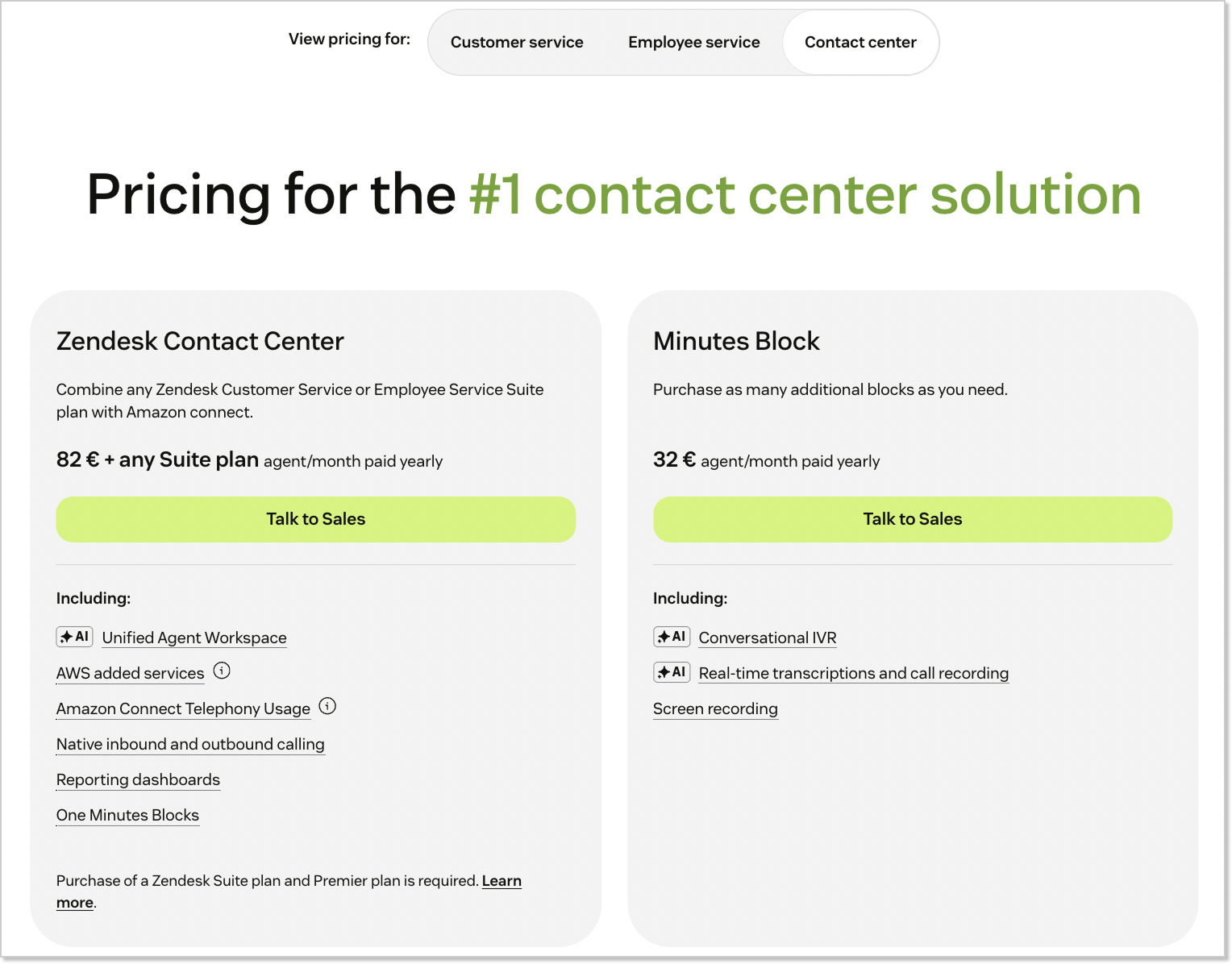
Zendesk Contact Center is a dedicated solution for teams where voice is the primary support channel. It’s separate from the basic Zendesk Talk features already included in Suite plans, and sold through Zendesk Sales only. The price starts from $83/agent/month on top of your existing Suite plan.
What you get:
- Advanced call routing and multi-level IVR trees;
- AI-powered voice agents for autonomous call handling;
- Real-time call monitoring and agent management;
- Built-in Amazon Connect infrastructure for enterprise-grade reliability;
- One Minutes Block per agent per month included.
Hidden costs: that “included” Minutes Block runs out faster than you’d expect. Once it does, phone numbers, inbound and outbound call minutes, call recording, and voicemail transcription all bill separately (per minute, per number, per feature). For a high-volume team, those usage fees add up fast.
Suite + Copilot bundle

Zendesk introduced bundled packages that include Copilot. Seems like they figured out people want AI without playing pricing Tetris.
Suite + Copilot Professional
Includes Suite Professional features + unlimited Copilot access. Previously listed at $155/agent/month. This bundle offers a decent deal if you were planning to add Copilot anyway. Current pricing is no longer published, so you’ll need to contact Zendesk Sales for a quote.
Suite + Copilot Enterprise
Includes Suite Enterprise features + unlimited Copilot access. Same story – saves you money if Copilot was already on your shopping list. Previously, the price was $155/agent/month.
Add-ons: where your budget disappears

Here’s where things get spicy. These prices are for monthly billing (annual is slightly cheaper):
Copilot – $50/agent/month
What it does: AI-powered assistant that suggests replies, routes tickets, and provides agent insights.
Do you need it? If you want your agents to work efficiently, yes. Otherwise, they’re doing everything manually.
Hidden catch: only available for Suite Professional and above.
Advanced AI Agents – contact sales (approx $50+/agent/month)
What it does: autonomous AI that handles complex customer interactions, learns from conversations, and resolves 80%+ of issues.
Do you need it? Only if you have high ticket volume and want serious automation.
Hidden catch: this is the good AI. Base plans only include limited automated resolutions.
Zendesk Workforce Management – $25/agent/month
What it does: AI-powered scheduling, forecasting, and performance tracking.
Do you need it? Yes, if you have more than 20 agents. Otherwise, you’re scheduling manually like it’s the ’90s.
Zendesk Quality Assurance (QA) – $35/agent/month
What it does: automatically reviews 100% of conversations, spots issues, identifies coaching opportunities.
Do you need it? Yes, if you care about service quality and agent performance.
Zendesk Workforce Engagement Bundle – $50/agent/month
What it does: combines WFM + QA at a discounted rate.
Do you need it? If you want to save $10/month per agent by bundling. This is a no-brainer if you need both.
Advanced Data Privacy and Protection – $50/agent/month
What it does: enhanced security, custom data retention, audit logs.
Do you need it? Only if you’re in healthcare, finance, or dealing with regulated data.
Contact Center – $50/agent/month
What it does: advanced voice features for complex call centers.
Do you need it? Only if voice support is your primary channel.
Okay, here’s where I save you from some nasty surprises:
Annual vs monthly billing
- Monthly billing costs roughly 20-30% MORE than annual;
- They push annual contracts hard because it locks you in;
- Example: Suite Professional is $115/agent/month (annual) but $149/agent/month (monthly).
User seat surprises
- You’re charged per agent seat, not concurrent users;
- Light agents (view-only users) are free on Growth and above, but limited;
- If your team does both internal and external support, you pay for both.
Storage and API limits
- File attachments, ticket history, and API calls have limits;
- Overages can add unexpected costs;
- Higher tiers have better limits, but it’s rarely spelled out clearly.
What you’ll actually pay: Zendesk Suite pricing examples
Let me give you the straight truth about what teams typically spend:
Small team (~5 agents)
At the start, everything looks cute: Suite Team for $345/month for 5 agents. But then you realize that AI is needed for your team, and Copilot instantly becomes a necessity, not an option.
Final cost reality: $595/month. That’s $7,140/year, but at least AI is replying to customers while you’re drinking your coffee.
Growing business (~25 agents)
For a growing business, Suite Professional is almost the default choice. This plan will cost you $3,725/month for 25 agents. But without Copilot, WFM, and QA, it looks like a sports car without a steering wheel, so they get added anyway.
Final cost reality: $6,475/month after all these upgrades.
Mid-size company (~100 agents)
Suite Enterprise sounds solid and costs accordingly: $21,900/month. But Enterprise without Advanced AI, analytics, and data protection is like “premium” without the premium.
Final cost reality: $36,900/month. Or $442,800/year, if you prefer to face bitter truth.
Top Zendesk features
Numbers like these tend to prompt a fair question: what exactly are you paying for, and what does Zendesk offer?
The top Zendesk feature is the ticketing system – a help desk built to handle inquiries across email, phone, social media, and chat, where every customer request becomes a ticket in a queue.
Beyond ticketing and messaging, the platform also includes:
- AI Agents
- Copilot
- Artificial intelligence and automation
- Help center
- Live chat
- Knowledge base
- Community forum
- Reports and analysis
- Quality assurance
- Answer Bot and other paid add-ons
That’s a solid feature set, but Zendesk isn’t the only platform that offers it. Most of these capabilities exist in more affordable alternatives (and without hidden costs and enterprise complexity).
HelpCrunch: the smarter Zendesk alternative for customer support
HelpCrunch features
HelpCrunch stands out as a feature-rich and affordable alternative to Zendesk. This omnichannel platform covers everything you need for customer support AND marketing, including AI-powered features that don’t break the bank.
What you get:
- Live chat with full customization (even on the Basic plan), automated messages, pre-chat forms, and chat ratings;
- AI Agents (multi-agent and multichannel) that autonomously handle up to 80% of customer queries across live chat, Facebook, WhatsApp, Telegram, Instagram and more, trained on your data sources;
- AI-powered chatbot with an intuitive visual builder for automating FAQs, qualifying leads, tagging users, and assigning chats;
- Shared inbox where messages from live chat, chatbots, email, and social media all flow into one place (includes email forwarding, tagging, and workflow automation);
- Knowledge base with AI Editor for self-service support, plus built-in advanced SEO features;
- Email marketing tool for both broadcast emails and automated campaigns with flexible triggers based on user behavior and timing;
- Popups for lead generation and marketing campaigns.
HelpCrunch pricing
There are just three HelpCrunch pricing options, and each of them includes something of the AI stack. No additional cost applies.
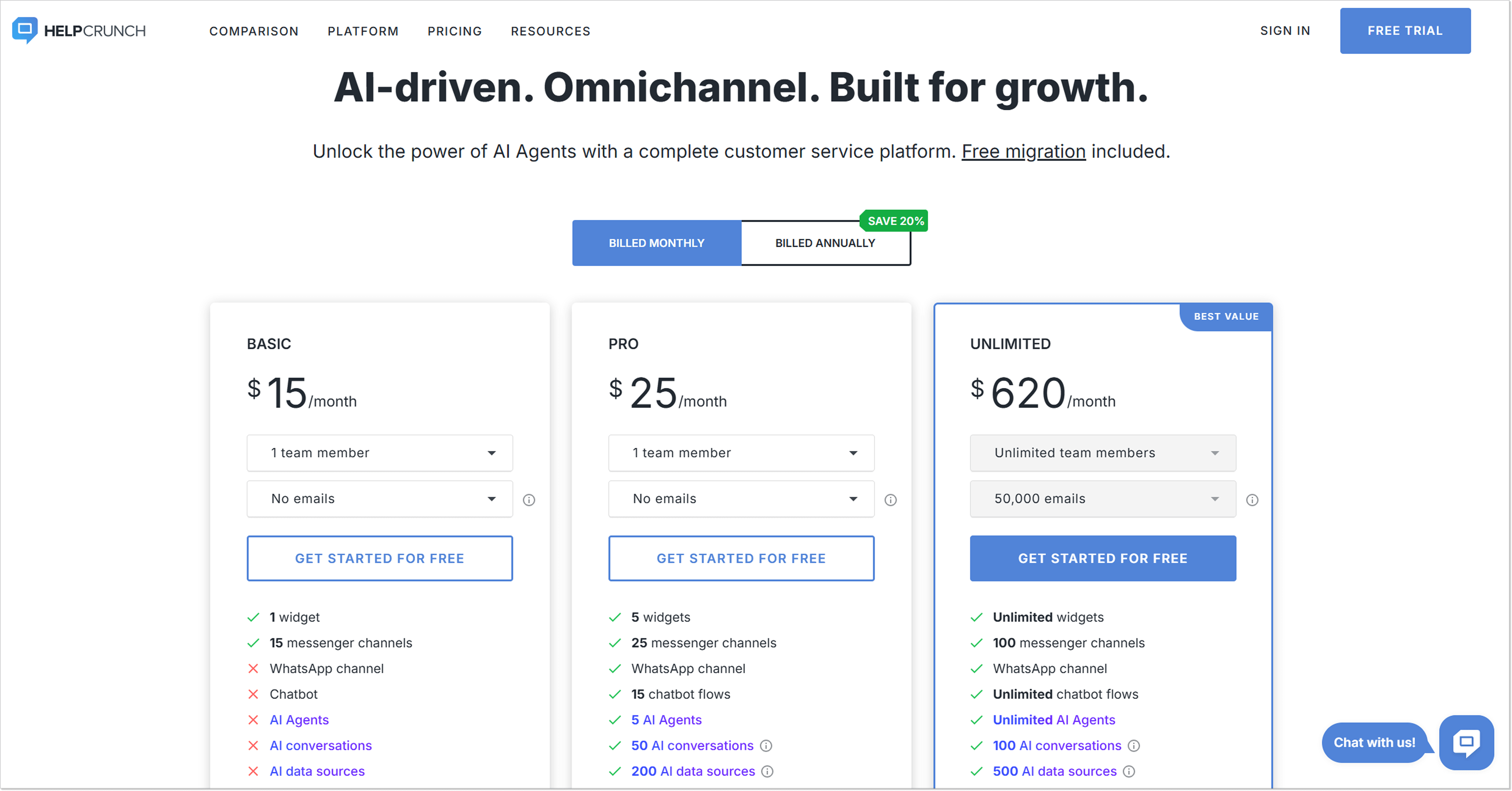
Basic – $15/agent/month
What’s included: 1 live chat widget with full customization, shared inbox with unlimited contacts, knowledge base with AI Editor, basic automation features, mobile apps, messaging via Telegram, Facebook, Instagram, Viber, and basic popups.
What’s missing: AI Agents, chatbot, multilingual knowledge base, WhatsApp integration, and advanced automation.
Pro – $25/agent/month
Includes everything in Basic, plus: up to 5 chat widgets, AI Agents, chatbots, multilingual knowledge base, WhatsApp integration, advanced automation, and customization.
Unlimited – $620/month total
Includes everything in Pro plan plus: unlimited team members (no per-agent pricing!), unlimited AI Agent conversations and data sources, unlimited chat widgets, advanced reporting and analytics, personal onboarding assistant, and priority support.
Real cost comparison:
Let’s say you have a 10-agent team.
- HelpCrunch Pro: $250/month total (includes AI Agents!)
- Zendesk Suite Professional with Copilot: $1,990/month ($149 + $50/agent)
Also, there are other competitors worth exploring. Zendesk vs Intercom is a common comparison, along with alternatives like Freshdesk. When businesses compare Zendesk pricing with Intercom pricing, they often notice a similar scaling, which can become costly as teams grow. In comparison, HelpCrunch remains nearly 8x cheaper while still getting AI automation, all communication channels, a knowledge base, and an email marketing tool.
Each platform has its pros and cons. Think twice and then choose the best solution that suits your current needs.
Bottom line
Zendesk support plans are somewhat complicated, and choosing the right one for your business might be a big challenge. Paying the invoices is even bigger. Despite that, Zendesk is a great tool. But so is HelpCrunch, which makes the Zendesk vs HelpCrunch choice less about features and more about what actually works for your business needs.
The only difference is that with HelpCrunch, you don’t have to overpay for the must-have customer support features. Don’t commit to the first option you see. Before committing to anything with the tool in question, just sign up for a free trial, and give it a try.
FAQs
Is Zendesk free to use?
No, Zendesk plans donʼt include a free option. But early-stage startups can apply for the Zendesk for Startups program. Qualified companies get up to 2 years of free access.
How much do Zendesk Suite plans cost in 2026?
Zendesk uses per agent/per month pricing. You pay for each support agent who needs access to the platform. The base plan covers core features, but most businesses need add-ons like AI Agents, Copilot, or QA, which cost extra per agent.
Can I try the Zendesk free trial before buying?
Yes, Zendesk offers a 14-day free trial with no credit card required. You get access to Suite Professional features during the trial. This gives you time to test the ticketing system, help center, live chat, and workflows with your team before committing to a paid subscription.
How much is the Zendesk ticketing system per year?
Annual pricing varies by plan. For example, Suite Team costs approximately $828/agent/year, and Suite Enterprise starts at $2,628/agent/year. Keep in mind these are base prices, add-ons increase the total significantly.