
We’ve recently updated the text editor in an agent’s chat so that your customer communications are more comfortable and structured.
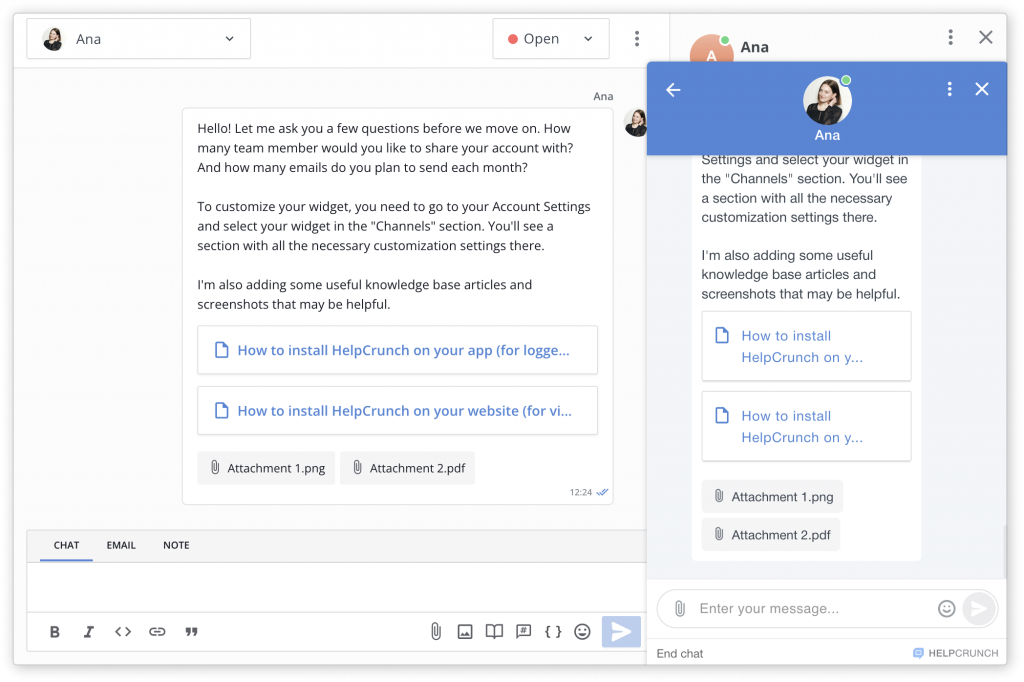
Our inline message editor helps you write and fine-tune chat or email messages that you send to customers so that every link, image, or attachment looks more natural.
The key changes involve:
- Adding images right to the chat or email body by drag-and-drop
- Adding files and images as attachments in the email or chat body
- Sending knowledge base articles with the article title shown as a link in the chat or email body
- Using the abovementioned functionalities for notes.
Not only do these features look more structured in an agent’s chat window, but they also look the same in the chat widget (which is even more important for a smooth customer experience).
Read Also
💌 Meet new assignment rules based on email fields (to/from/subject)
Time to bring order to your email workflow. Now, you can create assignment rules to redirect or tag messages based on the recipient, sender, or subject.
📖 Accordions, snippet callouts, and auto-logout for Knowledge base
Two new formatting tools in the Knowledge base editor, plus auto-logout for password-protected knowledge bases, smoother widget access, and minor fixes for iOS SDK.
📱 Mobile cleanup: New chat search in apps & SDK stability
Our mobile stack just got a serious cleanup. Enjoy a brand-new chat search in the HelpCrunch Inbox apps, improved message reliability, and a load of SDK stability fixes.
