
It feels like it’s been ages since we first told you about the new AFRT (Assigned First Response Time) metric. But we haven’t been sitting idly by all this time. We’ve added a Welcome message customization for the Viber bot! And made other enhancements to improve your HelpCrunch experience.
🖖 Add a Welcome message for your Viber bot
Now you can set up and customize a Welcome message in different languages, as well as an active button for this message. Your Viber bot will show it to users and can gather phone numbers through button clicks.
How to enable it? After setting up a Viber bot, go to HelpCrunch Settings → Channels → Viber → Customization.
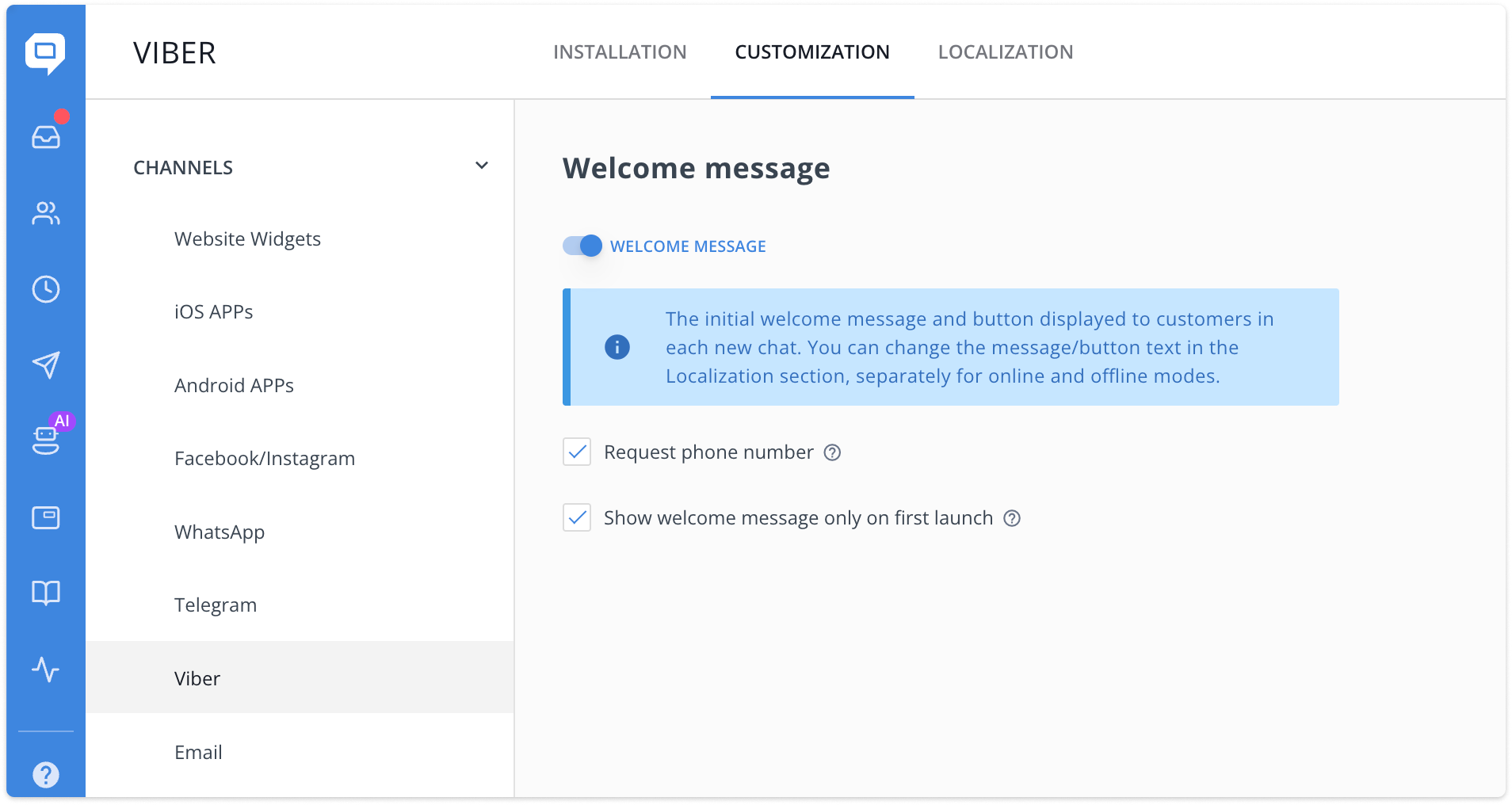
Here you can:
- Enable/Disable the Welcome message (it’s disabled by default).
- Enable/Disable requesting the user’s phone number by clicking the Welcome message button (it’s enabled by default).
- Enable/Disable showing the Welcome message every time the user starts the Viber bot. (It’s set to be shown only the first time by default.)
And in the “Localization” tab, you can customize the texts of both the Welcome message and the Button. Just click “Edit localization” next to your preferred localization language, and you gonna see the following:
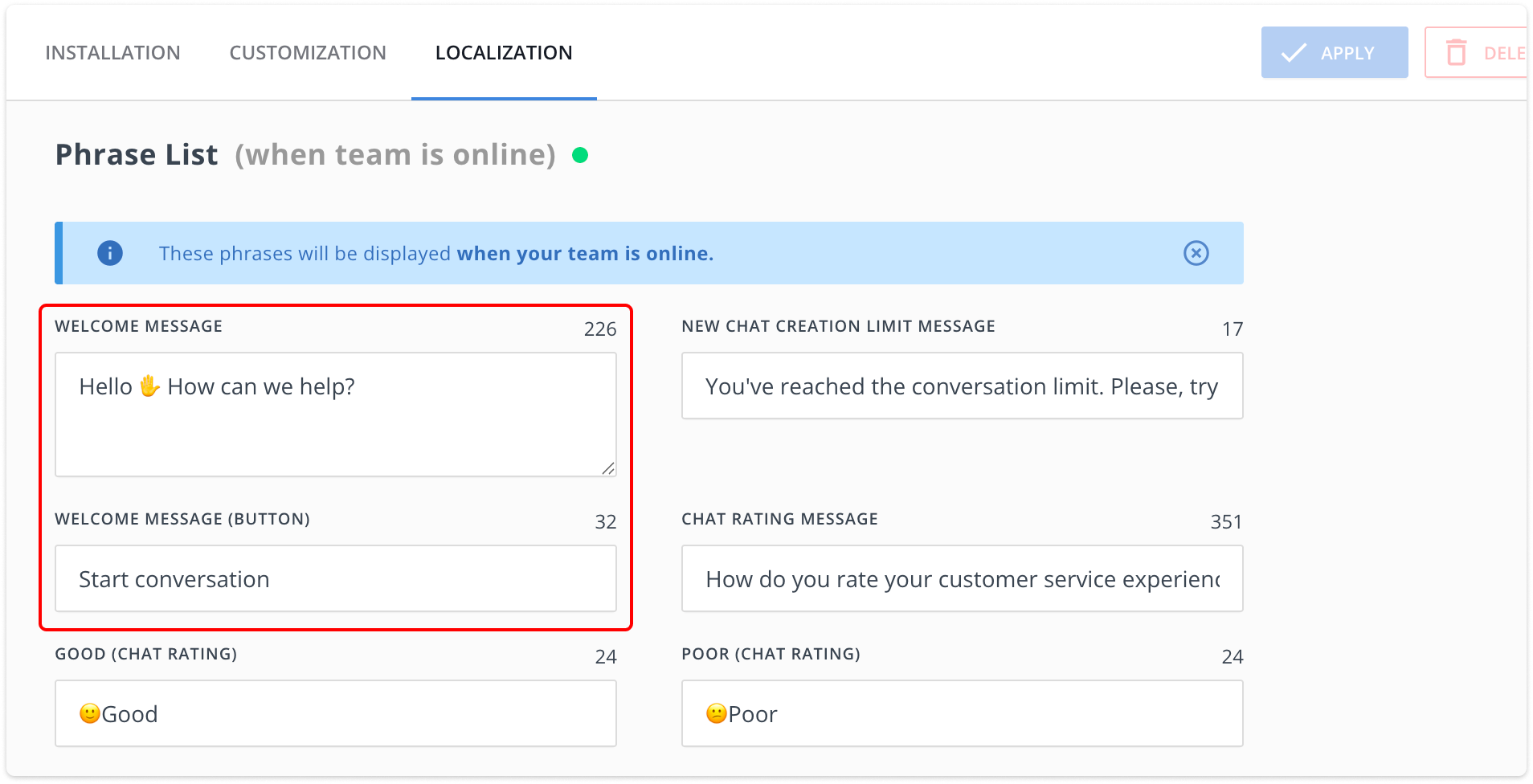
For more details on setup and customization, read our Knowledge Base article about Viber welcome message.
✂️ Improved Knowledge Base UX
We’ve added more flexibility in customizing tables within the Knowledge Base article editor. Now, you have more options while adjusting table settings using the right-click context menu, as shown in the picture below:

Additionally, we’ve made some UX improvements. The inline editor in the KB was getting too wide, so we’ve grouped text alignment and columns for a cleaner, more streamlined experience.
💌 Faster Popups and Auto/Manual Messages tables
Faster loading time for tables in Auto and Manual Messages (AM/MM). Previously, tables in AMs/MMs would take a long time to load if they contained a large amount of data. Due to different improvements, they fly now partly because we removed pagination and replaced it with an infinite scroll.
Ability to open AM/MM/Popups in a separate tab by holding Cmd/Ctrl or by clicking the corresponding icon. Auto and Manual Messages used to open in the same window, forcing you to open multiple tabs from the dashboard and then load each message separately, which is super inconvenient. Now, this grotesque is gone for good.
📝 New UX enhancements in Saved Responses
The table layout has been fixed, and we’ve added a “Reset Filters” button in the top menu for easier access. The internal design has also been revamped for smoother editing.
See the changes for yourself! Go to your HelpCrunch account and check out the new Viber welcome message.
Read Also
👥 Individual team member display settings per widget
Managing several brands or products? Choose which team members appear in each chat widget and hide offline ones. See what changed and how to set it up.
💌 Meet new assignment rules based on email fields (to/from/subject)
Time to bring order to your email workflow. Now, you can create assignment rules to redirect or tag messages based on the recipient, sender, or subject.
📖 Accordions, snippet callouts, and auto-logout for Knowledge base
Two new formatting tools in the Knowledge base editor, plus auto-logout for password-protected knowledge bases, smoother widget access, and minor fixes for iOS SDK.
